
Answered
Move/Nudge 1/2 a pixel?
Hey there Level: Newbie OS: Windows 7 64bit Ps: Cs6
Is there a way I can move an object 1/2 pixel? Is there a modify key that I can use along with the arrow keys or something like that?
Thanx for your time!!

Hey there Level: Newbie OS: Windows 7 64bit Ps: Cs6
Is there a way I can move an object 1/2 pixel? Is there a modify key that I can use along with the arrow keys or something like that?
Thanx for your time!!
A good question that is!
Earlier versions of Photoshop used to do this depending on zoom level. If you're zoomed in at 100% on canvas, one nudge will be 1pixel relative to your current object position. 200% will be 0.5 pixel and so on all the way till 3200% which nudges 0.03125px.
In Photoshop CS6, there is a handy little option that is (usually unnoticed) present in General Preferences.
Go to Photoshop Preferences > General > Snap Vector Tools and Transforms to Pixel Grid - uncheck this option as shown in screenshot below:
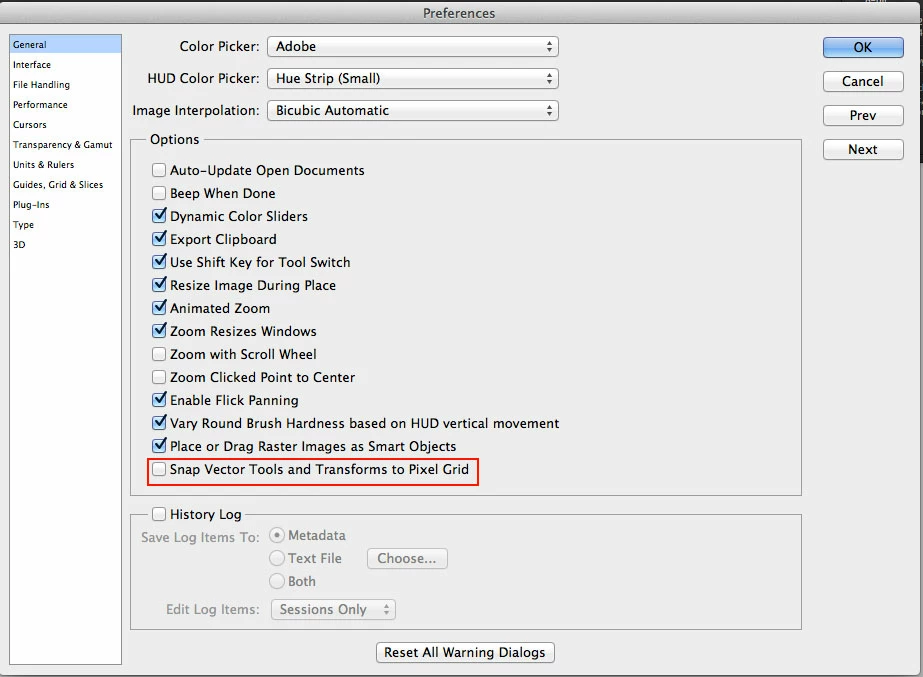
Once unchecked, Photoshop will behave like it did in earlier versions. Zoom level controls the nudge. 100% zoom is 1pixel nudge and 200% is 0.5pixel nudge.
Note that this behavior will work only with 'Free Transform' (Cmd + T) or (Ctrl + T) on your object. A normal nudge with Move tool (V) will not nudge 0.5pixel.
Trust this helps.
-ST
Message was edited by: Sudarshan Thiagarajan to add 'Free Transform' note
Already have an account? Login
Enter your E-mail address. We'll send you an e-mail with instructions to reset your password.
 AdChoices