


Inspiring
July 21, 2018
해결됨

My Healing Brush Tool seems to have disappeared after going into 3D mode

  • July 21, 2018
  • 3 답변들
  • 7412 조회

I was creating a graphic, ended up in 3D mode, and where my healing brush used to be, I now have the 3D Material Eyedropper Tool. 

I'm done with my graphic, now I want my Healing Brush back.  I have closed out the graphic, opened a photo I want to edit, but still don't have the Healing Brush.  I have exited and reopened Photoshop, still no Healing Brush. 

No doubt, I lack some basic understanding about 3D mode, but.... ?? Help?  I'd like my Healing Brush back and I'd also like an explanation so I can solve my own problems in the future.

I am using Photoshop CC 2018 19.1.5.
    이 주제는 답변이 닫혔습니다.
    최고의 답변: davescm

    Hi

    When you go into 3D mode it gives you the option to change the workspace to 3D - which makes some changes in the toolbar.

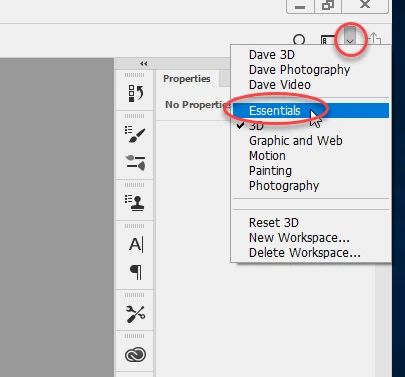
    No worries - just change it back to Essentials or Photography. To do that , click on the small downarrow at the top right of the options bar and choose the workspace from the dropdown list

    Dave

    3 답변

    Kathleen MacKenzie
    Participant
    November 5, 2020

    Thank you for this info! I had a similar problem except I was actually in the Essentials Workspace but the healing brush disappeared (Nov. 2020). However, I switched to the Photography Workspace and ... voila! ... I have the healing brush again. Thanks so much. 🙂

    missyruns54작성자
    Inspiring
    July 21, 2018

    Thanks!  Perfect answer along with the helpful screenshot so I know where to go.  And now I know 1 more thing about Photoshop.

    i'm back in business!

    davescm
    Community Expert
    Community Expert
    July 21, 2018

    You're welcome

    Dave

    davescm
    Community Expert
    davescmCommunity Expert답변
    Community Expert
    July 21, 2018

    Hi

    When you go into 3D mode it gives you the option to change the workspace to 3D - which makes some changes in the toolbar.

    No worries - just change it back to Essentials or Photography. To do that , click on the small downarrow at the top right of the options bar and choose the workspace from the dropdown list

    Dave

    Participant
    March 1, 2021

    hi dave i tried this multiple times after my healing tool but it just wont come back please help