Nikthegreek
Participant
January 13, 2019
Answered

Need help for Matrix Bullet Dodge scene recreation

  • January 13, 2019
  • 1 reply
  • 9018 views

I think most of us are familiar with the matrix movies and especially with the stunning visual effects!

I want to recreate the Bullet Dodge scene. The only problem I'm facing is how to create the bullet trails. Is it possible to accomplish that within photoPhot or will I have to use some other program? Below are some examples of the vulleb trails:

It doesn't have to be exactly the same, just that kind of transparent sound wave distortion thing.

Thanks in advance!
This topic has been closed for replies.
Correct answer davescm

Hi

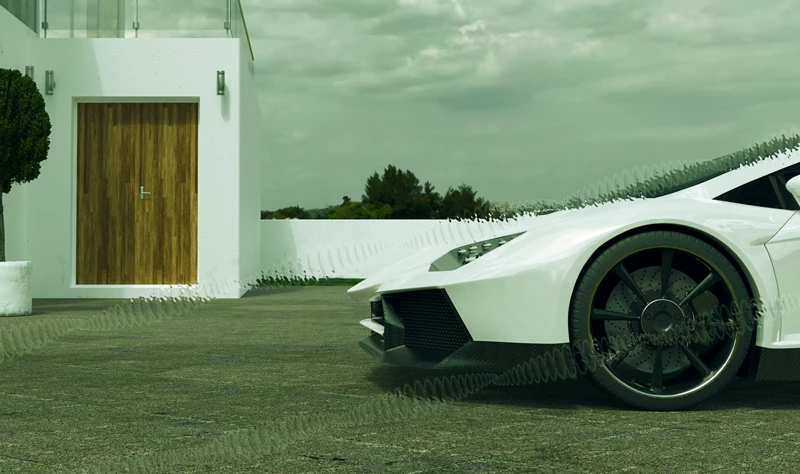
You could try something like this.

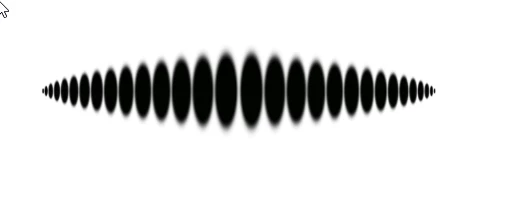
I started with an oval brush and used fade in shape dynamics to make a stroke which faded in size. I then duplicated that layer and flipped it to make the pattern below which I then turned into a separate brush using Edit - Define brush preset.

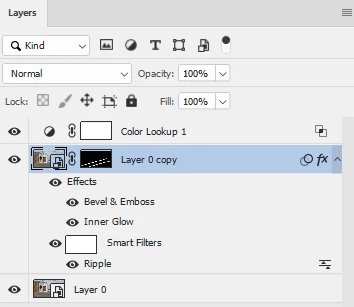
I duplicated the image and added a Ripple filter along with Bevel&Emboss and Inner Glow layer effects.

I added a mask and used the brush created previously to draw on the mask, revealling the distorted layer

Finally a look up adjustment layer  to get the green look

Dave

1 reply

davescm
Community Expert
davescmCommunity ExpertCorrect answer
Community Expert
January 13, 2019

Hi

You could try something like this.

I started with an oval brush and used fade in shape dynamics to make a stroke which faded in size. I then duplicated that layer and flipped it to make the pattern below which I then turned into a separate brush using Edit - Define brush preset.

I duplicated the image and added a Ripple filter along with Bevel&Emboss and Inner Glow layer effects.

I added a mask and used the brush created previously to draw on the mask, revealling the distorted layer

Finally a look up adjustment layer  to get the green look

Dave

Nikthegreek
Participant
January 13, 2019

Thanks. That's really helpful indeed! I'll try it when I have some spare time and I'm pretty sure the result will be great! Thanks again for your time.