


Participant
September 6, 2018
해결됨

New to Photoshop and needs help stopping annoying pop-ups

  • September 6, 2018
  • 1 답변
  • 9852 조회

Everytime I try to do anything on photoshop 2018 - these annoying little pop ups appear and get in the way of me seeing my full photo or document and then when I DO click the rectangle tool even if that's not the tool I needed or have been trying to use another blue pop up saying a new layer has been created shows up.
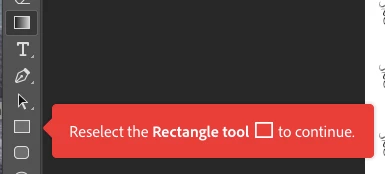
How do I get these to stop appearing because I am about to lose my mind.

    이 주제는 답변이 닫혔습니다.
    최고의 답변: Akash Sharma

    Hi gracer3200511

    Sorry that you're getting the tool-tip pop ups in Photoshop. Please refer the steps below to disable them in app preferences:

    • Go to Photoshop/Edit > Preferences > Tools to open Tools tab in the preferences dialog. You can also press Ctrl/Cmd + K than to click on Tools on the right side.
    • Click on the square on the left side of Show Tooltips to disappear checkmark (uncheck this option).
    • Click on the square on the left side of Use Rich Tooltips to disappear checkmark (uncheck this option).
    • Click OK to confirm and exit Preferences dialog.

    Turn off tooltips in Photoshop CC 2018

    Let us know if that helps.

    Thanks,

    Akash

    1 답변

    Akash Sharma
    Legend
    September 6, 2018

    Hi gracer3200511

    Sorry that you're getting the tool-tip pop ups in Photoshop. Please refer the steps below to disable them in app preferences:

    • Go to Photoshop/Edit > Preferences > Tools to open Tools tab in the preferences dialog. You can also press Ctrl/Cmd + K than to click on Tools on the right side.
    • Click on the square on the left side of Show Tooltips to disappear checkmark (uncheck this option).
    • Click on the square on the left side of Use Rich Tooltips to disappear checkmark (uncheck this option).
    • Click OK to confirm and exit Preferences dialog.

    Turn off tooltips in Photoshop CC 2018

    Let us know if that helps.

    Thanks,

    Akash

    gracer3200511작성자
    Participant
    September 6, 2018

    thank you!