Participant
February 15, 2018
Answered

Perspective Crop Tool Missing

  • February 15, 2018
  • 2 replies
  • 5321 views

I have the crop tool but there is no arrow that allows me to select the perspective crop tool. Does anyone have any suggestions?

    This topic has been closed for replies.
    Correct answer Trevor.Dennis

    Hi Pamela

    Which version of Photoshop do you have?

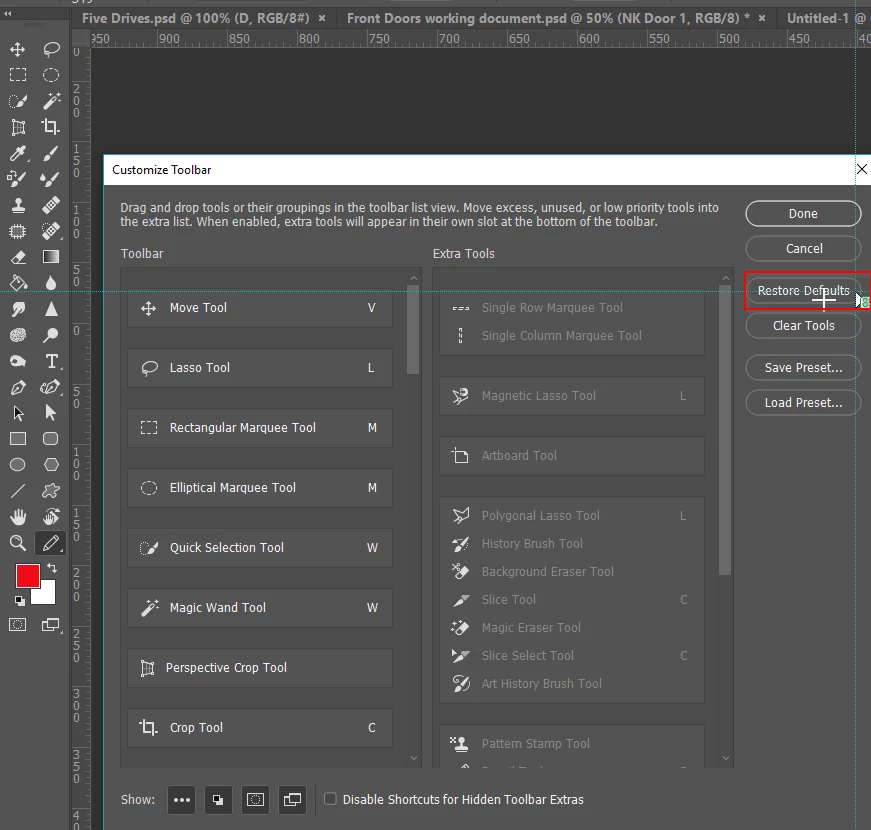
    If CC2017 or later, click on the three dots at the bottom of the toolbar, and then Edit Toolbar

    From there click on Restore Defaults

    ​If that does not do the trick, come back to us.
    2 replies

    trashcaneron
    Inspiring
    February 21, 2022

    Just had this issue in Photoshop CC 2022. To add it back in:

    Edit-->Toolbar

    Drag Perspective Crop from the right hand side to the left hand side, like so:


    October 1, 2022

    How does one ascertain the version of Photoshop as expressed in this "CC" terminology?

    Trevor.Dennis
    Community Expert
    Trevor.DennisCommunity ExpertCorrect answer
    Community Expert
    February 15, 2018

    Hi Pamela

    Which version of Photoshop do you have?

    If CC2017 or later, click on the three dots at the bottom of the toolbar, and then Edit Toolbar

    From there click on Restore Defaults

    ​If that does not do the trick, come back to us.

    Participant
    August 31, 2018

    I am having the same issue. That fix did not work for me.