


PHOTOSHOP在mac上的快捷键可以修改吗?
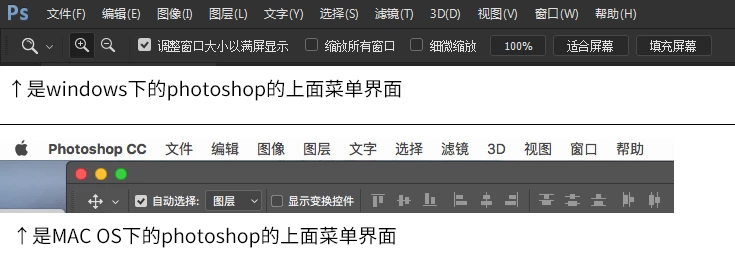
假如说在windows下我要打开编辑,我只需按下ALT+E就能快速打开编辑菜单,然后按需选择功能再按快捷键就行了,非常方便。
但是在mac下,我按ALT(Option)+E无效;Ctrl(commmand)+E无效;win(Control)+E无效。
我要的快捷键就是如图所示MAC下每个功能后面没跟字母快捷键,如何可以改成和win一样呢?
请问怎么解决这个快捷键的问题,让ADOBE系列的快捷键能够和windows下一样呢?
If you say I want to open the editor under windows, I simply press ALT+E to quickly open the edit menu, and then press the need to select features and then press the shortcut key on the line, very convenient.
But in MAC, I press ALT (Option) +E invalid; Ctrl (commmand) +E invalid; win (Control) +E invalid.
I want the shortcut key is as shown in figure MAC below each function does not follow the letter shortcut keys, how to be able to change and win the same?
I would like to ask how to solve the problem of the shortcut keys, so that the ADOBE series of shortcuts and windows under the same?
 AdChoices