


Participant
November 19, 2019
질문

Photoshop 2020: Not reading fonts in eps files properly

  • November 19, 2019
  • 1 답변
  • 438 조회

When opening an eps file generated by InDesign, Photoshop 2020 does not render fonts properly.
The font used is Ubuntu, an Adobe font.
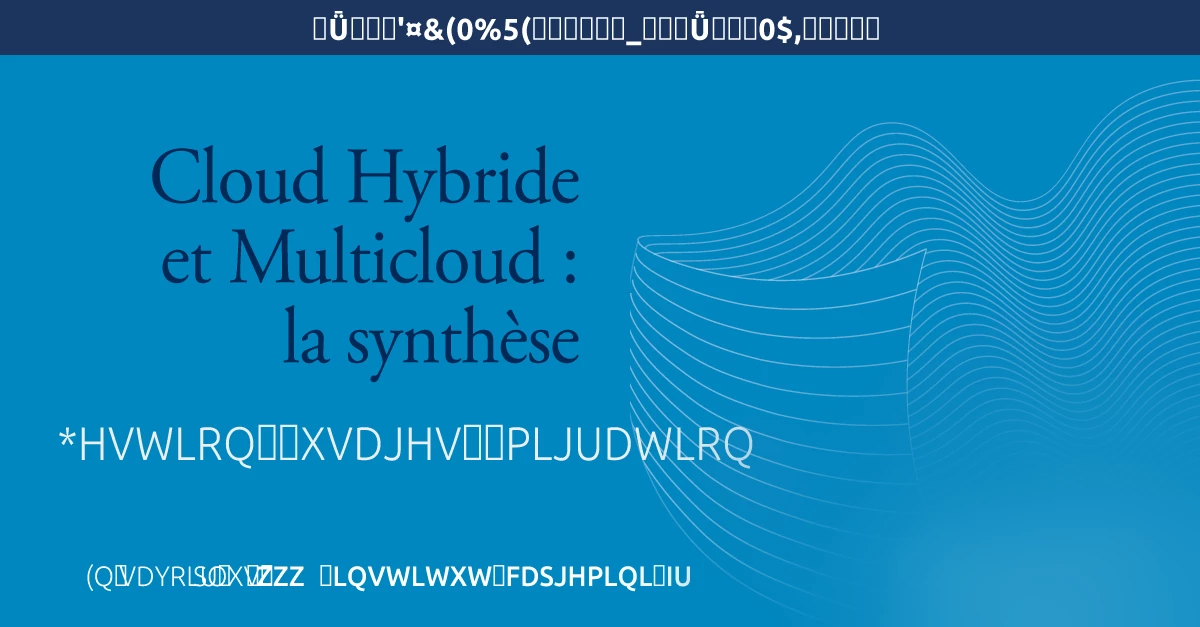

I have tried on two computers (Mojave), the fonts are rendered correctly with Photoshop 2019 and not with Photoshop 2020.
Below, the same eps file opened with Photoshop 2019.

Any solution ?

Philippe


{Thread renamed by moderator}

이 주제는 답변이 닫혔습니다.

1 답변

Sahil.Chawla
Adobe Employee
Adobe Employee
November 19, 2019

Hi Philippe,


Welcome to the Adobe Community!


Does it happen with every file EPS file?


Could you please try enabling "Legacy compositing" located in Photoshop's Preferences > Performance, then relaunch Photoshop and let us know if it helps?


Is the Ubuntu font working in Photoshop 2020 when you create a new document?


Regards,
Sahil


Kaleidon_PhM작성자
Participant
November 19, 2019

Thank you for your quick answer.
I made some tests.
The problem occurs with all InDesign (2019 ou 2020) generated eps files I have tried, but there is no problem with eps files I made with Illustrator 2019 and 2020.

Enabling "Legacy compositing" does not solve the problem.
The Ubuntu font is working properly in Photoshop 2020 (as in InDesign and Illustrator).

Philippe