

guidos50720937
Inspiring
October 20, 2017
Answered

Photoshop CC 2018 IGNORES TABLET PROPERTIES

  • October 20, 2017
  • 34 replies
  • 127587 views

I just updated Photoshop to the latest update ( 19.0 20170929.r.165 2017/09/29: 1138933  x64)
and it completely ignores the tablet properties such as:

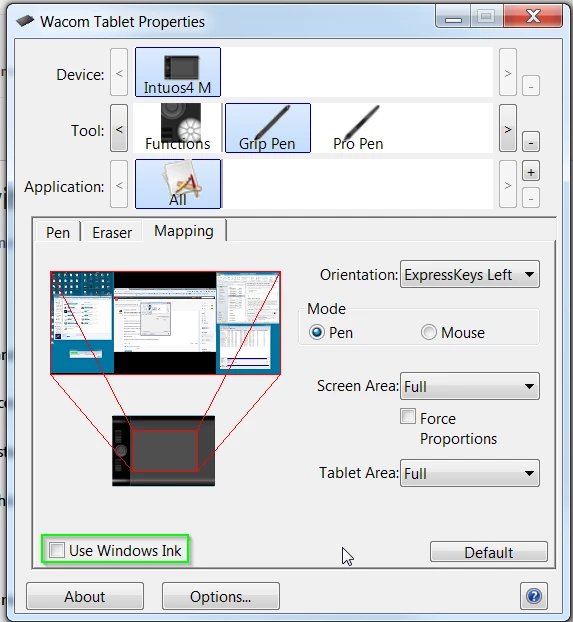
a) Pen Pressure (the pen no longer have pen pressure, no matter if windows ink is turned on or of)
b) Screen Lock (the tablet should lock on Monitor 1 while using Photoshop, and it doesn't)

Every other software i'm using such as Clip studio Paint, zBrush and so on are working fine.

While photoshop completely ignores them.

The previous version used to work fine, but it's been overwritten by the new one without even asking.

The software, no matter the new features, has got worse with every update in terms of performance,
stability, and usability.

Introducing the standard windows Alt key behaviour was already driving me nuts.

i still have not tried the windows ink workaround
i hope this gets fixed TODAY because as it is, PS is useless to me, and i'll be moving to
any alternative available.
    This topic has been closed for replies.
    Correct answer guidos50720937

    Update, the previous Win Ink workaround fix pen pressure and the screen lock

    Trevor.Dennis  ha scritto

    hansb90361119 wrote:

    If you check the "use windows ink" for wacom intous 5 (most likly all of the models) you are getting a REALLY annoying lag with zoom and pen size adjuster etc. If you turn it off, it works perfect, but the downside is the pen pressure opacity don't work.

    You've turned off Windows Ink, so without supplying an alternative, pen pressure is not going to work.  You have to enable WinTab.

    If Windows Ink is disabled

    1. Create a file that contains instructions to revert to the WinTab functionality.

    2. Create a text file in a text editor such as Notepad.

    Type in the following lines:

    # Use WinTab

    UseSystemStylus 0

    3. Save the file as a plain text file named PSUserConfig.txt

    4. Put (copy) the file into the Photoshop settings folder: C:\Users\[User Name]\AppData\Roaming\Adobe\Adobe Photoshop CC 2015\Adobe Photoshop CC 2015 Settings\

    5. Restart Photoshop and check the pen pressure and overall performance.

    34 replies

    Participant
    May 24, 2020

    I have Adobe Photoshop 2020 and I had the same issue. What worked for me was to reset my Photoshop settings completely by holding down CTRL+SHIFT+ALT. This fixed it for me.


    Participant
    May 6, 2020

    I am using an XP Pen on Deco 01 V2; Photoshop pressure selected but it will not work with the pen. Mac OS Catalina, PS 21.1.1.  Thank you.

    Participant
    December 5, 2018

    This needs to be redone every time Photoshop has a major update. I've just done it with CC 2019 and can confirm it works.

    It's hard to believe that after so much time Wacom and/or Adobe haven't fixed this, but at least there is a workaround. I've had constant problems getting pressure to work ever since I started using tablets with Photoshop two decades ago!

    Participating Frequently
    October 16, 2018

    Just installed the Newest CC2019 and the answer Correct Answer by guidos50720937 on Oct 20, 2017 7:34 AM Still works. Thanks so much!

    whackonondo
    Participating Frequently
    September 28, 2018

    Overall I have noticed, If i keep wacom AND photoshop to their respective LATEST drivers/updates - things seem to work. Probably there is some kind of tie-up between the two companies (it will be ridiculous if there isnt any!)

    Participant
    September 8, 2018

    This worked for me on Win 7 and Photoshop CC 2018.

    What I found as a newbie was that I had not changed my brush settings (!!!) so I thought the sensitivity was not working. Great tutorial here for n00bs - Customize Wacom pen and pressure settings in Photoshop tutorial - YouTube

    Participant
    April 18, 2018

    I'm having the exact same problem with my tablet. When I zoom in, vertical brushstrokes grab the screen and move the image around.
    I have always been able to find work-arounds for my PS problems, but this one is just beyond me. None of the proposed solutions have helped. Does anyone have any suggestions?

    Participant
    April 18, 2018

    This appears to be a world-wide issue.  A friend of mine in Israel also has the same problem. 

    My solution was contacting Windows Support directly.  https://support.microsoft.com/

    They installed the latest Windows 10 and now all is working as it should.

    The tech on the other end did it remotely and it took about 2 hours for the whole thing to reinstall.

    Known Participant
    April 17, 2018

    I'm having the same issue. Interestingly, it usually happens when I start making an up-and-down stroke. If I make a left-to-right stroke first (and continue to keep my pen on the tablet) I then can paint in any direction without the image moving. Sometimes, however, if I start moving my brush quickly, the image moves even when starting right-to-left.

    This is making Photoshop essentially unusable for some tasks.

    I haven't seen anything that sounds like a real solution yet.

    Participant
    April 17, 2018

    My solution was contacting Windows Support directly.  They installed the latest Windows 10 and now all is working as it should.

    The tech on the other end did it remotely and it took about 2 hours for the whole thing to reinstall.

    Participant
    April 14, 2018

    So I threw myself at this problem recently and could not for the life of me figure out what I was doing wrong...

    A friend suggested I double check to see if my file name extension was active; Sure enough by default it was not and was registering the text file as PSUserConfig.txt.txt ~ To which conflicted with this fix.

    After I set things properly the fixed worked! So keep this in mind.

    Inspiring
    April 12, 2018

    FYI. The work around at the beginning of this thread only fixes one issue. now... For instance, the MOVE Tool in Photoshop picks whatever layer it wants to pick and moves that layers object. It's frustrating.