


Photoshop CC 2019 Brush Stroke Is Too Small (Huion WH1409 tablet)
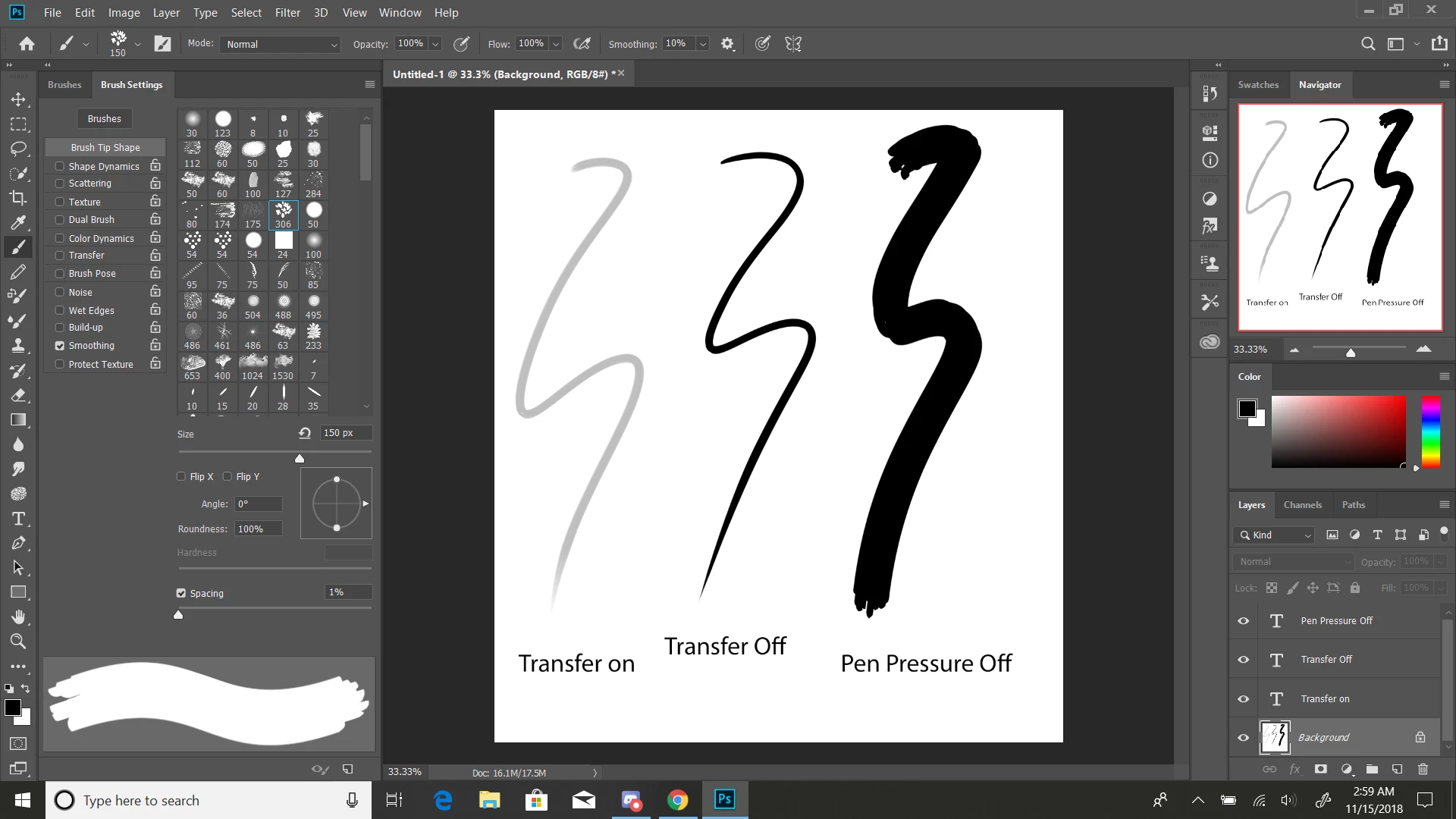
Hi there! I've recently been having an issue with Adobe Photoshop CC 2019 where the brush stroke is way too small. In the picture, I added the line without pen pressure to show the size that the line should be. The brush size is at 150 and with the pen pressure on the stroke extremely thin. I have a Huion WH1409 tablet, but I don't think it's the tablet that's doing this because pen seems fine with other apps. Another issue is that the transfer option doesn't seem to be working correctly. Normally the transfer just lowers the opacity as the stroke tapers down but now the entire line's opacity is lowered, though the lines can still visibly layer on top of each other.
I've tried the method of going to preferences>cursor and then setting the cursor to normal but that's not helping either. I've tried creating a text document and typing in UseSystemStylus 0 renaming the document and then moving it to the Adobe Photoshop CC 2019 folder and that isn't working either. I've tried turning "flicks" and "touch and hold" in the control panel but nothing seems to be working. I've also reset my tools but that didn't work either. I've been at this for around 5 hours now trying different methods of fixing this but I can't figure out how. I'd really appreciate help on this.
[Title edited to include “Huion WH1409 tablet”.]
 AdChoices