
sarah2044
Participant
August 23, 2018
Answered

PhotoShop .gif looping delay

  • August 23, 2018
  • 2 replies
  • 3133 views

Hello!

I'm having some trouble with a gif - I have rendered the animation I want using After Effects (rendered as QuickTime .mov) then imported the video file into PhotoShop and prepared my file for .gif export via Save for Web (Legacy). On the Save for Web settings the Looping Option is set to 'Forever'.

The gif colour and quality is fine - but the one big issue is that the rendered gif has a very long delay between each loop.

I've scoured the forums, but I'm having real trouble figuring out what is causing this - any help would be greatly appreciated!

Thank you,
Sarah
Correct answer ElPi ngas

Edit= I had multiple tabs and I replied to the wrong one. Still this answer may help someone googling "Photoshop video playback delays first frame of the loop"


Anyways. Forward 2024, I had the same problem as you with a video timeline (though I was using it for making frame-by-frame animation). I was about to make a post with a screen capture counting the frames of my animation through After Effects. The first frame was almost double the lenght of the framerate (at 10fps the first frame lasted 150ms instead of 100ms and all the others correctly played back at 100ms each one).


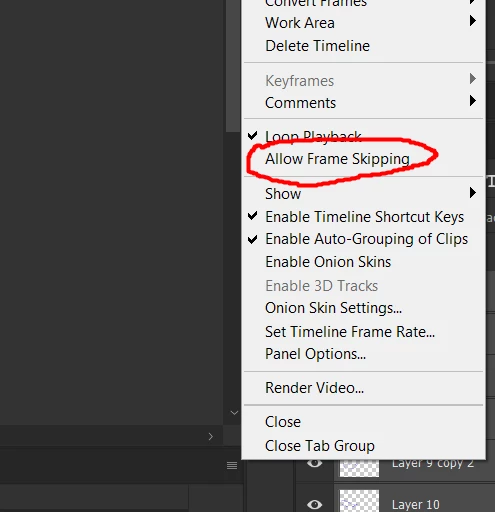
Thankfully I managed to figure it out by myself: Uncheck "Allow frame skipping" and it will loop correctly.


Hope this helps people that unsuccessfully googles an answer for this issue

2 replies

ElPi ngas
ElPi ngasCorrect answer
Inspiring
April 5, 2024

Edit= I had multiple tabs and I replied to the wrong one. Still this answer may help someone googling "Photoshop video playback delays first frame of the loop"


Anyways. Forward 2024, I had the same problem as you with a video timeline (though I was using it for making frame-by-frame animation). I was about to make a post with a screen capture counting the frames of my animation through After Effects. The first frame was almost double the lenght of the framerate (at 10fps the first frame lasted 150ms instead of 100ms and all the others correctly played back at 100ms each one).


Thankfully I managed to figure it out by myself: Uncheck "Allow frame skipping" and it will loop correctly.


Hope this helps people that unsuccessfully googles an answer for this issue

Participant
January 23, 2025

I'm still experiencing this same problem using a video animation. I've tried everything I've seen online so far, and nothing has worked. I tried converting the video animation to a frame animation, and that somewhat worked... I see in the last fram that there is a 13.7s delay, but the animation is a bit buggy. 

Is there a way to ensure that delay is NOT at the end of the video animation? I can't seem to find a way to change that.

ElPi ngas
Inspiring
July 10, 2025

Sorry, mate. It was a while I had the problem and I'm pretty sure it got fixed with the option I pointed out above. 

I think for me it was always the first frame that lasted longer than the rest, not the last one.

One thing, do the delay in the loop happens only in the playback within photoshop? Or do you see it when looking at the exported .gif? Because it's maybe a problem with the playback and not the generated file itself. 

Sahil.Chawla
Adobe Employee
Adobe Employee
August 23, 2018

Hi Sarah,

In Photoshop under Timeline window, click on the last frame and you'll find a downward arrow under the frame thumbnail with a number next to it. Yours might be set to 2 or more seconds. Click on it and change it to the value you desire or just chose "No delay".

Regards,
Sahil

sarah2044
sarah2044Author
Participant
August 23, 2018

Hi Sahil,

Thank you very much for your reply!

I have the last frame selected on the timeline, however I am not seeing the downward arrow you are describing - am I missing something obvious here?

Here's a screenshot of the end of my timeline:

Kindest regards,
Sarah

Sahil.Chawla
Adobe Employee
Adobe Employee
August 23, 2018

Sarah, I believe you're working on a video timeline and not on a frame animation timeline.

Could you please post a full view screenshot of the timeline?

Also, try converting the video to .mp4 format and then try making a gif in Photoshop and let us know if it helps.