

Participant
September 23, 2020
Question

Photoshop is very slow

  • September 23, 2020
  • 5 replies
  • 487 views

I had Photoshop on my PC for a while and didnt really use it. Today i wanted to make some simple logos und Photoshop is just slow as hell, the brush takes ages to load when painting, navigating in photoshop is very slow. I dont get it why this is the case...I updated the Graphics Drivers and Photoshop and nothing changed...


My PC Specs are:

16 GB DDR4 3200 MHz

Ryzen 7 3700x 4.00 Ghz

RTX 2060 Super 8GB

1 TB NvME Samsung 960 Evo (with 300 GB Free)


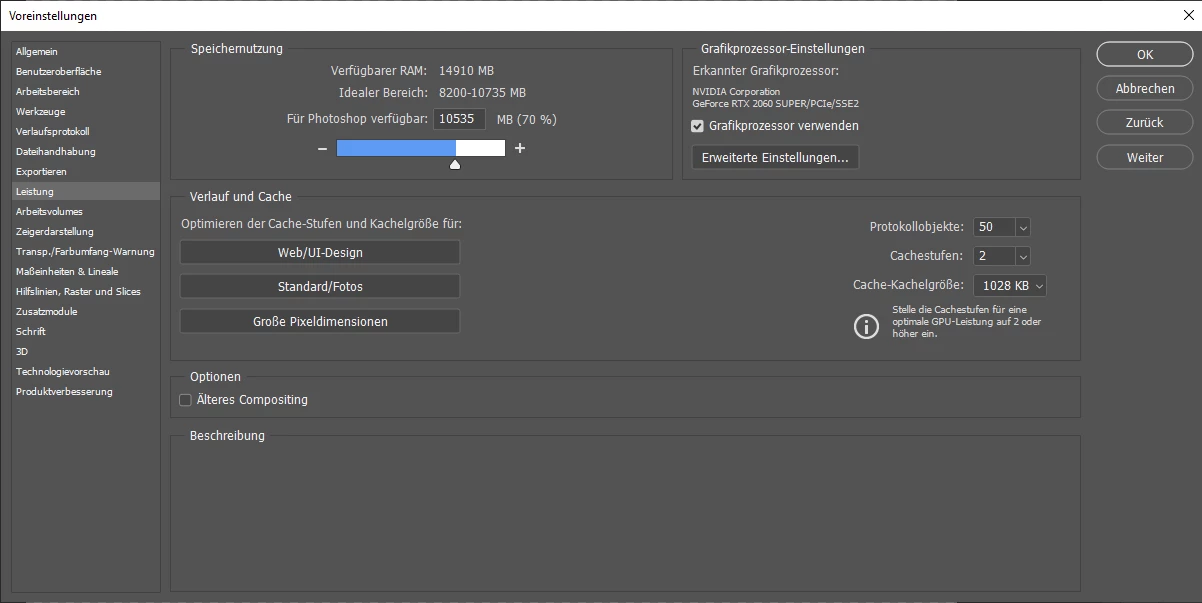
This are my Photoshop Performance Settings:
This topic has been closed for replies.

5 replies

4TL4SAuthor
Participant
September 24, 2020

Soo i found the problem...Its only slow when i use brushes > 3000 px. But what i dont understand is how can i use a 3000px Brush when my Canvas is only 525x350px ?


Edit: Its because i am blind as hell....I didnt use Pixels...I used Zentimeters....xD

4TL4SAuthor
Participant
September 24, 2020

I resetet it but it didnt help...Would it make sense to delete all folder of Photoshop (Programms(x86) etc ) and just try a clean install?

Community Expert
September 23, 2020

did you have any other apps open?

MarekMularczyk
Community Expert
Community Expert
September 23, 2020

You mention that everything seems to be very slow in Photoshop. When you load Photoshop and open Task Manager, how much RAM and CPU is being used?

Adobe Community ExpertAdobe Certified Professional
4TL4SAuthor
Participant
September 24, 2020

Its using the full RAM so 10256 MB and i had my Wallpaper Engine and some Chrome Tabs open. I will try and resetet and will tell you guys if it worked

MarekMularczyk
Community Expert
Community Expert
September 23, 2020

This sounds odd. Your specs are fine, they're actually higher than specs of my Surface Pro and mine works perfectly well.

Have you tried resetting Photoshop? (when you start it hold Ctrl+Alt+Shift)

Adobe Community ExpertAdobe Certified Professional