
Participant
December 11, 2019
Answered

Photoshop not recognizing pen tilt (windows)
  • December 11, 2019
  • 3 replies
  • 19343 views

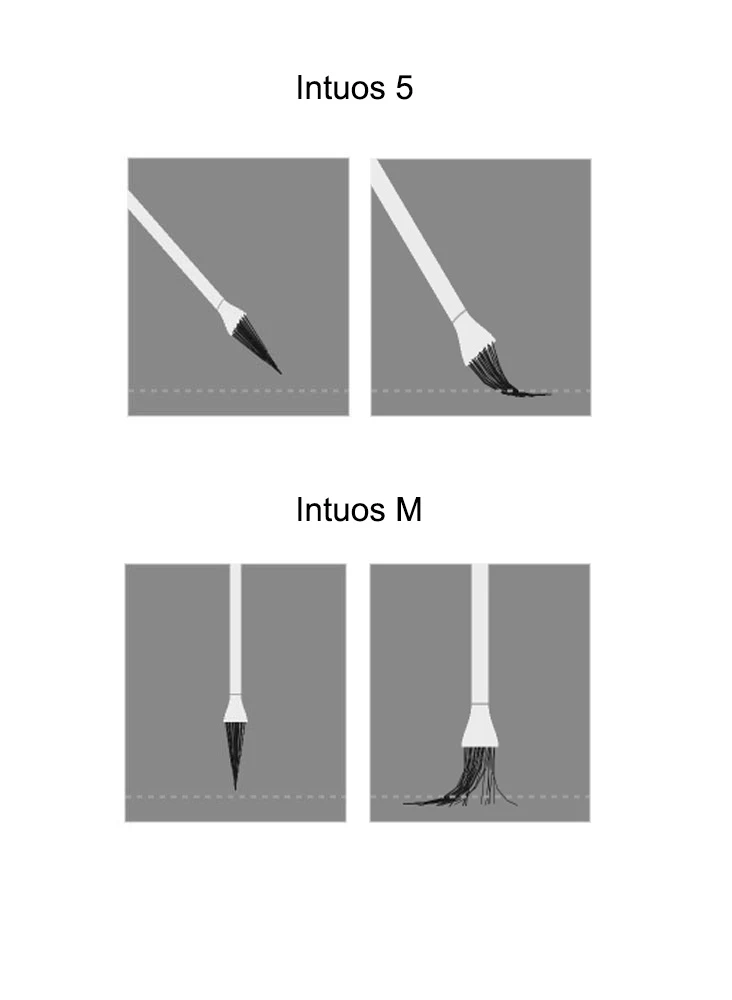
Currently i'm using intuos m as my main tablet, my intuos 5 has no problem with it. Honestly i have no idea what's this issue called, i tired both checked and unchecked windows ink nothing happened. If anyone knows how to fix it please tell me thank you very much.

This topic has been closed for replies.
Correct answer kmagda

Oh, that's right, thank you! I've found the PSUserConfig file already existing in this folder (it must be the one I copied before the PS update). It means that the pen tilt still doesn't work with Windows Ink off. Also, after the latest update the brush tilt image (just like the one in the first post in this thread) doesn't appear. I'll try turning the Windows Ink on to check if it's any help. If it's not then I'll look further for the solution.


I deleted the file and turned on the Windows Ink - pen tilt started working! I hope that no bug emerges now and I'll be able to just continue using it 🙂 Thank you for help.

3 replies

Participant
April 20, 2020

Where is the brush visualization activated, as you have in the screenshot?

JJMack
Community Expert
Community Expert
April 20, 2020

I do not know where the toggle is in Photoshop CC 2019 + or if the feature was removed.  Here is where the toggle is in Prior version of Photoshop the capture was made in CC 2018


Its no more


Adobe adds and remove features here the link 


JJMack
Participant
September 15, 2020

I have done everything that was mentioned here (update Wacom and photoshop, reset the preferences, reset the configuration) and also added and edited the text file in the Settings folder, nothing happened. If someone else had experienced something similar could please mention here?


Just to be clear, my Wacom tablet is normal with pressure and mapping, only photoshop seems not to recognize the pen as a Pen, the brush is flat and not moving, as a mouse. I don't know if I can explain any better and I couldn't find related topics (I tried to search in different ways since English is not my first language).

JJMack
Community Expert
Community Expert
December 11, 2019

I have an Wacom intuos pro small.  I have old versions of Photoshop installed as well as current version of Photoshop. I have configured the Wacom Driver not to use Windows INK with Application Photoshop. Old Perpetual versions of Photoshop only have WinTab Pen support. Wacom driver is configures to use Windowss INK for all other applications.  New Version of Photoshop Default to using Windows INK for Pen support. So I configure CC Photoshop versions not to use INK by adding a PSUserConfig.txt to my userid Photoshop versions Preferences.  I can not write that I use Wacom Pen tilt. However Photoshop Special Brush animations seem to respond to pen tilt.  I also set a hard round brush Transfer to Pen Tilt controlled and that seem to work fine on my Windows 10 system. 

JJMack
kmagda
Participant
January 31, 2020

I also have the same tablet. Before the newest version of CC I used this tip to deactviate Windows Ink since I'd experienced massive brush lags. However, now in CC 2020 the pen pressure seems to work regardless of Windows Ink box being checked in the Wacom stylus options. And it wouldn't have been an issue, if the pen tilt worked, but it doesn't, either way. I wanted to copy the "PSUserConfig" file into the Photoshop folder, but the Settings folder doesn't exist. Where should I put the file? Can I fix the tilt?

This is what's insinde my PS folder:

January 31, 2020

Hi

You need to go to this location

C:\Users\yourname\AppData\Roaming\Adobe\Adobe Photoshop 2020\Adobe Photoshop 2020 Settings

You may need to enable this option to view the appdata folder

italosan
Community Expert
Community Expert
December 11, 2019

Hi, have you tried to reset the Adobe Photoshop preferences? Have you checked if there are any updates available for Intuos?

Bigfoot21Author
Participant
December 11, 2019

I just tried to reset but still the same, and no updates available for intuos.

thank you.