
Inspiring
November 18, 2020
Answered

Recoloring of Clothing with artefact

  • November 18, 2020
  • 4 replies
  • 1564 views

Hi There,

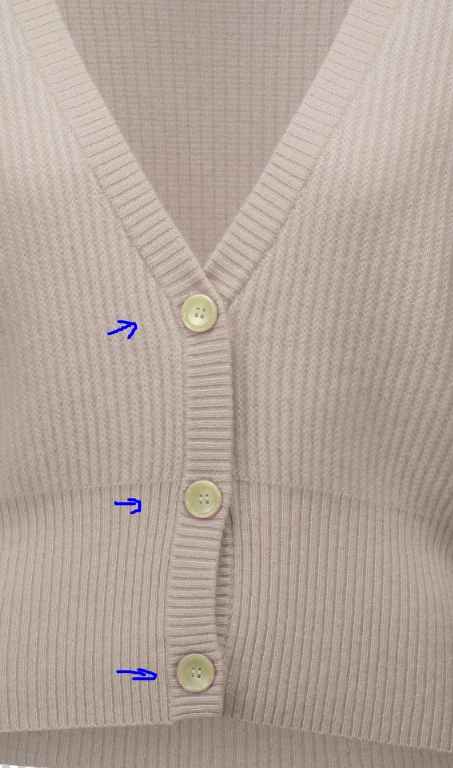
i would like to recolor a jumper from one color into another color --> light green into scin color. This works just fine for the majority of the article. But I have a purple shimmer around the buttons. How can i avoid this. Are there any tricks or tipps how i can do this. (The color of the button is not important since it will be put onto a seperate layer)


Many Thanks


This topic has been closed for replies.
Correct answer Caroline Stafford

Cool cool cool cool!!! wonderful help!! just epic - learning so much. and will also have a look at the painter :-)! i actually got it to work now. Many thanks for you support 


Hi @Christian5C7E  - I’m Caroline, a Product Marketing Manager at Adobe. 


I'm conducting some research on recoloring assets and think you'd provide some super valuable insights -  would you be interested in a brief interview? We'd also offer a gift card for your time! 


Hi @Tori30907758bol6 - I’m Caroline, a Product Marketing Manager at Adobe. 


I'm conducting some research on recoloring assets and think you'd provide some super valuable insights -  would you be interested in a brief interview? We'd also offer a gift card for your time! 


Let me know if you'd like to proceed and can send over a calendly link (or feel free to DM me)

4 replies

Norman Sanders
Legend
November 18, 2020

I suspected that in RGB mode the color shift in the shadows was caused by the fact that changing a channel’s tone level automatically changes the channel’s color to some degree and vice versa.


I switched to Lab Color, where tone resides in a channel separate from color. (I could not choose your exact green and skin for a test because there is no flat color area to measure. I settled for something in the neighborhood.)


The shadow color shift was eliminated.   


I would like to try it with your exact colors. Can you tell me the RGB values and color profile of each of the two colors or the Lab value for each?


If, on the other hand, you are familiar with Lab curve adjustments (far different from RGB) I suggest you give it a try. Good luck. 

Inspiring
November 18, 2020

This looks very nice - can this also be used to recolor images to a needed color, likle the example given? Could you give me some more information about this so that i can get into this and learn. Need it desperately :-). Thank you so very much. 

And what do you mean with any flat area --> Maybe that all the colors are a mix and?

Norman Sanders
Legend
November 19, 2020


You have chosen a point on the sweater that is light black (about a 20% value). It allowed for considerable modeling throughout the darker end of the tonal. You chose to compress those values to 8 points short of solid black, yet hoped to carry modeling into that compressed space…a space in the tonal scale where definition is almost imperceptible. That is a lot to ask. Detail matters.


It would be logical to choose another point in the sweater that can abandon detail for the sake of a near black. For example, consider a dark but not the darkest point on the sleeve where detail can be compromised and meet your chosen color. A possible version is shown above. You can choose to to make it darker; the sacrifice of detail is your call.


Note: A wonderful painter who worked in the 60’s, Ad Reinhardt, created black on black paintings that required you to study the surface for a few minutes before the different geometric shapes revealed themselves. I thought it was great art – but I would not recommend attempting to apply the technique here.


c.pfaffenbichler
Community Expert
Community Expert
November 18, 2020

A Gradient Map Layer set to Blend Mode Color would be one option. 

Inspiring
November 18, 2020

i will try that :-)! it looks very promising...have to figure out how this is done, since i am still quite far from good 🙂

c.pfaffenbichler
Community Expert
Community Expert
November 18, 2020

Could you please post a screenshot taken at View > 100% with the pertinent Panels (Layers, Channels, Options Bar, …) visible? 

How did you colorize – Hue/Saturation Layers, Curves Layers, …? 

Inspiring
November 18, 2020

here you go:

i colored the images with Hue/Satturation only --> and tiny amount with color balance

i did not use any curve Layers!

c.pfaffenbichler
Community Expert
Community Expert
November 18, 2020

When you change Hue globaly you »move« all pixels along the color circle. 

Checking »Colorize« (»Färben«) might be worth a try. 

Inspiring
November 18, 2020

A close up to highlight the problem


c.pfaffenbichler
Community Expert
Community Expert
November 18, 2020

And please also post the section of the original image. 

Inspiring
November 18, 2020

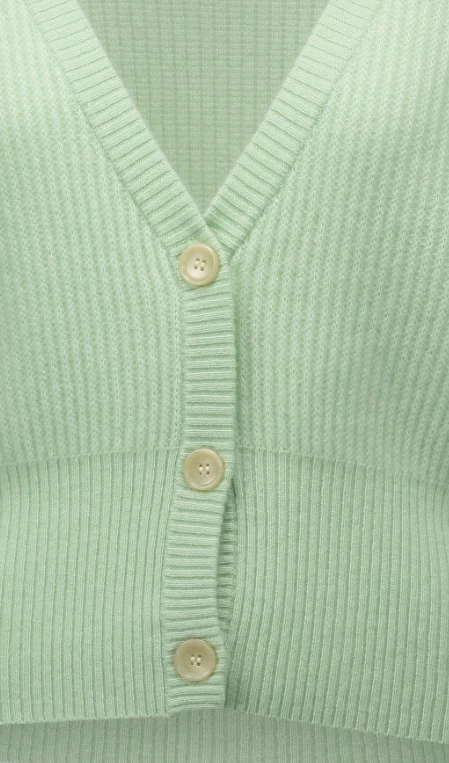
Thank you very much for your reply!! Beneath you can find the 2 images: