Hey pixxxel schubser, thanks for the reply! I appreciate you going into detail about removing and hiding elements, but I already know how to do this 
Here's a screenshot of the part of my dialog that I'm referring to:
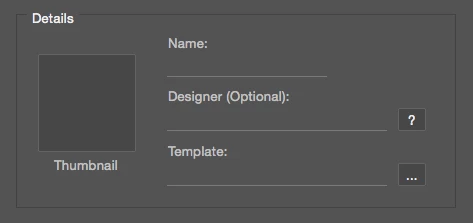
The iconbutton element has an onClick function attached to it which opens up a dialog for the user to select their image, so I don't want to remove or hide it. If a user chooses to add a new task (template) for a particular file, it clears all the info in the fields and I want to be able to clear the image that is currently in there too without actually removing/hiding the element.
Chuck Uebele hinted at the possibility of being able to do this by leaving a blank space along with using layout.layout, but I can't get it to do it without it returning a File or Folder does not exist error (see my reply above).
If there's a will - there's a way. Hope this is something you might find useful.
What I did is I created a fixed size group and assigned eventListener. Once event is triggered, it prompts to select image.
// Create UI
var win = new Window("dialog");
var grp = win.add("group");
grp.preferredSize = [200, 200];
grp.addEventListener("mousedown", function() { toggleImage(grp) });
win.show();
function toggleImage(container) {
// Select new image
var newImage = selectFiles(false, "png");
if (!newImage) return;
// Remove old image
while(container.children[0])
container.remove(container.children[0]);
// Add new image to UI
container.add("image", undefined, newImage);
// Refresh UI
container.layout.layout(true);
}
function selectFiles (multiSelect, extension) {
var theString = "Please select files";
if ($.os.search(/windows/i) != -1)
var theFiles = File.openDialog (theString, "*." + extension, multiSelect);
else
var theFiles = File.openDialog (theString, getFiles, multiSelect);
function getFiles(theFiles) {
var re = new RegExp("\.(" + extension + ")$","i");
if (theFiles.name.match(re) || theFiles.constructor.name == "Folder") {
return true
}
}
return theFiles;
}


 AdChoices