
Participant
July 4, 2021
해결됨

Right click and drag to adjust brush size is not working

  • July 4, 2021
  • 6 답변들
  • 11472 조회

In Photoshop 22.4.2. (Apple Silicon) on my M1 Mac Mini running on Big Sur 11.4, adjusting the brush size while right clicking is not possible. 

When right clicking and attempting to drag-adjust the brush size it only shows the normal window where I have to manually set the size & hardness.
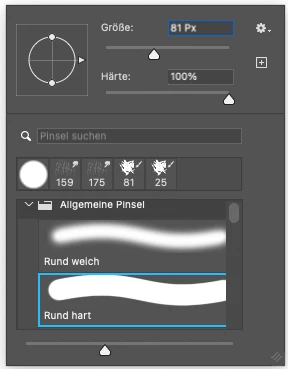
As I'm coming from Windows, where this always worked - did I miss something or is this a known bug?

최고의 답변: Lukas Esch

I thought I had the same issue, tried all different key press options except one... I feel so dumb but somehow didn't try this one:

CONTROL + OPTION + LEFT (!) CLICK


On Mac it's NOT right click 🙂 

6 답변

Participating Frequently
November 29, 2023

hey Folks I'm new to mac's previously working on windows. I can not fix this issue, using the wacom pen and tablet, how do i left click on the pen? 

c.pfaffenbichler
Community Expert
Community Expert
November 29, 2023

Just click, right click should work with ctrl-clicking. 

Or assign the clicks to the button on the pen. 

Participating Frequently
December 18, 2023

@c.pfaffenbichler Thx for comming back, unfortunatly its still not working for me. I have chosen right click on the bottom pens button, i tryed the click on the pens tip. Right click  + Ctrl. is not working, Opt + Ctrl+ Click and drag is also not working.  When right clicking i get the bush setting pop-up and when Opt+Ctrl+click and drag I'm duplicating the top layer.  

Any othe solutions please? 

Participant
May 9, 2023
  1. I solved the problem on my M1 Mac: MacOS 13.3.1  Photoshop  24.4.1
  2. Go to Settings
  3. Search "zoom"
  4. Scroll down and double-click on 
  5. Turn OFF;

    Remember to click OK!

    This setting now allows adjusting the brush size and hardness with Ctrl & Option Left-click and drag.

This may be a bug in MacOS because I tried turning it on again and the result remained the same 😲.  A restart would probably cause the problem again, so leave it off and hit OK to lock it in.

Participant
November 7, 2023

Nice bro, I got the same problem, but I don't understand where do you find the "settings", there's no one option on the Photoshop menu (bar). Can you pls be more specific 😞 .... thanks a lot anyway!

jane-e
Community Expert
Community Expert
August 17, 2024
quote

 I don't understand where do you find the "settings",

By @Mkt933437224zzte


"Settings" is in all applications in newer versions of macOS. In older versions and in all Windows versions, it is "Preferences".

Jane

Participant
May 2, 2023

I found a way to solve it on my Mac M1: 

I've put click (nothing else) on the lower button of the pen and CTRL + Option on one of the buttons. It's work around, but it finally works! 

aidamilja
Inspiring
August 17, 2024

This worked for me aswell on my Mac Book Pro M3 with mac OS Sonoma 14.4 and Wacom PTH-660 !

I simply changed the lower pen button to "click" for Photoshop ! Please see image attached

Participant
May 13, 2022

Any news on that? Also comming from windows here, also M1. Thanks a lot!

Participant
May 18, 2022

I thought I had the same issue, tried all different key press options except one... I feel so dumb but somehow didn't try this one:

CONTROL + OPTION + LEFT (!) CLICK


On Mac it's NOT right click 🙂 

Inspiring
May 25, 2022

Thanks soo much

c.pfaffenbichler
Community Expert
Community Expert
July 4, 2021

Try ctrl-alt click-dragging (edit: with the left button). 

Participant
July 5, 2021

Thx but this doesn't work for me either.

c.pfaffenbichler
Community Expert
Community Expert
July 5, 2021

»Use Graphics Processor« in the Performance Preferences (Photoshop > Preferences > Performance > Graphic Processor Settings) checked? 

Ged_Traynor
Community Expert
Community Expert
July 4, 2021

Hi

For Windows the shortcut is ALT + right click and for the MAC it's OPT + CMD and click

Participant
July 5, 2021

Thanks a lot for the reply. Unfortunately, this doesn't work either. I also can't change the brush size using my Wacom Tablet. Usually on Windows it worked just fine when right clicking on the pen and then dragging it to adjust the brush size/hardness. Is there a possibility that Photoshop is misconfigured for Mac or something in the System Settings? I left everything on default so it seems unlikely to me.