Participating Frequently
January 16, 2021
Question

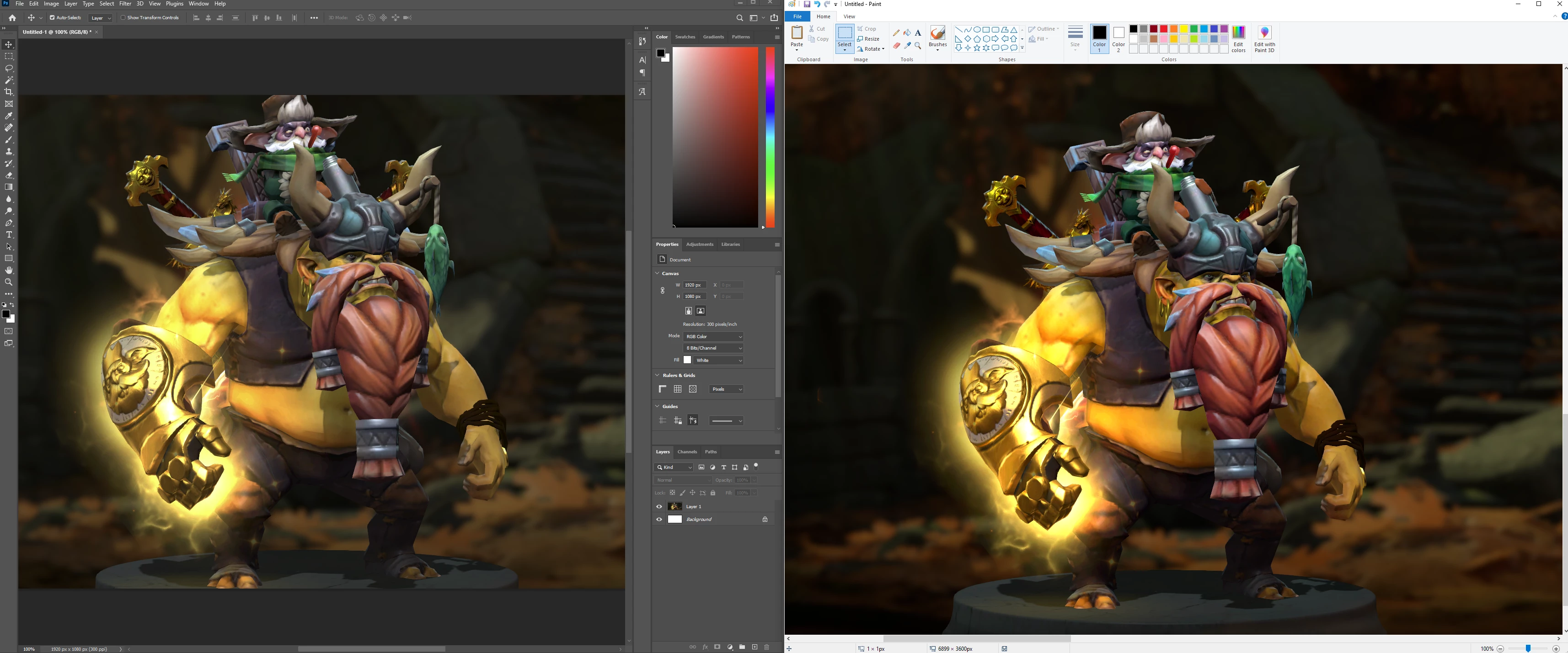
Screenshot has faded colors when pasted into Photoshop

  • January 16, 2021
  • 2 replies
  • 3879 views

Hello!


As the title says, when I take a screenshot and paste it into Photoshop, I get these messed up faded colors. See image below (left is what I get when I paste into Photoshop, right is what I get when pasted into MSPaint). I'm also attaching a screenshot with my picture settings (I tried fiddling around with the color profiles, but to no success).

Any advice>
This topic has been closed for replies.

2 replies

rob day
Community Expert
Community Expert
January 16, 2021

Rather than pasting the capture can you open it? On OSX screen captures are saved with the monitor profile assigned, so opening the capture maintains its appearance:


buru95Author
Participating Frequently
January 16, 2021

I tried opening it directly, same result. (I saved the screenshot in MSPaint as "screenshot.png", then opened it in Photoshop, colors are still faded). Keep in mind I am using Windows though, not MacOS, as previously mentioned.

D Fosse
Community Expert
Community Expert
January 16, 2021

With a screenshot, you first assign your monitor profile, then convert to the standard color space you want. Then they will match.


The numbers sent to screen have already been converted into monitor color space, but the monitor profile isn't embedded in Windows. That's why you need to assign it. In MacOS, the monitor profile is assigned to screenshots.


In both cases you need to next convert into the standard color space you want (sRGB, Adobe RGB etc). If you paste into an existing file that already has a profile, that conversion happens automatically.

c.pfaffenbichler
Community Expert
Community Expert
January 16, 2021

Please read this (in particular the section titled "Supply pertinent information for more timely and effective answers”):

https://community.adobe.com/t5/using-the-community/community-how-to-guide-tips-amp-best-practices/td-p/11601738?page=1


What are your Edit > Color Settings? 

Maybe you ignored the screenshot’s Color Space which is very unlikely to be sRGB (which seems to be the image’s Color Space). 

buru95Author
Participating Frequently
January 16, 2021

Screenshot of Color Settings attached.

How can I tell what "the screenshot's Color Space" is? It's just a screencap taken by hitting the "Print Screen" button (on Windows).