
Miguel Hortiguela
Inspiring
July 7, 2021
Answered

Set Default Bit Depth and Colour Space

  • July 7, 2021
  • 2 replies
  • 4969 views

Hi Everyone:


I know where to change my Bit Depth and Colour space on any OPEN image file but is there a way to set default settings for those two variables for EVERY image that I open, not NEW files, existing files?


Thanks,

Miguel
This topic has been closed for replies.
Correct answer c.pfaffenbichler

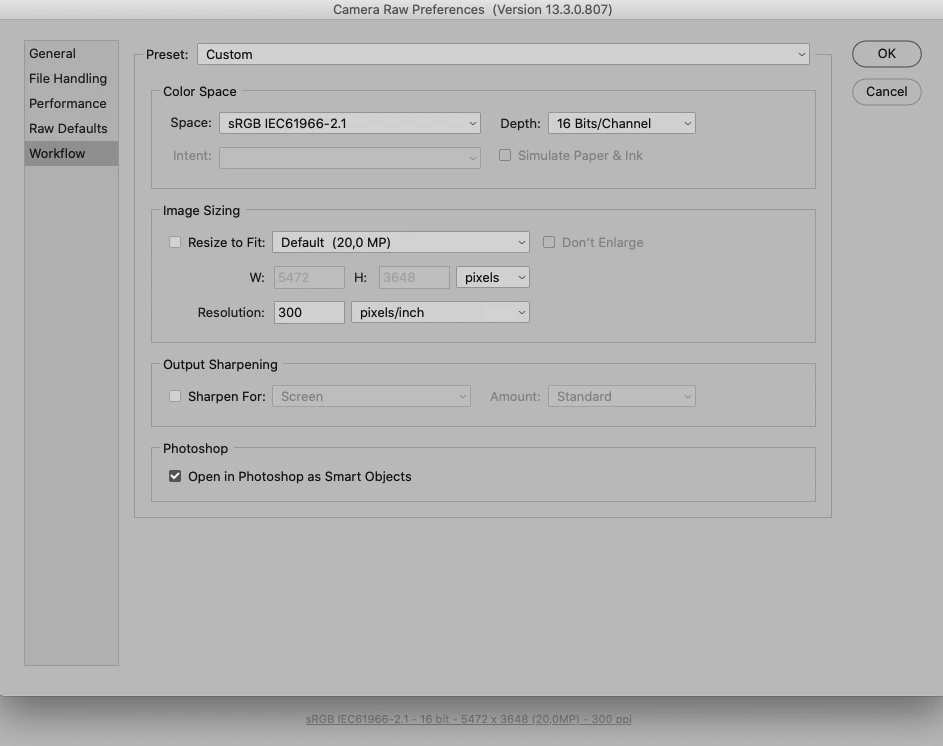
»If I always shoot RAW in 14 bit, why do the files automatically open in PS as 8 bit?«

Because you apparently set them up that way. 

Why don’t you develop 16bit right away? 

2 replies

c.pfaffenbichler
Community Expert
Community Expert
July 7, 2021

But you may want to think twice about implementing that – conversions mean damage, so one should try to keep them to a minimum when possible. 

Miguel Hortiguela
Inspiring
July 7, 2021

Hi ????:

Thanks for your reply. I watched a video by Joel Grimes in which he describes his technique for working in 32 bit by merging three - out of the camera 14 bit bracketed-files.  I understand your concern with regard to messing with the original files but near the end of the video, it appears that he sets those variables as defaults and was curious as to where.


If I always shoot RAW in 14 bit, why do the files automatically open in PS as 8 bit?  What happens to the files if I change the Mode to either 16 or 32?


Miguel

c.pfaffenbichler
Community Expert
Community Expert
July 7, 2021

»What happens to the files if I change the Mode to either 16 or 32?«

If one starts with 8bit and converts to 16bit that may be beneficial for extreme Adjustments (in particular multiple ones) but it does not recreate the data one may have destroyed by processing the RAW images as 8bit RGB images. 

c.pfaffenbichler
Community Expert
Community Expert
July 7, 2021

That would likely need to link an Action or Script to the Open-Event in File > Scripts > Script Events Manager.