Inspiring
December 20, 2012
Answered

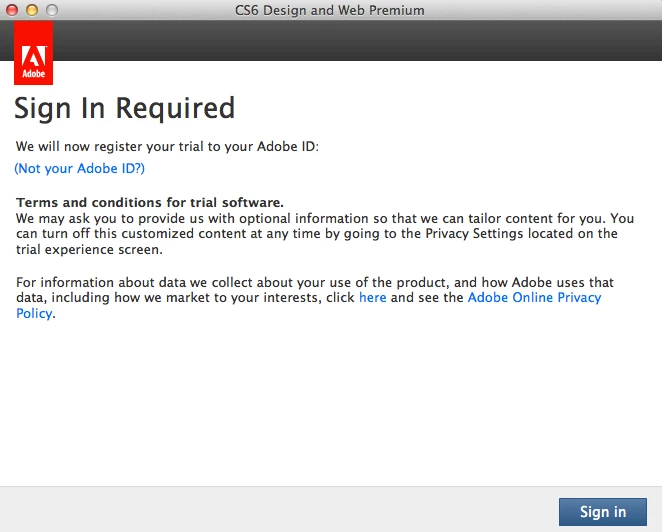
Sign in Required CS6 Adobe Photoshop

  • December 20, 2012
  • 5 replies
  • 91681 views

This has been installed and working since just after CS6 released, now Photoshop won't launch it gives me this "sign in required" screen

the only change to my OSX 10.7.5 system is I ran the recent Adobe updates

i bought CS6 directly from Adobe... i guess i could just click on some suspect mystery SignIn screen... strange

    This topic has been closed for replies.
    Correct answer amxyz

    We are sorry to hear that so many of you are hitting issues. It appears that one of the licensing files was corrupted during the recent update. We are working on a fix right now but in the meantime, you can workaround the issue by relicensing the software:

    1. On receiving Trial/Trial Expired screen
    2. Make sure that you are online
    3. Click on license this software
    4. Creative Cloud members: Log in with Adobe ID which has subscription
      Perpetual product owners: Log in with adobe ID and enter product serial number
    5. Product should be licensed successfully

    Note that this isn't a permanent solution, and you might need to repeat the above mentioned steps again should the licensing screen reappear. Again, we apologize for any inconveniences we've caused and we should be able to provide a real fix soon.


    5 replies

    Participant
    February 14, 2022

    Why the frig am I being forced to sign in to Adobe, when I've owned my own copy of CS6 for years? How the hell do I get around this stupid control feature?  

    Participant
    April 2, 2015

    it is not working please someone help me its coming like this i have an internet connection but it shows there is no internet connection please help

    liriodendrontulipifera
    Participant
    October 16, 2015

    It's amazing to me that this thread is 3 years old, and even with the latest versions, I'm still having the same problem.  This is seriously annoying.

    amxyz
    Community Manager
    amxyzCommunity ManagerCorrect answer
    Community Manager
    December 21, 2012

    We are sorry to hear that so many of you are hitting issues. It appears that one of the licensing files was corrupted during the recent update. We are working on a fix right now but in the meantime, you can workaround the issue by relicensing the software:

    1. On receiving Trial/Trial Expired screen
    2. Make sure that you are online
    3. Click on license this software
    4. Creative Cloud members: Log in with Adobe ID which has subscription
      Perpetual product owners: Log in with adobe ID and enter product serial number
    5. Product should be licensed successfully

    Note that this isn't a permanent solution, and you might need to repeat the above mentioned steps again should the licensing screen reappear. Again, we apologize for any inconveniences we've caused and we should be able to provide a real fix soon.

    Participating Frequently
    December 21, 2012

    Thank you so much for letting us know. It feels so much better to be in the know. People (including myself) try make sense of it all in the absence of an explanation so it helps to quell the swell. Could you let us know when it is resolved here in this thread as many of us are following it? We can then get word without having to keep checking back. I will not update to 13.03 till then. Can you tell me if the 13.03 update addreses the broken HDR Pro function in any way? I'm having to use a 3rd party app. thanks again, aloha, Uhane

    amyzhong wrote:

    We are sorry to hear that so many of you are hitting issues. It appears that one of the licensing files was corrupted during the recent update. We are working on a fix right now but in the meantime, you can workaround the issue by relicensing the software:

    1. On receiving Trial/Trial Expired screen
    2. Make sure that you are online
    3. Click on license this software
    4. Creative Cloud members: Log in with Adobe ID which has subscription
      Perpetual product owners: Log in with adobe ID and enter product serial number
    5. Product should be licensed successfully

    Note that this isn't a permanent solution, and you might need to repeat the above mentioned steps again should the licensing screen reappear. Again, we apologize for any inconveniences we've caused and we should be able to provide a real fix soon.
    Inspiring
    December 20, 2012

    okay, i see the ongoing thread

    http://forums.adobe.com/thread/1114727

    it was a bit off from my previous searches why i didn't hit it

    i should add my copy is an actual retail updater disk i purchased directly from adobe -- not a download or monthly lease

    and to be clear, it has already been properly Licensed and functioning for months (since it was initially released)

    it is suspicious that it is asking me to click on a bogus popup is my point (but it looks like my only option and i hope i don't get caught up in the other thread headache of wasted time)...

    Noel Carboni
    Legend
    December 20, 2012

    I'd say enter your info once - the dialogs you're showing look legit.

    If it prompts again, that's when it can definitely be said that it didn't fix the problem.

    Adobe has had some serious problems with activation.  It may be that the activation mechanism itself has had to be updated, thus the re-prompting.

    -Noel

    Participating Frequently
    December 21, 2012

    Hi noel, this problem is because of update 13.03. NOT installing it fixed the problem for me. Otherwise I was constantly having to enter the info and watch the count down day after day! And I own, outrigh my license. I had to reinstall the app and run updater from within the app and choose NOT to install that one update. I no longer have the pop up.. I suspect they added it on to what ever fixes they were introducing. I do wish I could get whatever was in the update without that nusance advert popping up. I suspect (hope) that update 13.03 would fix the HDR horor show. but I will have to wait and see a more stable vesion of the update. 

    Noel Carboni wrote:

    I'd say enter your info once - the dialogs you're showing look legit.

    If it prompts again, that's when it can definitely be said that it didn't fix the problem.

    Adobe has had some serious problems with activation.  It may be that the activation mechanism itself has had to be updated, thus the re-prompting.

    -Noel

    Inspiring
    December 20, 2012

    thanks, it must be a real 'joy' for those who administrate numerous users/workstations...

    installing 13.0.3 didn't fix the problem

    turning off Internet access at least gives me an option to open Photoshop to get my work done in trial mode until i investigate the problem

    YOU CAN TRY THIS PRODUCT FOR 30 DAYS

    i have to add, this looks like as much a hacker spoof virus attempt as the Adobe Flash updater that pops up and runs without an ADMIN password... how are regular people supposed to know authentic real notices with this sort of behavior

    are we supposed to just click on every Adobe popup and enter our info

    Noel Carboni
    Legend
    December 20, 2012

    gator soup wrote:


    installing 13.0.3 didn't fix the problem

    How so?  Did you enter your Adobe ID and serial number, have it activate and tell you all was well, then prompt you to sign in again?

    I could imagine you needing to do that one more time after installing 13.0.3.

    -Noel