Inspiring
March 2, 2019
Answered

Solid to Transparent brush strokes

  • March 2, 2019
  • 1 reply
  • 3641 views

At one time (long, long ago), it was possible to make a stroke that essentially dissolved to transparent. (like the tail on a shooting star) Is that tool still around?

I suppose it might be possible to make a "clean brush" that unloads to zero?  But that's not exactly what I am looking for now.

Thanks in advance,

Mike Jackson

    This topic has been closed for replies.
    Correct answer Michael Bullo

    Hi Mike,

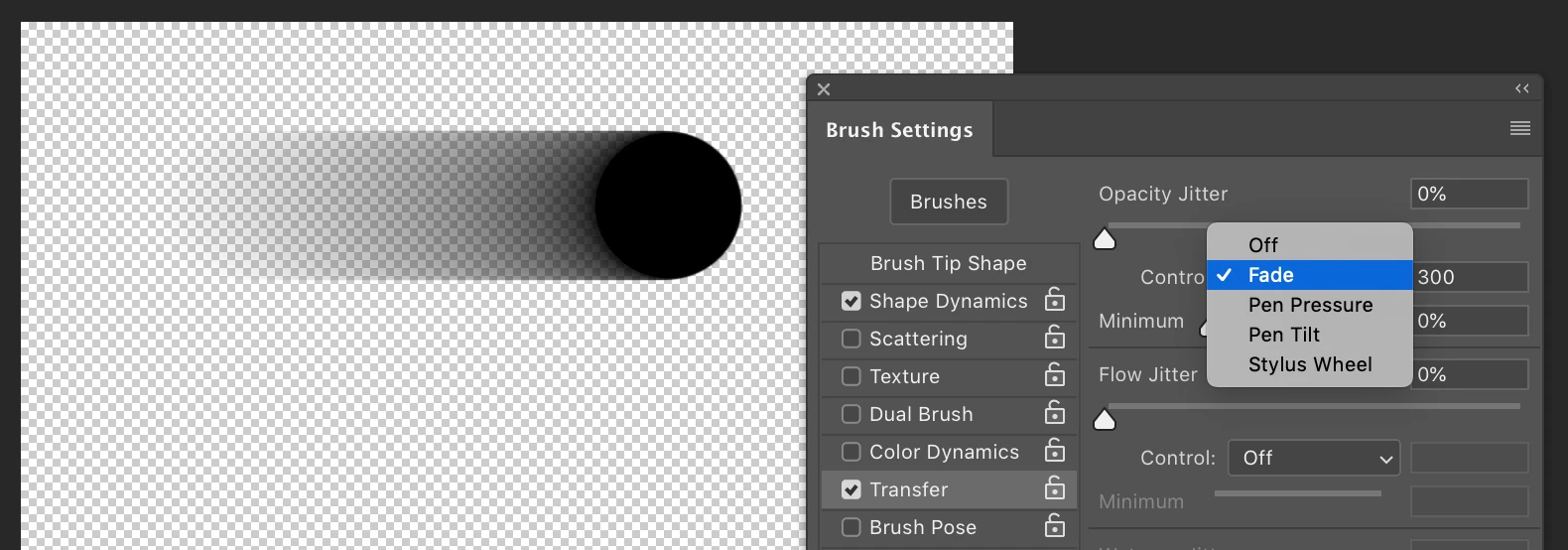
    Try setting the Control value to Fade in the Transfer section of the Brush Settings panel. To change the length of this fade change the number directly to the right of this drop down menu.

    Hope this helps,

    Michael

    1 reply

    Michael Bullo
    Community Expert
    Michael BulloCommunity ExpertCorrect answer
    Community Expert
    March 2, 2019

    Hi Mike,

    Try setting the Control value to Fade in the Transfer section of the Brush Settings panel. To change the length of this fade change the number directly to the right of this drop down menu.

    Hope this helps,

    Michael

    mrjacksonAuthor
    Inspiring
    March 2, 2019

    I can see this works, but it looks like you constantly have to fiddle with the length setting in the Fade boxes. It seems like the older version waited until after the stroke to apply the 100% to 0% opacity. A long stroke spread the transformation over the whole thing where this would require constantly adjusting the settings if making a variety of stroke lengths.

    (The older version I was talking about was probably v2.5 or v3 ...30 years or so ago)

    Thanks! Mike Jackson

    Michael Bullo
    Community Expert
    Community Expert
    March 2, 2019

    There is another thing you might be thinking of involving paths. In this example I have drawn a short and a long path. With both a path and a layer selected, from the Path panel menu choose Stroke Path.

    Set the Tool as Brush and activate the Simulate Pressure check box.

    Within the Brush Settings panel activate item(s) that you want controlled by pressure.

    Pen Pressure controls Size

    Pen Pressure controls Opacity

    Pen Pressure controls both Size and Opacity