


Participating Frequently
March 19, 2020
Answered

[SOLVED] Scrubby Zoom & Alt Brush Resize - Lag - Photoshop 2020

  • March 19, 2020
  • 2 replies
  • 8295 views

Hi there,


I've updated yesterday to Photoshop 21.1.1. Previously, I was using Photoshop 21.0.2.

In the latest version of Photoshop, there is a split second lag when using Scrubby Zoom, or when using the Alt key to resize brushes. Dragging left or right, doesn't have an effect for a fraction of a second. Then it jumps to resize. This happenes every time. It feels almost like it's waiting to see what I want to do.


I know a split second doesn't sound like a lot, but it's exceptionally annoying when it wasn't there before. It makes my workflow stutter.


I uninstalled Photoshop 21.1.1. and installed a slightly older version, 21.1. It had the same issue. I went back and reinstalled Photoshop 21.0.2 and the Scrubby-Zoom/Alt-Resize lag dissappeared completely.
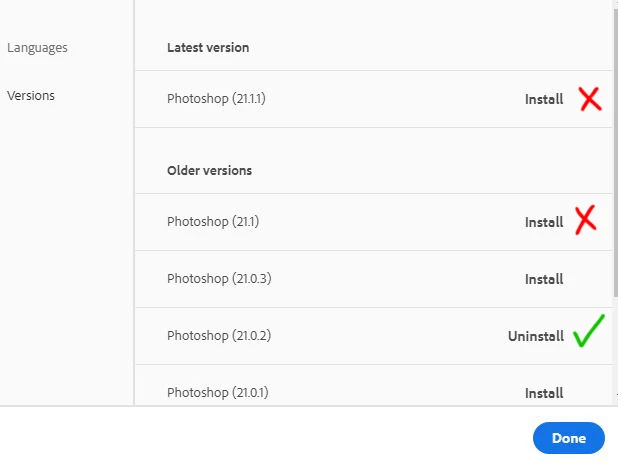
 

Also, this is not a tablet issue. I have tested this at my work (Games Studio in the UK), where I use a Wacom Cintiq PRO 32, and Photoshop 21.1.1 has the same problem. 

I am using a Huion KAMVAS GT-221 PRO HD at home, and once again, Photoshop 21.1.1 has the laggy scrubby zoom.

All Pen Display drivers are up to date at work and home.


My home PC specs are:

Intel® Core™ i7-9700K 3.6 GHz
64GB RAM
NVIDIA GeForce RTX 2080 Super 8GB
Windows 10


Photoshop has around 41GB RAM assigned, so I don't think it's a performance issue.

Is there something I can do to fix this, beside never updating Photoshop? 😄

Thanks a lot. Any help would be much appriciated.


17th of June, 2020 UPDATE:

I have enabled Windows INK. It does work with Windows INK.

This topic has been closed for replies.
Correct answer JJMack

Are you using a Wacom Tablet Pen? If you are are you using WinTab or INK  support pen support with Photoshop.  Adobe broke Photoshop's WinTab support in 21.1.0 and did not fix it in 21.1.1.  The bottom pen button seems to be flaky when using WinTab interface.  21.1.1 is the only version I user Window INK support with. I  change Wacom to use WinTab for all other versions for some do not have INK support and other have issues with INK support.  21.1.1 seems to work well  using INK support.  I do not know what Window 7 users can do the is not INK in Windows 7.

2 replies

JJMack
Community Expert
JJMackCommunity ExpertCorrect answer
Community Expert
March 20, 2020

Are you using a Wacom Tablet Pen? If you are are you using WinTab or INK  support pen support with Photoshop.  Adobe broke Photoshop's WinTab support in 21.1.0 and did not fix it in 21.1.1.  The bottom pen button seems to be flaky when using WinTab interface.  21.1.1 is the only version I user Window INK support with. I  change Wacom to use WinTab for all other versions for some do not have INK support and other have issues with INK support.  21.1.1 seems to work well  using INK support.  I do not know what Window 7 users can do the is not INK in Windows 7.

JJMack
Participating Frequently
March 26, 2020

Thanks a lot for your the info. Good to know that Photoshop broke the WinTab support. I am using WinTab for sure. Windows INK is the devils work, and I ain't touching it. It's hideous and I hate it with a passion. lol. I have the PSUserconfig file that forces Photoshop to use WinTab.


Also, I am using both, a Wacom Pen Display, and a Huion Pen Display (two seperate PC's. Not the same PC). And on both PC's the Windows INK function is disabled. Good to know it's that what's causing it. I hope Adobe will fix the WinTab support.


Thanks again. 😄

Participant
April 17, 2020

Hello,

My English is not very good. So, if I understood you well...there is no solution for that problem? It is really anoying, indeed. I didn't have that problem in my older laptop (Windows 7 and Photoshop 15), and now with Photoshop 2020 and a new powerful PC it's driving me crazy... 

The only solution is to wait for an Adobe actualization 😞

Thank you in advance...

gener7
Community Expert
Community Expert
March 19, 2020

This may be worth a try: Uncheck "Enable Generator" under Preferences > Plugins. This feature has been slowing down Photoshop for some users.


Also might help: https://helpx.adobe.com/in/photoshop/kb/photoshop-slow-lags.html

Participating Frequently
March 19, 2020

Thanks a lot for your reply. 🙂 Sadly, I've already disabled that. I generally always have that disabled. 😞 I also tried the photoshop-slow-lags advice on adobe and none of those options improved it. T_T

Thanks again, for your time.

gener7
Community Expert
Community Expert
March 19, 2020

I just remembered, is Legacy Compositing checked on? That may help. If not then 21.0.2 will have to do as long as the features are there.


That's about it, unless you want to give Adobe's Chat Service a try.


Gene