
Tablet skipping strokes when pressing lightly, losing sensitivity
Operating system: Windows 7 64x
Program Used : Adobe Photoshop CS6, CS5
Malfunctioning Equipment:
- Wacom Cintiq 13 hd and/or Pen
The problem itself:
My tablet seems to skip strokes when I do light strokes. If I would for example draw a circle by quickly and lightly making a circular gesture, nothing or just a part of the circle would be drawn.
Note that the problem does not occur when I do hard strokes where I put medium pressure on my pen. Also, the problem seems to randomly occur; sometimes the circle would be drawn sometimes not, sometimes partially. Here's an example:
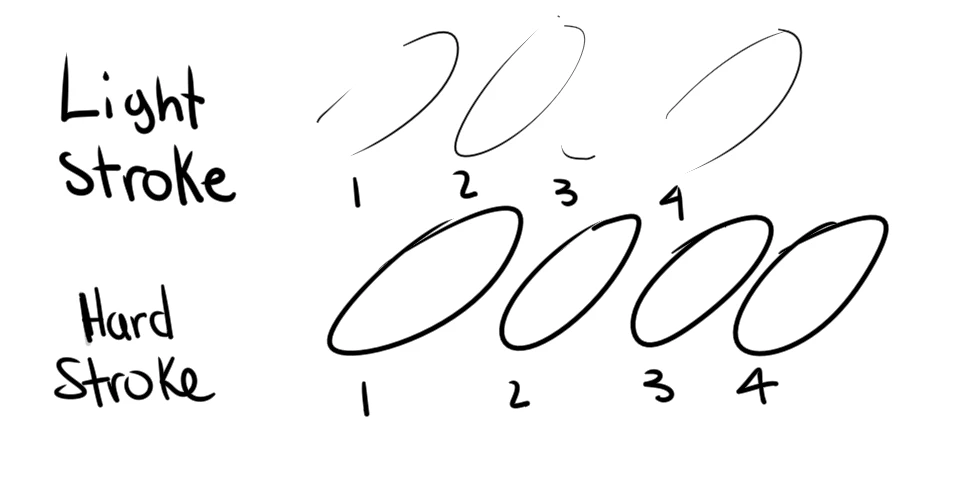
For this same reason if I lightly click on an program's icon on my desktop, sometimes nothing happens, sometimes the program would open normally.
I've gone into the Tablet Diagnostic thingy, in Tablet Proprieties and have noticed that it says that 0% pressure is applied and that ''All Switches are open'' when I'm clearly putting pressure as I would normally do to click on something or draw. Here's what im talking about : 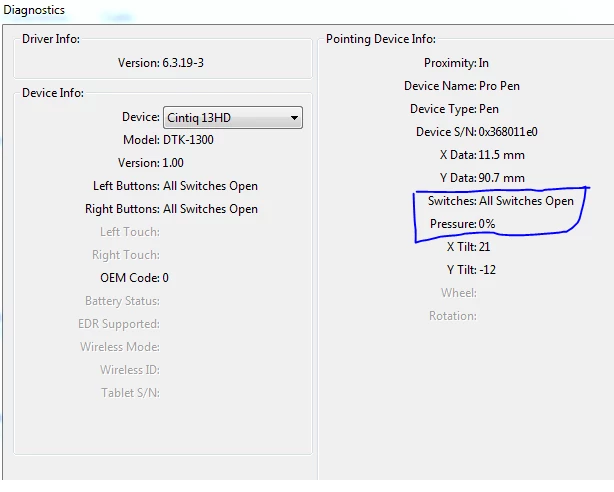
I've done some researching on the web but the only thread I've found that is identical to my problem is this one :
___________________________________________________________________________________________________________________________________
Things I did before that problem started occuring that may or may not have caused the problem:
- Cleaned my Pen and my Tablet with a screen cleaning spray (I doubt this wouldve dammaged the Pen or Tablet as the susbtance evaporates extremely fast for it is made to clean screens and such).
- Tweaked some mouse sensitivity stuff, on Windows (Put it back to normal, didn't fix the problem).
___________________________________________________________________________________________________________________________________
Things I have tried:
- Resetting my computer.
- Removing my Tablet's drivers and reinstalling them. (By uninstalling ''wacom tablet'' with the windows uninstalling feature).
- Unticked ''Use Windows Ink'' in the tablet proprieties, and turned ''Double clicking'' off.
- Completely disabled all Windows related Pen and Tablet stuff (Flicks, double clicks etc.)
___________________________________________________________________________________________________________________________________
I tried changing program (tried on Mischief ) and testing it, but it didn't fix it.
Please help me, I don't know what to do anymore...
 AdChoices