Exit
  • Global community
    • Language:
      • Deutsch
      • English
      • Español
      • Français
      • Português
  • 日本語コミュニティ
  • 한국 커뮤니티
0

Tree rendering goes horribly wrong

New Here ,
Dec 14, 2017 Dec 14, 2017

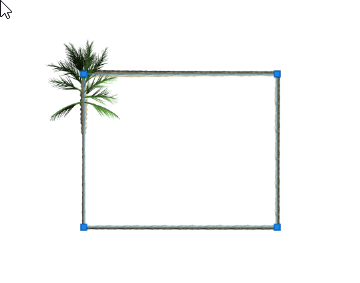
Whenever I try to render a tree it's 'trunk' (think it's called like that) gets in a square-shape during the rendering process. as you can see below. What should I do??Screen Shot 2017-12-14 at 10.13.34.png

1.1K
Translate
Report
Community guidelines
Be kind and respectful, give credit to the original source of content, and search for duplicates before posting. Learn more
community guidelines

correct answers 1 Correct answer

LEGEND , Dec 14, 2017 Dec 14, 2017

Do you actually have a selection or a vector path in your document? Some of those renderers will follow contours. Certainly looks like that in your image.

Mylenium

Translate
Adobe
Community Expert ,
Dec 14, 2017 Dec 14, 2017

I've just tried the same settings as you but I don't get that result.

The Tree render uses the GPU so you could try different GPU settings (basic, normal, advanced) in Preferences > Performance

Dave

Translate
Report
Community guidelines
Be kind and respectful, give credit to the original source of content, and search for duplicates before posting. Learn more
community guidelines
LEGEND ,
Dec 14, 2017 Dec 14, 2017

Do you actually have a selection or a vector path in your document? Some of those renderers will follow contours. Certainly looks like that in your image.

Mylenium

Translate
Report
Community guidelines
Be kind and respectful, give credit to the original source of content, and search for duplicates before posting. Learn more
community guidelines
Community Expert ,
Dec 14, 2017 Dec 14, 2017
LATEST

Mylenium  - well spotted - I tried again with a rectangular path and got this

Dave

Translate
Report
Community guidelines
Be kind and respectful, give credit to the original source of content, and search for duplicates before posting. Learn more
community guidelines