Feast
Known Participant
January 8, 2018
Answered

UI: Remember last path entered

  • January 8, 2018
  • 1 reply
  • 12274 views

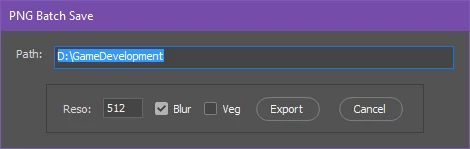
I have a simple UI for my artists that does some modifications to his files then saves it to the folder of his choice.
However it gets quickly tedious to re-enter the path every time he uses the script.

I would like to remember the path he previously entered or use the path that Photoshop uses as a default.
How can that be done?


Here's the script if someone is interested, it allows you to save out your groups as PNG's with possible additional blurred versions:
Photoshop PNG Blur Save - Pastebin.com

Message was edited by: Jeremy Vansnick

This topic has been closed for replies.
Correct answer Kukurykus

Thanks

I realized that upon quitting Photoshop the path is lost, is there nothing I can do about that?


Change beginning of your script to:

PTH = ""; displayDialogs = DialogModes.NO

var Path = $.getenv('pth') || PTH || "d/";

// for saving files

var doc = app.activeDocument;

And in the middle where you last time insterted new part, edit that to:

dlg.show();

$.setenv('pth', Path.slice(1))

if (PTH != ge = $.getenv('pth')) {

     (fle = File($.fileName)).open('r'), jsxFile = fle.read()

     .replace(/"(.*)"(?=;)/, '"' + ge + '"'), fle.close()

     fle.open('w'), fle.write(jsxFile), fle.close()

}

Additionally what is important change two your trim methods from doc.trim(TrimType.TRANSPARENT, true, true, true, true); to just doc.trim(). This way your images will be trimmed whether they are on transparent or one coloured or else coloured background. If you won't do this then your script will stop working (of course in specific situation).

As to beginning and middle of script now when PTH is false, and environment pth is undefined it will display 'd\', however it will happen only once, at first time of running script. During using Ps it will always refer to environmental path. Every time it is changed your .jsx script is going to update itself of new path (first line of code). If you choose few times in a row the same path, then PTH variable will keep last different path, if you change it to other in dialog and click 'Export' button it's going to be changed also in your script, but will be used only at every next Photoshop session.

1 reply

Kukurykus
Legend
January 8, 2018

There are 4 mistakes in code. Actually one four-fold, and honestly two double. Script can't save (at least for me) as far as there is AUTOMATIC set for ResampleMethod. Correctly there should be ResampleMethod.BICUBIC. in all four places

To answer your question:

  • change var Path = "D:\\GameDevelopment"; to var Path = $.getenv('pth') || "d/";
  • and right after dlg.show(); insert another line: $.setenv('pth', Path.slice(1))
Feast
FeastAuthor
Known Participant
January 8, 2018

That's exactly it!

I don't know why but my artist keeps having the popup about trimming with the options despite using BICUBIC like you said.
On my Photoshop, it doesn't ask for that, there is no popup showing during the script. However he has a popup for every time my script calls trimming.

Is this something you're familiar with? Thanks a lot for the help already, it's working great except for the popup.

Kukurykus
Legend
January 21, 2018

Mhh I don't think it's slower because I do this only at the very end of the script?

Anyway doing autoUpdate = false won't close the layersets for me.

I did realize it does something I don't want: which is to turn off all the groups instead of leaving them as they were. (some on, some off depending on how the artist left them).


Yes, your artists will suffer extra delays when autoUpdateOpenDocuments is on, because when once you turn it on it'll be working till you untick it. And while that option serves not only layer folders swich, working of script would be remarkably longer. You are right, seting autoUpdateOpenDocuments back to false right after setting it true doesn't update documents (more about it read under new chunks of code). Closing only layerSets opened by script is not hard thing. It needs only to make a loop over current expanded layerSets at the start of script to make array of them and with end of script close only other ones. You can try these 2 new (Windows) codes and later we'll see how to change your curent script it could be ran twice for the moment, only to make layerSets refreshment, the way that won't trigger any other part of code in you script:

#target photoshop

function e(v1, v2, v3) {

     eval(pre + ' = ' + v1), $.setenv('u', v2), eval('bat.' + v3 + '()')

}

if (bat = File((fN = $.fileName).slice(0, -3) + 'bat'), !(eval(pre =

'preferences.autoUpdateOpenDocuments')) && !$.getenv('u')) {

     (function(){

          (fle = activeDocument.fullName).encoding = 'binary'

          fle.open('r'); var rep = fle.read().replace(/\x018BIMp/g,

          '\x028BIMp'); fle.open('w'), fle.write(rep), fle.close()

          bat.open('w'), bat.write('"' + Folder.startup.fsName +

          '\\photoshop.exe" ' + '"' + File(fN).fsName + '"')

          bat.close(), $.setenv('u', 1), bat.execute()

     })()

}

else if($.getenv('u') == 1) e(1, 2, 'execute') else e(0, '', 'remove')

#target photoshop

if (vbs = File((fN = $.fileName).slice(0, -3) + 'vbs'),

!(eval(p = 'preferences.autoUpdateOpenDocuments'))) {

     (function(){

          (fle = activeDocument.fullName).encoding = 'binary', fle.open('r')

          var rep = fle.read().replace(/\x018BIMp/g, '\x028BIMp'); fle.open('w')

          fle.write(rep), fle.close(), documents.add(1,1,1).close(), eval(p + ' = 1')

          txt = 'CreateObject("Shell.Application").ShellExecute """'

          txt += Folder.startup.fsName + '\\Photoshop.exe""", "'

          txt += File(fN).fsName + '"', vbs.open('w')

          vbs.write(txt), vbs.close(), vbs.execute()

     })()

}

else eval(p + ' = ' + !p), vbs.remove()

Some facts about second code:

  • self invoked function had to be used to prevent ExtendScript ToolKit from freezing
  • var was used as 1st point works only for saving binary to .txt, while not when .psd binary is beeing overritten
  • preferences.autoUpdateOpenDocuments beeing set to true and then to false during single script session result false and vice versa so false, then true gives true. It's why after changing preferences, script had to initiate itself again to apply just changed preferences, and then change them back, as they would slow down process
  • immediatelly closed new created document had to help in the process described in previous point otherwise script had to initiate itself one more time like it's in first version of script where command prompt was used
  • vbscript had to be used to hide system window that flashed for a moment using command prompt, also because there is no option in cmd to silently invoke its commands
  • second and actually main reason of using immediatelly closed new document was to refresh current document state that binary changes made to file, otherwise if not current document (window) switch they couldn't be visually updated

btw, don't post next time your whole script here, better fix your pastebin, as your code may be changed few times more