


Known Participant
June 28, 2019
해결됨

Unable to fix the height of a path in Photoshop CS6

  • June 28, 2019
  • 2 답변들
  • 1942 조회

I want to create a path in Photoshop CS6 with a fixed height and variable width, but when I draw a path Photoshop takes no notice of the height I have set.

For example, I select the Path (rounded rectangle) tool, set the height as 50 px and leave the width box empty. But when I drag the mouse across the screen the rectangle has no fixed lengths.

i have tried resetting the Path tool, but it makes no difference.

Many thanks for any suggestions.
이 주제는 답변이 닫혔습니다.
최고의 답변: Jeff Arola

Thanks edgrimley. This is a really helpful workaround of my problem.

Still puzzled why why I can’t fix the height (by itself) using the dialogue box.

many thanks.


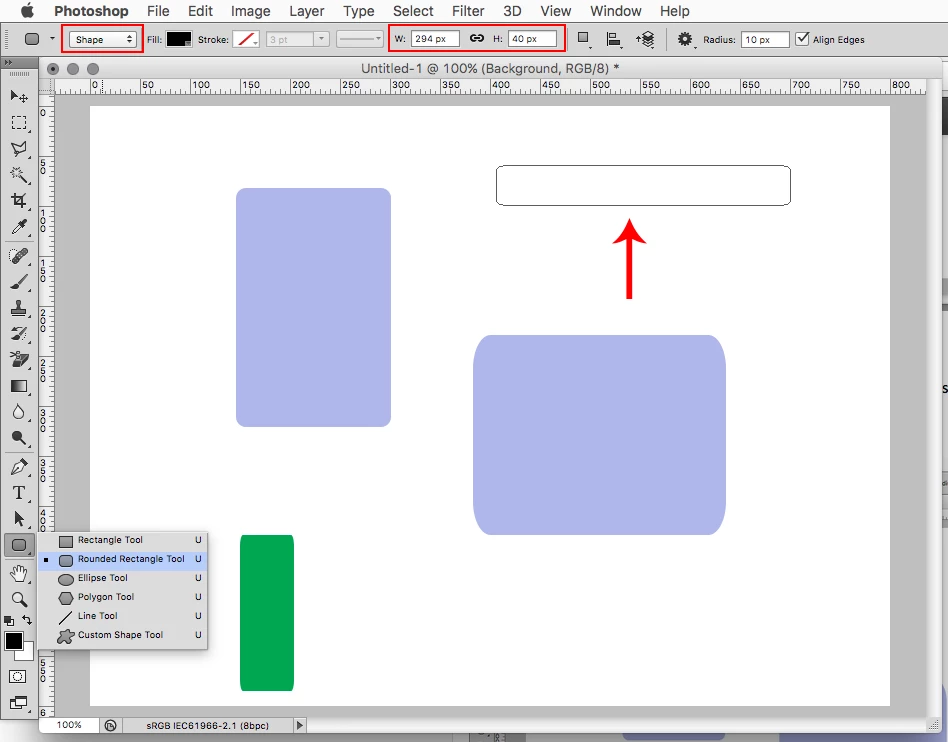
Another way is to draw a path, leave the Rounded Rectangle Tool selected, change the Tool Mode from Path to Shape

and then you should be able to change the path size by entering the size in the tool options bar.

2 답변

Participating Frequently
June 28, 2019

Try this, used a fixed size of 4X4. The use Transform and leave the height at 100%, then set the width to whatever you wish.

davescm
Community Expert
Community Expert
June 28, 2019

Hi

You draw the rectangular path by either dragging the mouse or by entering values. The latest entry of either mouse or values overrides the last. What you can do is drag out the rectangle first with the mouse then enter a height value and the rectangle will change to that height keeping whatever width you dragged.

To make copies with the same height use the path selection tool (black arrow) and Alt drag to get a copy. You can now type in the new width and repeat as required.

Dave

TheTurbot작성자
Known Participant
June 28, 2019

Thanks for your help, Dave.

however, if I set values, Photoshop insists on me entering both the width and the height. Then it will place a shape with those values on my screen. If I enter a value for the width alone, then Photoshop will not place a shape of any size on my screen.

if, instead, I draw a freehand path using the mouse, with no fixed values set, it will not allow me subsequently to fix a value for the width or height.

so, I am unable to do what you suggest.

I am using the shape too (U) with the rounded rectangle, to create a Path.

Thanks again for your help.

davescm
Community Expert
Community Expert
June 28, 2019

Hi

I was using CC when I wrote my last post so I just fired up a laptop, with CS6, to check. It did work exactly as I describe above. Drag out the rectangle path with the mouse then immediately enter the height value in the options bar and the rectangle changes. I am using Windows on both machines so can't check on Mac

Dave