
Warm Hearts Publishing
Known Participant
March 14, 2017
Answered

Why are my psd files opening in Illustrator instead of Photoshop?

  • March 14, 2017
  • 2 replies
  • 10706 views

For some reason, the default for all of my psd files is set to Illustrator instead of Photoshop and I don't know why. This happened since the latest Adobe upgrade. I want to change them back. How do I do that on a Mac (OS Sierra)?
    This topic has been closed for replies.
    Correct answer gener7

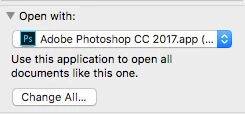
    Cmd i (get info) on a PSD file and see that Photoshop is chosen as the  app it opens in. Then click on Change All to apply to all PSDs.

    2 replies

    Participant
    January 22, 2018

    Has anyone had this continue to happen after you've gone through the steps above. It seems as though it's it's not "applying to all" but still remembers to open that specific file in Photoshop thereafter.

    Participant
    February 7, 2018

    I have the same problem @jackieHover i'm consistently needing to change to default my .PSD files to open with my PhotoshopCC. (Because the PSD files want to open in .AI illustrator application.) I click "APPLY TO ALL" in the info window.

    It stays for a few days, and then all of a sudden in goes back to wanting to open to default that PSD files want to open with illustrator application.

    This goes for all my jpeg and png images as well. i normally have them default to PSD and it defaults to mac default opening like "PREVIEW"

    After this first happened I updated all my software. EVERYTHING! Mac software to the latest and PSCC to the latest and still same issue.

    ADOBE WE NEED HELP!

    gener7
    Community Expert
    Community Expert
    February 7, 2018

    I'm experiencing something really strange with MacOS 10.13.3 where Photoshop will drop off the "Open with..." list at random leaving Preview the default. I can go to "other" at the bottom of the list and choose Photoshop again, but randomly as in saving an image from a web page, it happens again.

    I won't go into all I have tried, but it's been uninstalling CC, FireFox, testing hardware, checking for viruses and just not getting anywhere. If I find out anything...I'll be glad to post it.

    gener7
    Community Expert
    gener7Community ExpertCorrect answer
    Community Expert
    March 14, 2017

    Cmd i (get info) on a PSD file and see that Photoshop is chosen as the  app it opens in. Then click on Change All to apply to all PSDs.

    Warm Hearts Publishing
    Known Participant
    March 14, 2017

    Great! Thanks! It worked.

    gener7
    Community Expert
    Community Expert
    March 14, 2017

    And just a reminder, Bridge CC 2017 (free download) has its own File Association Settings  Preferences > File Type Associations that  differ with MacOS.