Known Participant
November 4, 2019
Answered

Why is the Photoshop 2020 App Icon Shape Different?

  • November 4, 2019
  • 8 replies
  • 25602 views

Just wondering why Photoshop 2020 is the oddball with a different app icon/shape design than the rest of the 2020 apps?
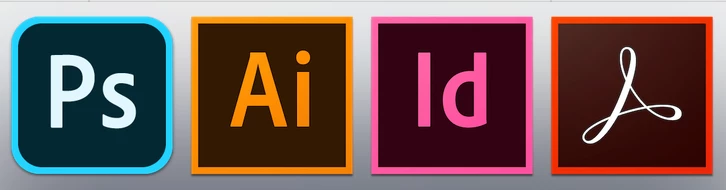

This topic has been closed for replies.
Correct answer Sahil.Chawla

Hi There,

The rounded corners actually have a meaning- they mean the app works across multiple devices and the cloud.

Regards,
Sahil

8 replies

Participant
April 20, 2020

I had to remove the apps from dock because the inconsistency makes me get a rash. 

100pk
Inspiring
June 16, 2020

Wel, the update of today finally solved all icon-inconsistencies. Let alone the apps which werent updated as of now:-)

rogézz
Participating Frequently
June 17, 2020

I'm curious if they finally put back the old decent Photoshop icon. The rounded icons are assiciated with unusefull apps in my mind. Will install update now and see 🙂

Participant
April 10, 2020

That's one of the dumbest ideas I've ever heard.

Dan Rodney
Community Expert
Community Expert
April 4, 2020

But Illustrator and InDesign can be used on multiple devices (Mac and PC) and use cloud features. You probably mean mobile devices.


I conceptually understand, but as a designer this annoys me every time I look at it. The icons don't feel integrated, and the icon differentiation does not explain why they are different, so for most people the reason is lost and it looks like a mistake. 

— Adobe Certified Expert & Instructor at Noble Desktop | Web Developer, Designer, InDesign Scriptor
Participant
January 25, 2020

These programs are designed for DESIGNERS. I personally think it's ridiculous to make the shape different from the other apps. Consistency is one of the most basic yet most important principles in design yet the update has foolishly ignored this. 

Participant
February 5, 2020

I agree! 

rogézz
Participating Frequently
December 7, 2019

Ah, that makes sense. Thank for getting back to me! And thanks for answering my curiosity of UI disuniformity.


no it doesn't, it's totally stupid. It's a cheap marketting trick to make people aware of a tabled photoshop version, where no one is waiting for. why should anyone downgrade to software that can do less?


If you copy the old icon in finder you can replace the new one. That is what I have done

You will need to remove from dock then put it back again.


That's exactly what I did directly after installing the new CC before I even read it was annoying so many other designers. For me the rounded corner apps are the "simple" apps like Premiere Elements and Photoshop Elements, they are good for a certain croud, but don't bring any new functionality to me. I'm sorry.


stefanm46562695
Participant
November 19, 2019

thats SO annoying, PLEASE make the icons consistent! you are making products for designers, so do your job and make your product look consistent. this icon really drives me nuts. eighter make them all the same in general or per device. but NEVER EVER mix them!! its not even the rounded corners, even the font is too bright!!!

csuser13c22638785
Participant
December 5, 2019

If you copy the old icon in finder you can replace the new one. That is what I have done 🙂

You will need to remove from dock then put it back again.

Participant
January 15, 2020

Done.... thank you so much for the tip!! 

SG...
Adobe Employee
Adobe Employee
November 19, 2019
Sahil.Chawla
Adobe Employee
Sahil.ChawlaCorrect answer
Adobe Employee
November 5, 2019

Hi There,

The rounded corners actually have a meaning- they mean the app works across multiple devices and the cloud.

Regards,
Sahil

Known Participant
November 5, 2019

Ah, that makes sense. Thank for getting back to me! And thanks for answering my curiosity of UI disuniformity.