
kharkow
Participating Frequently
July 21, 2019
Question

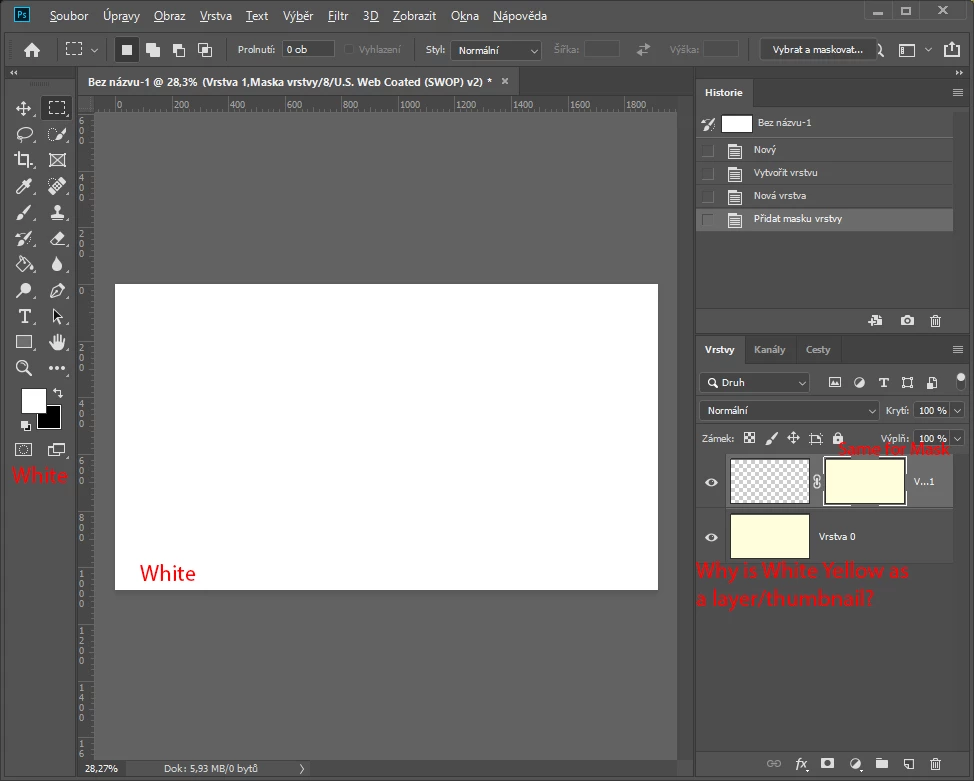
Yellow layer/thumbnail instead of White

  • July 21, 2019
  • 2 replies
  • 1740 views

Hi,

for 2 days ago, something goes wrong. Without any changes in settings, I now started to see yellow/creamy thumbnails instead of white.

Also, Mask thumbnail has a yellow color. What should I do to change this back?

P.S. If I change monitor profile, that will change the all photoshop windows, not only thumbnail

P.P.S. Reinstallation of photoshop didn't solve that.
This topic has been closed for replies.

2 replies

Bob_Hallam
Legend
July 21, 2019

Well, this is a tough question!  Here's what we know so far:

1.) It's not the monitor profile

2.) It's not the video drivers,

3.) It's not the GPU.

4.) It's isolated to Photoshop

5.) It's random.

So a random problem in Photoshop suggests there is something wrong with the Software on this install different from every other install of the same software.   So I would suggest uninstalling any Adobe Cloud apps. 

Start here:

Use the Creative Cloud Cleaner Tool to solve installation problems

Before using read this:

Use the CC Cleaner Tool for installation issues

Then run CC cleaner, and reinstall the Adboe Apps.

That should take care of the problem.  If it's related at all to the install of PS on your computer. 

ICC programmer and developer, Photographer, artist and color management expert, Print standards and process expert.
c.pfaffenbichler
Community Expert
Community Expert
July 21, 2019

Does turning off »Use Graphics Processor« in the Performance Preferences (Photoshop > Preferences > Performance > Graphic Processor Settings) and restarting Photoshop have any bearing on the issue?

kharkow
kharkowAuthor
Participating Frequently
July 21, 2019

Nope.

I tried to change settings in Performance/GPU Settings, restarted and there is no difference in color. Stil canvas white, thumbnail/layer yellow.

c.pfaffenbichler
Community Expert
Community Expert
July 21, 2019

If the GPU is not involved and changing the screen profile makes a difference it seems likely that your screen profile is the issue.

Can you create a new one?