
ingark59650180
Participant
November 8, 2017
Question

DirectX/Direct Play Windows 10
  • November 8, 2017
  • 1 reply
  • 9328 views

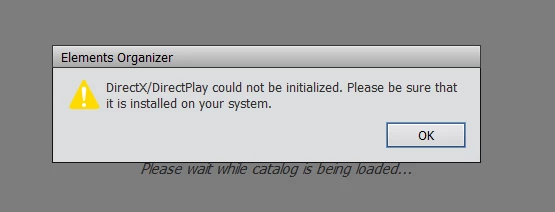
I can,t start Adobe Elemnts in Windows 10 and recive this message: DirectX/DirectPlay could not be initialized. Please be sure that it is installed on your system.

Why? Becauce it is installed

I am so sick of this shit and why I can,t contact Adobe by mail..................

    This topic has been closed for replies.

    1 reply

    Peru Bob
    Community Expert
    Community Expert
    November 8, 2017

    Different versions of software may need different versions of DirectX.  What version of Premiere Elements?

    ingark59650180
    Participant
    November 8, 2017

    Elements 13

    Sendt fra min iPhone

    [details removed by ussnorway]

    Togel
    Participant
    December 29, 2018

    If the solution provided by Ussnorway doesn't work:

    • Microsoft DirectX 9 or 10 compatible sound and display driver

    from here:

    Adobe Premiere Elements system requirements

    You can download from here:

    Download DirectX 9.0c (Jun 10) - FileHippo.com


    I felt far more comfortable downloading the legacy DirectX 9.0c End-User Runtime directly from the Windows XP section of Microsoft's own site...

    https://support.microsoft.com/en-us/help/179113/how-to-install-the-latest-version-of-directx

    It's obviously intended to install/work alongside more recent versions of DirectX because it states

        "When you run this package, no change is made to your version of DirectX"

    I installed it while logged in as an Administrator, rebooted and enabled DirectPlay as described above and now Elements 13 is working on my Windows 10 machine (the DirectX diagnostic tool dxdiag still reports that DirectX 12 is installed).