Exit
  • Global community
    • Language:
      • Deutsch
      • English
      • Español
      • Français
      • Português
  • 日本語コミュニティ
  • 한국 커뮤니티
0

find a clip in the timeline

New Here ,
Nov 08, 2020 Nov 08, 2020

if you know the clip name, or a partial name, how do you find a clip in the timeline?


Thank you

287
Translate
Report
Community guidelines
Be kind and respectful, give credit to the original source of content, and search for duplicates before posting. Learn more
community guidelines
Contributor ,
Nov 08, 2020 Nov 08, 2020

Same way how you'd search in the main media tab: contol-shift-k, enter the (file)name and see what it can find. See also the 'Search' menu for more options.

Translate
Report
Community guidelines
Be kind and respectful, give credit to the original source of content, and search for duplicates before posting. Learn more
community guidelines
New Here ,
Nov 08, 2020 Nov 08, 2020

I am really having a hard time using the community post!  I first sent this to the Premiere Pro, not to this community.  Sorry, meant to post it to Premiere Elements.

Translate
Report
Community guidelines
Be kind and respectful, give credit to the original source of content, and search for duplicates before posting. Learn more
community guidelines
Community Expert ,
Nov 08, 2020 Nov 08, 2020

I'm moving the thread to the Premiere Elements forum.

Translate
Report
Community guidelines
Be kind and respectful, give credit to the original source of content, and search for duplicates before posting. Learn more
community guidelines
Community Expert ,
Nov 08, 2020 Nov 08, 2020
LATEST

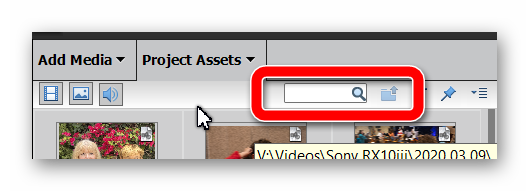
AFAIK, you can only search for a file in the Project Assets bin (using the Search bar), not in the timeline.


Ashampoo_Snap_2020.11.08_16h13m39s_004_.png


Translate
Report
Community guidelines
Be kind and respectful, give credit to the original source of content, and search for duplicates before posting. Learn more
community guidelines