


Participant
September 18, 2021
解決済み

GTX 1650 Super in PRE 2021

  • September 18, 2021
  • 返信数 6.
  • 1534 ビュー

I've installed latest version of PRE 2021.


It shows my GTX 1650 Super in the preferences, but lists it as "unsupported":
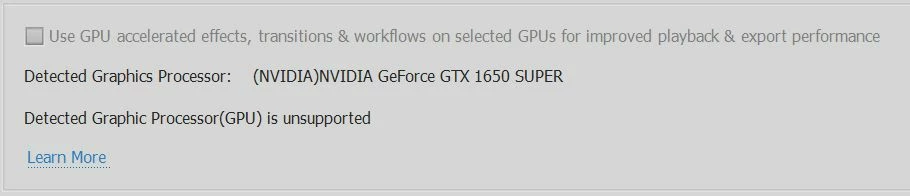
 

It's clearly listed as "supported" on the website: https://helpx.adobe.com/premiere-elements/using/gpu-acceleration.html


I have latest NVidia Studio driver: 471.68 (release date 10/08/2021).

Premiere Elements 2021 version 19.0 (20210809.daily.2242976), activated (not in trial mode which doesn't support GPU acceleration).


Any hints?

 

このトピックへの返信は締め切られました。
解決に役立った回答 Ann Bens

Roll back a few drivers.

Try the 462.59 straight from Nvidia. Do a clean install.

返信数 6

Participant
September 18, 2021

Thanks Ann, I have rolled back the driver to 462.59 and it works! Shame, because I sent back the super-duper graphics card thinking that the software didn't want the Elements versions to be very good and Adobe wanted you to upgrade.... Cynical, but the official support is rubbish!

Thank goodness for people like you!

John T Smith
Community Expert
Community Expert
September 18, 2021

You need to go back and click the link you put in your original message to re-read what a card will do to help


As far as I know, it only helps with playing the video, not exporting

igs764作成者
Participant
September 18, 2021

Ann Bens
Community Expert
Ann BensCommunity Expert解決!
Community Expert
September 18, 2021

Roll back a few drivers.

Try the 462.59 straight from Nvidia. Do a clean install.

igs764作成者
Participant
September 18, 2021

This did the trick, thanks! It's listed as "supported" now. However, in the export preferences, "software encoding" is still the only option:


John T Smith
Community Expert
Community Expert
September 18, 2021

I scrolled back in time and found the previous discussion

https://community.adobe.com/t5/premiere-elements-discussions/premiere-elements-does-not-support-rtx-2060-except-on-out-of-date-drivers/td-p/12341115


ADDED - problems with nvidia driver versions has a LONG history... my very first editing computer was a Pentium that came bundled with Premire 6, and I mean the OLD version 6 not CS6, and an nvidia card... which worked properly with exactly ONE driver version, nothing older and nothing newer


So when Adobe tests and certifies an nvidia card, a note SHOULD be made of the driver version... since that information is not provided by Adobe, you will have to test drivers to find one that works

Peru Bob
Community Expert
Community Expert
September 18, 2021

Make sure to use a Studio Driver, not a Game Driver.

Just choose Clean Install when installing and it will restart automatically,  There is no need to uninstall the previous driver, as it will be done as part of the installation.


Go here to download:

https://www.nvidia.com/en-us/geforce/drivers/


John T Smith
Community Expert
Community Expert
September 18, 2021

I don't have the link handy, but I do remember a similar discussion (may have been about a different model card) where an older nvidia driver had to be used to obtain full function... so go back to nvidia and download other drivers and keep testing


I've never had to change a driver, but I think the process is to...

1 completely remove the current driver

2 restart Windows and install a different driver

3 restart again and test

Repeat 1,2,3 until you find a driver that works