


Inspiring
November 16, 2023
질문

iPhone Prores files heavily distorted in playback in Adobe Premiere Elements 2023

  • November 16, 2023
  • 4 답변들
  • 1149 조회

In Adobe Premiere Elements 2023, when I use "Add Media" to add any iPhone Prores video with a H.264 format, it shows up with diagonal lines distorting it. Also, if I export that same file from Elements, it continues to have the same heavy distortion after export. This same file plays fine in Windows Media player. I'm on Windows 11 fully updated and I've updated my NVIDIA drivers to the latest version.  Also this same file works fine in Shotcut video editing program, which ironically is free.  Attaching photo of what it looks like in playback. 
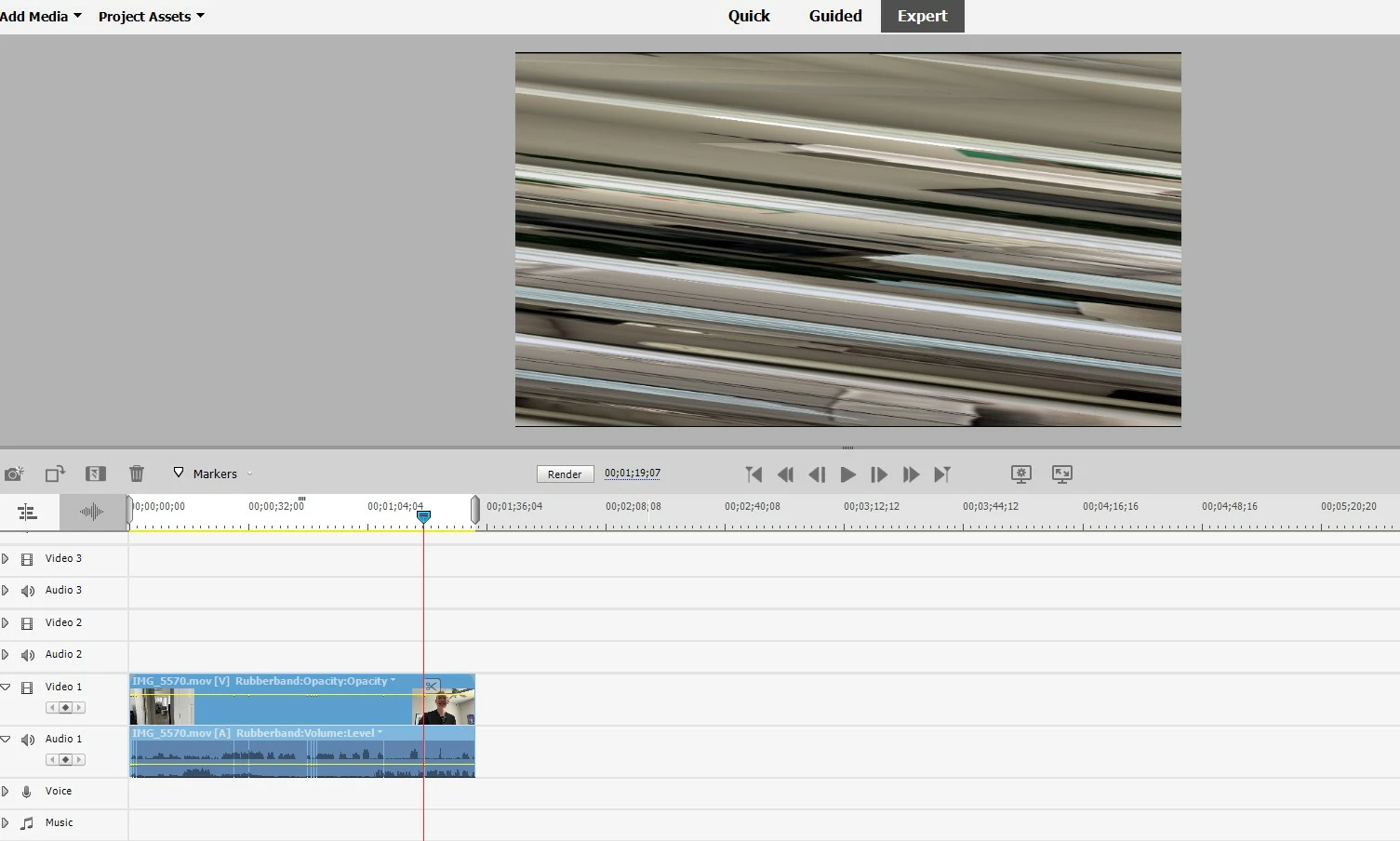
 

From reading help, this file format should be supported. Any ideas?

이 주제는 답변이 닫혔습니다.

4 답변

Inspiring
November 18, 2023

This is well know problem and Adobe doesn't care to fix it. That is why I decided to ask for refund. 


HEVC videos look scrambled in preview images and v... - Adobe Community - 11380726


Is it not related to VRF

It is due to HEVC + non standard resolution. 


You can always re-encode but this is waste of time.  Just try to find better video editor which has all modern codecs properlu implemented. 


Zeusthecat123작성자
Inspiring
November 18, 2023

Have you found one you can recommend? I did find a free one, shotcut, but I'd prefer something a bit more professional but without a subscription model.

Inspiring
November 20, 2023

I’m still looking for the one which will satisfy my needs. I’m checking now Power Director. It has many options and can work with many different formats, but I have some quality issues. The output quality is not as good as I would expect after applying some effects.


APE would be perfect for amateur video editing if only Adobe listened to the feedback of their users and fixed obvious issues and bugs.

John T Smith
Community Expert
Community Expert
November 17, 2023

>add any iPhone Prores video with a H.264 format


The best thing you can do is go into your iphone settings and MANDATE a Constant Frame Rate


Or... go to an Apple forum to find out if Apple has a video editor that will work with their VFR video

Zeusthecat123작성자
Inspiring
November 17, 2023

As far as I know, VFR is a limitation of the iPhone with prores. No way to force a CFR. 

Like I mentioned in the initial post, there's a free (non-Apple) video editor that can handle VFR and prores files just fine. But I paid for Premiere Elements so it would be nice if it could handle VFR.

Peru Bob
Community Expert
Community Expert
November 16, 2023

Please use the free MediaInfo and post a screenshot of the properties of your media in tree view:
https://mediaarea.net/en/MediaInfo

Many users are having issues with VFR. If the file is variable frame rate, use Handbrake to convert to constant frame rate before importing into Premiere Pro:
https://handbrake.fr/downloads.php
Here is a tutorial:
https://www.youtube.com/watch?time_continue=34&v=xlvxgVREX-Y

Shutter Encoder may also be used to convert to Constant Frame Rate:
https://www.shutterencoder.com/en/

Zeusthecat123작성자
Inspiring
November 17, 2023

Changing the frame rate to constant fixed the issue. I watched the Handbrake video and I also did some research but I'm having difficulty getting a lossless video back out of it. The bitrate ends up reduced significantly or if I use Production Max it increases the bitrate but the video doesn't play smoothly on export. Are you aware of a preset or custom settings that will produce a video with constant framerate with the same quality and settings otherwise in Handbrake? Thanks!

Zeusthecat123작성자
Inspiring
November 17, 2023

Try using Shutter Encoder.


I can't find a way to keep the video the same and only change the frame rate to constant in Shutter Encoder, but the H.264 seems to change the video the least and allows me the constant option - most of the functions do not give an option for constant. The file size gets smaller but the bit rate is similar. I exported the video and it looks OK. I'd still like to ideally keep the video exactly the same in all aspects except changing variable to constant. If you have any tips for that I would appreciate them! Thank you!

John T Smith
Community Expert
Community Expert
November 16, 2023

>updated my NVIDIA drivers to the latest version


Are you using the STUDIO driver or the GAMING driver?

Zeusthecat123작성자
Inspiring
November 16, 2023

I was using the gaming driver so I switched to the studio driver and still the same issue. Even rebooted just for good measure, still the same problem