
Known Participant
August 30, 2024

Beta Override Media Color Space Sony S-Gamut3.Cine, Direct PQ (HDR), Rec. 2100 PQ - EXPORT PROBLEM!!

  • August 30, 2024
  • 22 replies
  • 1758 views

Beta Override Media Color Space Sony S-Gamut3.Cine, Direct PQ (HDR), Rec. 2100 PQ - EXPORT PROBLEM!!

Below screenshot shows: Picture in Program Monitor (Right Side: which I spent loads of time editing based on) and a exported frame (Left Side: this is a single frame, but I'm trying to export video too and the whole video looks like this)
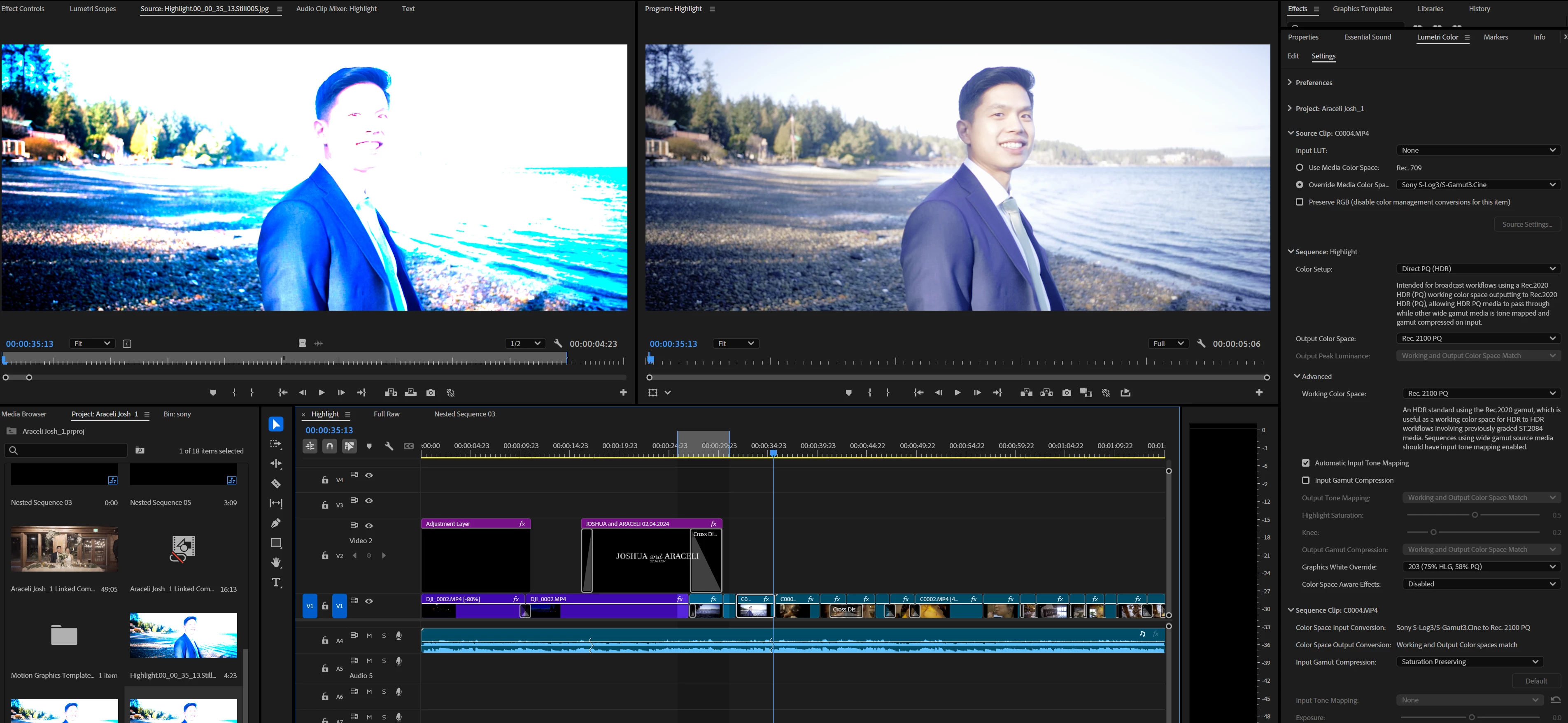

I was thinking the export video option labeled "Match Sequence Settings" would work but, every export option I've tried is producing colors like the one on the left.

I need help please. My last post, I posted 1 thread in the Discussion forum, and one in the Beta forum, and instead of just deleting one or the other thread, BOTH were deleted, even though the email for the reasoning I got was "Just add to one thread, don't create two threads"..... REALLY HOPING this doesn't get deleted.

My client is expecting this project done and I need help ASAP PLEASE.

22 replies

jamieclarke
Community Manager
Community Manager
August 30, 2024

I believe you are looking for this thread. https://community.adobe.com/t5/holding-room-discussions/i-need-help-immediately-beta-feature-new-color-management-messing-up-my-exports-bad/td-p/14831762


Please delete this post and continue the conversation in the above thread, since a team member has already reached out and offered assistance.  Thank You.

Known Participant
August 30, 2024

I need an immediate fix please ASAP.

I didn't know this was a new beta feature until I started messing with it yesterday.
I was so amazed at how awesome my clips looks now for this wedding video I'm doing.


many of my clips have these settings, but some have other settings where I clicked on "Preserve RGB" footage (specifically on my iphone footage)


But I've tried numerous export settings and it keeps coming out like this:


please help ASAP! this client is expecting their video today..... and it's already late. <3<3<3<3<3<3<3<3<3<3<3<3<3<3<3<3<3<3<3<3<3<3<3<3<3<3

Alexis Van Hurkman
Community Manager
Community Manager
August 30, 2024

A few questions will help me help you. It looks like you've chosen an HDR workflow for color management, and you're currently set up to output HDR video with very bright highlights intended for displaying on an HDR display. Is this your intention? In any event, the preset you've chosen for color management is designed to provide a pass through workflow for HDR media, which is why your source media is clipping so badly.

If not, if you are intending to output a regular SDR clip you should try duplicating your sequence for safety, and then changing the Color Setup drop-down menu to Direct Rec.709 (SDR) which will set that sequence to work more similarly to how Premiere Pro has worked in prior versions. Particularly since you're using titles, this would be the safest way to get what you need. 


When you do this, all color adjustments you made while using the prior preset will need to be redone, because grades are dependent on the working color space, which is now Rec.709. However, you'll be in a better position to output the video you need.

Hope this helps!

Alexis Van Hurkman
Community Manager
Community Manager
August 30, 2024

Additionally, keep in mind that turning Preserve RGB on results in those clips not being color managed. You may get better results from turning Preserve RGB off on these clips, unless you've tested that and decided you prefer the result of suspending color management for those clips. This setting is mainly for people who want to use LUTs to convert their footage instead of the new color management.