
Community Manager
April 1, 2020
Answered

Discuss : Nvidia Hardware Accelerated Encode for H264/HEVC

  • April 1, 2020
  • 23 replies
  • 31339 views

With the latest Adobe Premiere Pro Beta build we have enabled Hardware Accelerated Encoding through Nvidia GPU card.


If you have Nvidia GPU card on your Windows machine, you will be able to use this feature.


To enable this option, select H.264/HEVC from the Format drop-down under Export Settings. Then under the Video tab, go to Encoding Settings and set the Performance to Hardware Encoding. Setting it to Software Encoding will disable hardware encoding and Adobe Premiere Pro won't use Nvidia HW to encode the media. Please see attached screenshot.

Feature is enabled in Adobe Premiere Pro Beta , Adobe Media Encoder Beta and Adobe Premiere Rush.


Please try out the feature and share your feedback.
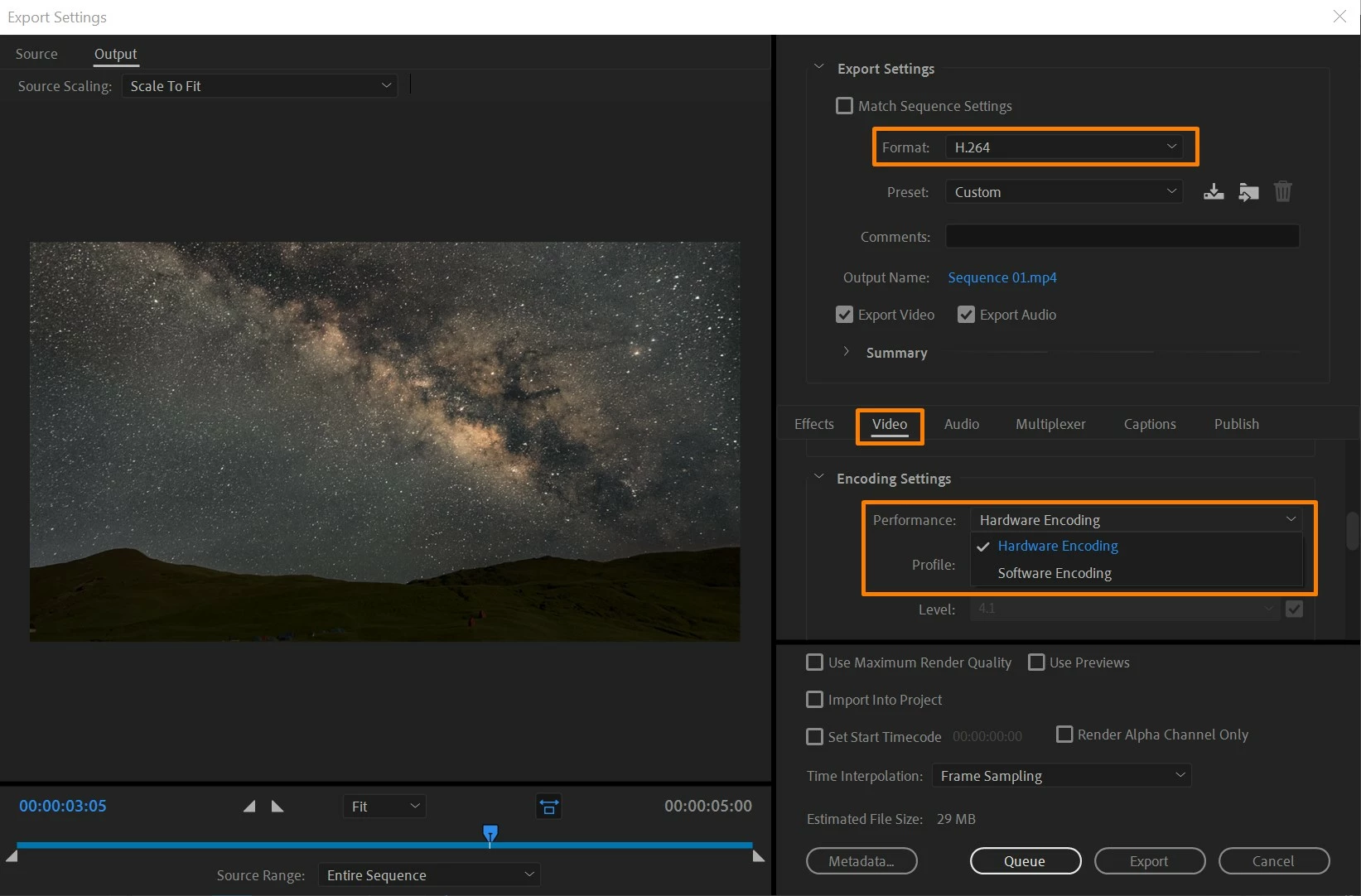
 

[Image embedded by mod]


This topic has been closed for replies.
Correct answer brajesh_kumar

Hi Everyone,

Nvidia Encode support is now available in the released (non-Beta) versions of:
- Media Encoder 14.2
- Premiere Pro 14.2
- Premiere Rush 1.5.12


Thank you to all for your feedback during the Feature Development. 


Thanks

Brajesh

23 replies

Adobe Employee
April 9, 2020

Hi Mark,


Please check following link for Support Matrix of Nvidia Cards 

https://developer.nvidia.com/video-encode-decode-gpu-support-matrix


Also update to Latest Driver 

https://www.nvidia.in/Download/driverResults.aspx/159206/en-in


Regards

Abhishek 

DAVIDE PEPE
Known Participant
April 2, 2020

Hi Brajesh,

Just to let you know I've tried it on my system and it works really well!!!
You can't imagine how long I was expectint it to work!!!!

THANK YOU!!!


I think is worth to report my system's specs:

BRAND AND MODEL: ASUS G752VS-BA266T
GPU:NVIDIA GTX1070 2048 CUDA CORE + 8Gb of memory on board
CPU: INTEL i7-7820HK @2.90GHz
RAM: 64 GB
OS: Windows 10 64bit
2 SAMSUNG 960 PRO NVME SSD drives by 2TB each
1 SAMSUNG 860 PRO SSD hard drives by 4TB

Premiere updated to the latest build
After Effects updated to the latest build
NVIDIA DRIVER VERSION: 441.66

BrajeshCommunity ManagerAuthor
Community Manager
April 13, 2020

Thanks David for your feedback!

Ann Bens
Community Expert
Community Expert
April 1, 2020

What if you have both quick sync and nvidia on ones machine.

What if for some reason you cannot disable intel.

Which one will be used and on what critria is that choice based.


BTW the latest AME 14.2 wont open: application wont start correctly (0x0000142). Fixed: added to ransomware protection.

Participant
April 21, 2020

I noticed both my Intel graphics processor and Nvidia GPU were being used during video export. It turns out the Nvidia GPU was being used for encoding and the Intel graphics were used for decoding.  

CinegyDev
Participating Frequently
June 8, 2020

If the discrete GPU decoding is also added then this will be a game changer of how we edit videos -

no more proxies in 90% of cases. This will save a lot of time and some space. Typical Intel decoding is not so good at 4K as we know it, especiallay at timeline scrubbing.


Hello Viktor, 


as mentioned below. You can have Nvidia GPU decoding for faster H.264 and HEVC editing today. It is available as free plugin (for Windows 10 64bit) only either via the Adobe Exchange portal -> Daniel2 plugin or get it directly at www.turbocut.com

You can also just search on Youtube with the keywords Turbocut and Premiere and you will find videos of people that have successfully tried it. It helps a lot if you have a machine with 4 to 12 CPU cores and a recent Nvidia card (e.g. GTX1050 or higher). If you have a monster machine (16 core or more), the benefit of having Nvidia GPU decoding is less noticable - other than the CPU fans revving less high and according to my PSU power reading 20W and more power consumption when using the CPU over the Nvidia hardware decoder.

So if you want to save power and reduce your global CO2 footprint - use Nvidia GPU decoding. Not a big difference but 20W are a good number of LED light bulbs.