Francis-Crossman17221443
Community Manager
Principal Product Manager
September 14, 2020
Question

DISCUSS: Quick Export

  • September 14, 2020
  • 4 replies
  • 3252 views

Premiere Pro Beta Users!

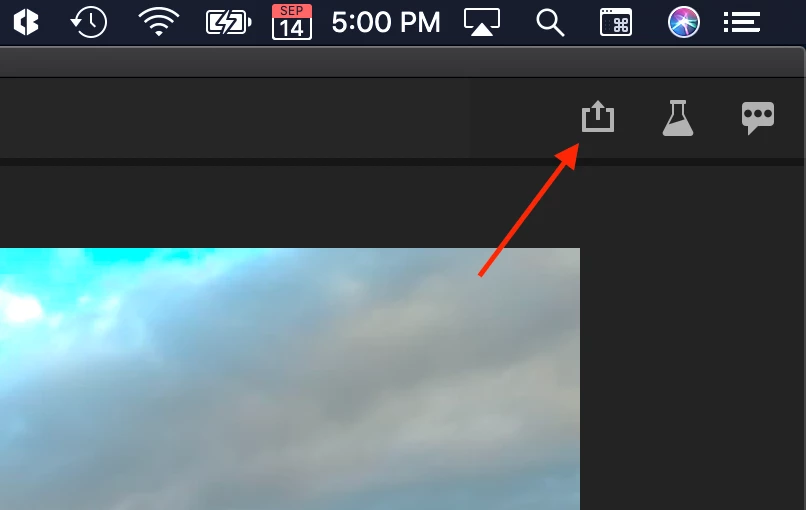
We have an exciting and convenient new way to get your projects exported out of Premiere Pro with just a couple of clicks!  Quick Export takes the frustration and guesswork out of exporting. Just click on the Quick Export icon in the header bar and press Export. The high-quality H.264 output will satisfy the majority of users.


Get your sequence exported with just a few clicks

Quick export is made for exporting sequences with minimal fuss, so make sure the sequence you want to export is in focus.

  1. Click the Quick Export button in the upper right corner of the header bar
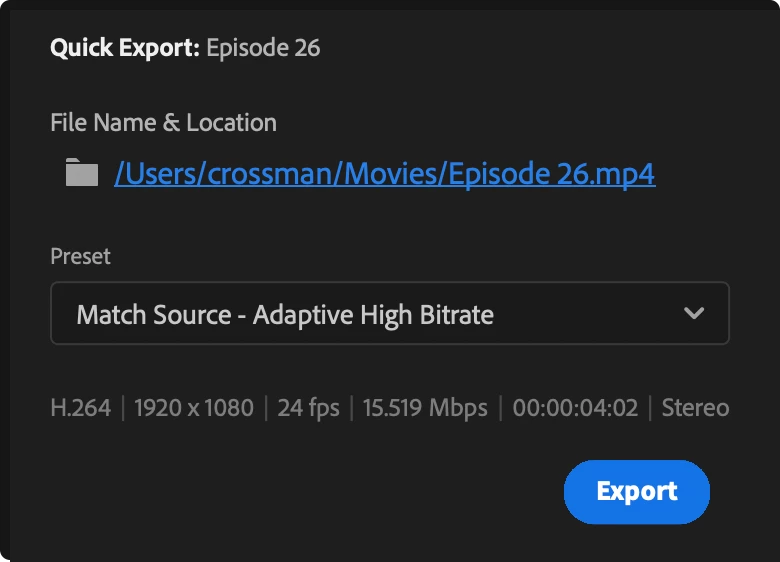
  2. You may change the file name and location if you wish (optional)
  3. Click export


Presets

There is a shortlist of common H.264 options in the preset dropdown. The default choice “Match Source – Adaptive High Bitrate” will create a high-quality H.264 .mp4 file which is a great choice for most applications – like posting to YouTube (or posting anywhere else online for that matter). There are presets for Medium bitrate or smaller frame sizes which will produce a smaller resulting file and is a good option for stakeholder reviews or where bandwidth is limited.


Advanced options

If you still need more options and other codecs, the exiting Export Settings dialog can still be accessed (File > Export > Media), and you can still queue to Media Encoder for even more flexibility.


This topic has been closed for replies.

4 replies

Neckebba
Inspiring
December 10, 2020

Is there gonnan be an option to export "quick" the proxy version of the edit? Or is this stay within the File-export menu ?

The IN-OUT option would be great ? 


I think quick export is ment to be a fast export for a director? Then it would be nice if you work in proxies to use that. 

johnpooley3
Inspiring
September 25, 2020

In addition to woytekz's notes; 

  • There is no Menu Bar item
  • One cannot export the range on the source monitor
  • The Quick Export menu takes multiple seconds to open
  • Save as Type on Windows doesn't show up correctly


Every new feature should get a menu bar item and keyboard shortcut. Essential Sound and Graphics shipped with barely any keyboard shortcuts.


Can you please fix the tab button selecting the timecode field in the Timeline window too? DVAPR-4217854

Known Participant
September 24, 2020

There are several issues with Quick Export:

1. No keyboard assignable shortcut.  I searched the Keyboard Shortcuts panel for a way to add a keyboard shortcut to Quick Export but didn't find anything.  Will it be possible to assign a keyboard shortcut to this?  If not, this feature is going to be frustrating for power users right off the bat.  Note: When calling up the Quick Export window through a keyboard shortcut, it should appear in the center of the screen by default, and then where ever the user last placed the window (just like it works with the 'Export Settings' window).

2. The export icon is on the 'Workspaces' panel.  That is a terrible place to put the icon for 2 reasons:

  1. Power users create their own custom workspaces in which they eleminate redundant panels as much as possible to maximize efficiency.  Part of maximizing efficiency is getting rid of the 'Workspaces' and the 'Tools' panels (power users assign and memorize custom keyboard shortcuts for their workspaces and tools and therefore have no need for those panels cluttering up their workspace).
  2. Users who do use the 'Workspaces' panel almost certainly will have it at the very top of the screen.  This puts the Quick Export button further out of reach of the user.  A much better place to place the icon is in the Program Monitor, inside the Button Editor so users can place it where they want it!  While not everyone uses the Workspaces panel, it's safe to say that 100% of Pr editors use the Program Monitor.  Plus, since the buttons on the Program Monitor are at the bottom of the window, this will usually place the Quick Export button closer to the Timeline where most of an editor's mouse action happens.

3. The save location defaults to my 'Documents' folder on Windows 10 everytime I reopen a project.  Sorry to be blunt, but this is terrible design.  The save location should default to the last saved location, on a project per project basis.  When working on two or more projects at once, users want their exports to go into the correct folder relative to the current project being worked on (e.g. Exports from project 'Test 2' should go in the 'Exports' folder for project 'Test 2'.  Likewise, exports from project 'Test 1' should automatically go into the 'Exports' folder for project 'Test 1').  Unfortunately, the 'Exprt Settings' panel always defaults to the last export location for any project rather than the last used location for the current project. THIS is a problem that should be fixed first and foremost, before spending time on Quick Export!  Rather than fixing this export location problem, Quick Export makes things even worse by always defaulting to the same export folder every time a project is reopened.

4. The blue 'Export' button can't be activated by hitting 'Enter'.  Mousing over to a button and clicking on it is always slower than using a keyboard shortcut, so enabling 'Enter' is a must for maximum efficiency (the 'Export Settings' window does allow users to hit Enter to activate the 'Queue' button, so the omission of this in the Quick Export window is both strange and inconsistent)


As it stands now, despite being simpler, the Quick Export tool is even slower to use than the traditional Export Settings window!

Note: I'm surprised development time is being spent on this feature that probably few if any people were asking for.  The issue people have been asking to be fixed, saddly, still isn't being addressed: the problem of exported files always defaulting to the last used export location, whether that location is relevant to the current project or not.  Please fix this first! 


Final thought: Rather than making Quick Export a completely separate window, why not combine it with the current 'Export Settings' window?  Give users 2 display options they can easily toggle between (via toggle button or 2 tabs): 'Quick' which would show the current 'Quick Export' interface, and 'Advanced' which would show all of the options of the current 'Export Settings' window.  This way, either interface could be called up using the same export button (added to the Program Monitor) or using the same Keyboard shortcut!  The display setting should of course be 'sticky', meaning that if a user toggled the window to the 'Quick' view upon last use, when calling up the export window again it should display once again as 'Quick'.  Finally, user saved export presets should be accessible from the 'Quick Export' view, and also be 'sticky' (defaults to last used preset when opening a project again).


Thanks for listening!


Known Participant
September 24, 2020

I posted a more detailed version of my post above on User Voice: https://adobe-video.uservoice.com/forums/911233-premiere-pro/suggestions/41469646-fix-issues-with-current-export-window-before-spend and included some illustrations (which I've added here as well for reference).

Known Participant
October 3, 2020

Here are a few thoughts on the illustrations... I agree the top right corner isn't ideal, but my only issue with putting it in the program monitor area is that area is super customizable, so people may not want that icon there (and maybe it is better as a toggleable icon) So then the next best place in my mind is somewhere in the sequence pane maybe? The most logical would be at the end of the icon stack that usually sits to the right maybe? I also think to reinforce it it would be nice as a right-click menu option when you are selecting that particular sequence out of the project panel. People have different habits on how they do a task, and lord knows Premiere usually gives you a thousand ways to do the same thing (which is a good thing.)


Thanks for your thoughts Mizzou95.  Is this the location you're suggesting in the Timeline?

Any location is better than the icon's current location in the Workspaces panel, IMO.


Known Participant
September 20, 2020

OK, only if you could set your own presets and target location for Quick Export in preferences ?  . Because you can change, of course  the destination  but every action  you have to do it  from the beginning ..  Or if you  can  make a Quick Export right away, for example to You Tube, or FTP. ? it could be cool!    Cheers Wojti