Adobe Employee
June 16, 2020
Question

DISCUSS: Scene Edit Detection

  • June 16, 2020
  • 3 replies
  • 3933 views

Hi everyone,


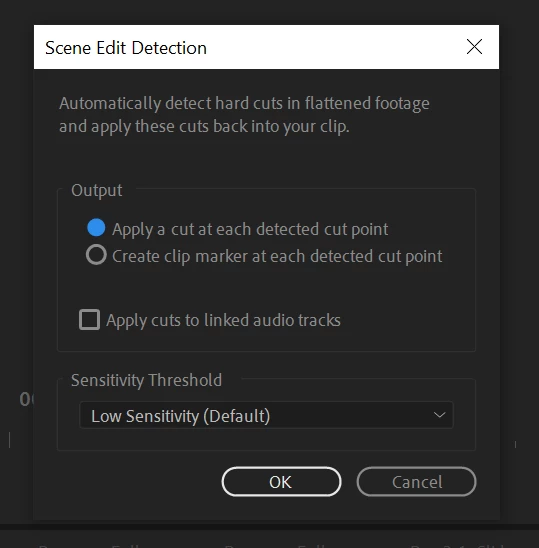
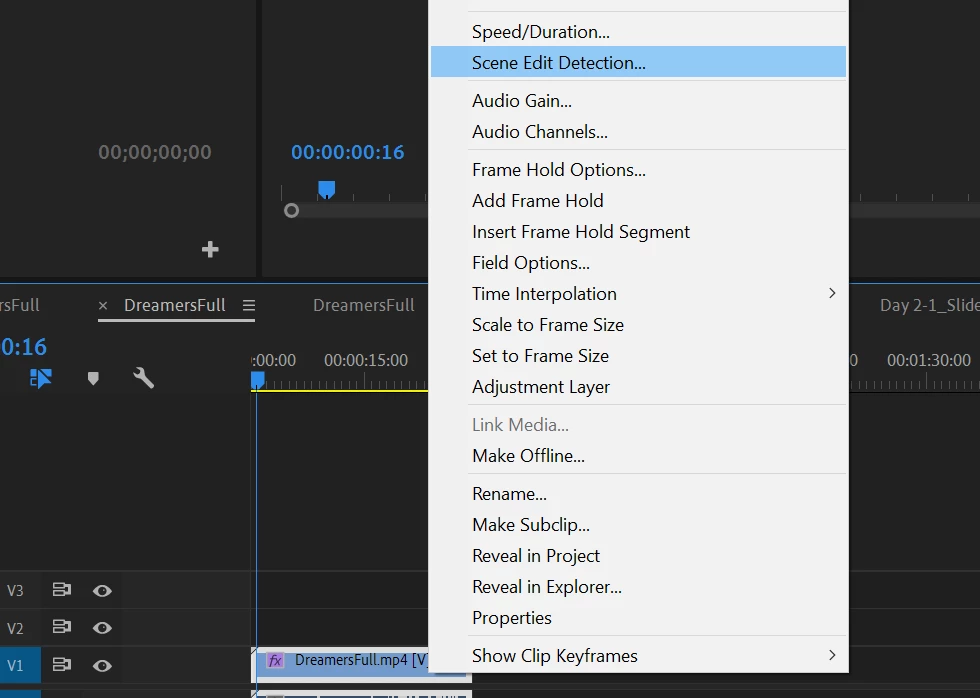
We're excited to announce the Beta release of Scene Edit Detection in Premiere Pro! Powered by Adobe Sensei machine learning and AI technology, Scene Edit Detection automatically detects the cut points in a single video to facilitate per-clip adjustments, such as color correction and reframing. To use the feature, right-click on a clip in the timeline and choose "Scene Edit Detection" from the context menu.


This feature is available in 14.3.1.24 and later (downloadable via the Creative Cloud Desktop application). 


Known issue: running Scene Edit Detection on long clips (in the 1hr+ range) can result in system crashes. We're aware of the issue and are actively working on a fix.


Screenshots:
 

This topic has been closed for replies.

3 replies

Richard TOULON
Legend
August 2, 2020

Hi,

It works pretty well ! Tested with cuts only and few fades transitions. Pretty long to analyse a 4mn vidéo , what make me think, could this be done with Adobe media Encoder as background task ? Would alllow me to use Premiere while analysing. Thanks for the great work your teams are doing.

R Neil Haugen
Legend
August 2, 2020

Hey Riklard, haven't seen a post in a while!


And great idea too ... I like that a lot.


Neil

Everyone's mileage always varies ...
Richard TOULON
Legend
August 3, 2020

Hi Neil, It comes and goes. 😉

I'll try to have a look in here more often. I'm also on the Facebook Premiere pro group user...

Always a pleasure to contribute if I can.

Kevin-Monahan
Community Manager
Community Manager
June 17, 2020

Hi,

Here's a community link, an article from Scott Simmons on the topic on PVC: https://www.provideocoalition.com/scene-edit-detection-and-stock-audio-coming-to-adobe-premiere-pro/


Kevin

Kevin Monahan - Sr. Community and Engagement Strategist – Adobe Pro Video and Audio
Known Participant
January 11, 2021

Yo Kevin,


I've needed SED for a loooong time. Today I was so excited to use it to break up some client footage into chunks of B roll. And.... it doesn't work for some reason (?). 


Demo here: https://www.loom.com/share/de3007ba80614324947835fc68fa393c


What am I doing wrong

FlyingFourFun
Inspiring
January 11, 2021

Looks like you clicked all the right buttons,   do you have a download link to the file?  Id like to try it to see if it works for me....   I dont have a Mac but that should not matter, I wanted to see if the PC version I have detects the changes in your video.

johnpooley3
Inspiring
June 17, 2020

Thanks, this is useful but long overdue since the functionality already existed via the Capture window. 


Tested works with cuts, but without wipes or stinger support, I'll continue to use other tools


The performance is unacceptable for a 30 minute clip though, used 32GB of memory for a 2.4GB clip. That's a leak if I've ever seen one. 

Kevin-Monahan
Community Manager
Community Manager
June 17, 2020

Thanks for the feedback, John.

Kevin Monahan - Sr. Community and Engagement Strategist – Adobe Pro Video and Audio