


Exit
  • Global community
    • Language:
      • Deutsch
      • English
      • Español
      • Français
      • Português
  • 日本語コミュニティ
  • 한국 커뮤니티
0

New in Beta: Improvements to Relinking

Adobe Employee ,
Oct 29, 2025 Oct 29, 2025

We’ve made several improvements to the Link Media process in Premiere Pro. You’ll typically see the Link Media dialog when you open a project and Premiere Pro can’t find some of your assets.
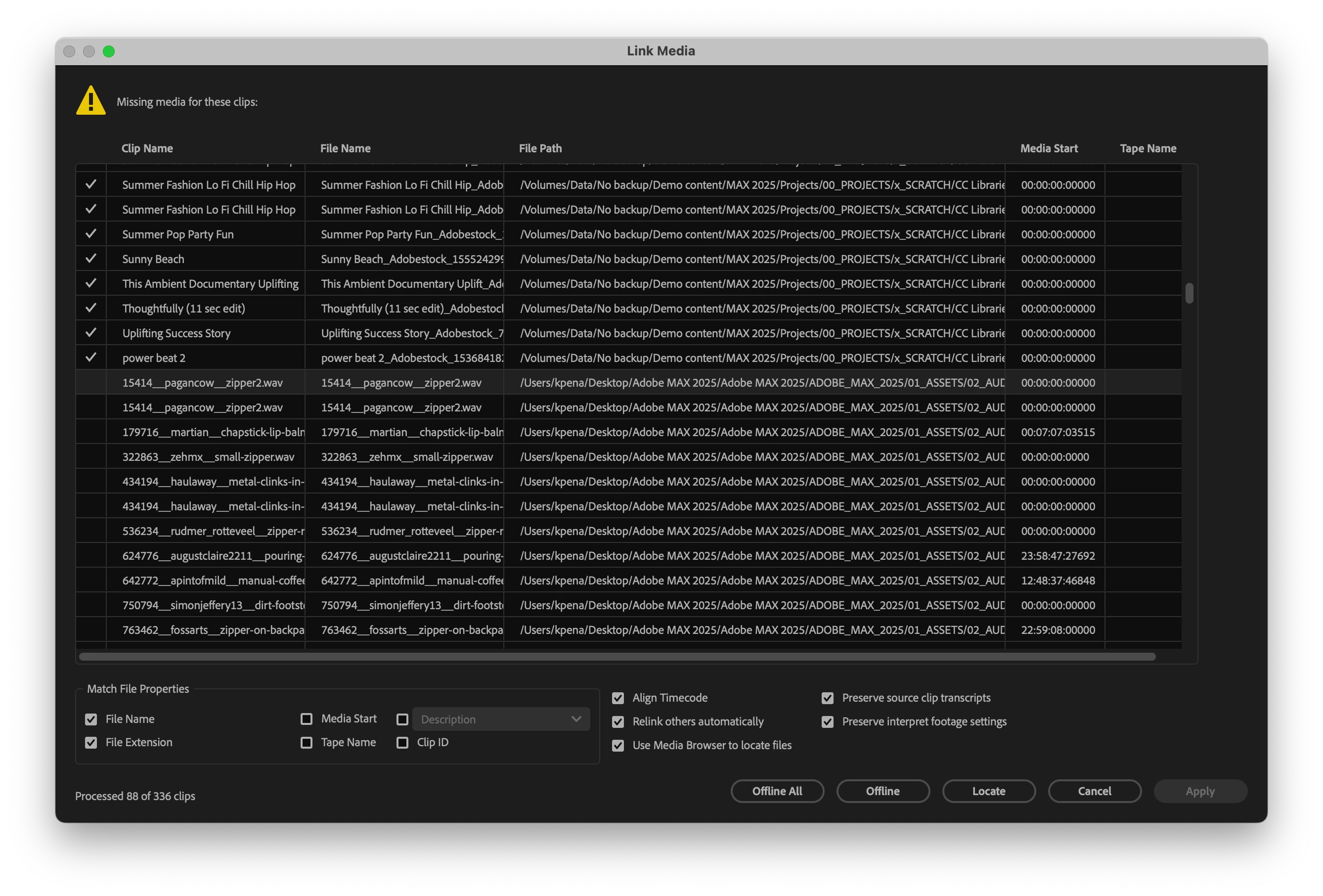
 

Screenshot 2025-10-29 at 10.15.50 AM.png

What’s new

  • New “Apply” button: You can now apply the changes you’ve made and continue opening your project — without having to relink every missing file or cancel your progress.

  • Right-click options: Right-click one or more files to access Locate, Offline, and Reset commands, giving you more granular control over relinking.

Bug fixes

We’ve also fixed several issues that could slow down relinking or force you to go through the locate process multiple times, even when all the missing files are in the same folder path.

Try it out

We’d love your feedback. If you have a project where relinking has been frustrating in the past, please test these updates and let us know if the experience has improved.


Thanks!

Fergus

TOPICS
Feedback
1.1K
Translate
Report
Community guidelines
Be kind and respectful, give credit to the original source of content, and search for duplicates before posting. Learn more
community guidelines
Engaged ,
Oct 30, 2025 Oct 30, 2025

Hi Fergus.

If you’re revisiting relinking behavior, I’d like to suggest something.


Currently, Premiere automatically relinks any file that’s renamed or moved within the Project file folder or its subfolders. That’s useful, but limited - many editors (myself included) will store media separately like in the folder structure below.


What I'd like to see is Premiere also searching a level above the Project file folder to catch any changes made in these media folders. This would save having to use the dreaded Link Media dialog in the first place.


Of course, I understand if the level above the Project file folder contained an entire drive or system directory, that could be problematic. So perhaps turn this behavior off by default and make it an option in the Preferences?


Dan


df2217_pprpwkflw_3.jpg

Translate
Report
Community guidelines
Be kind and respectful, give credit to the original source of content, and search for duplicates before posting. Learn more
community guidelines
Adobe Employee ,
Oct 30, 2025 Oct 30, 2025

@DJP2014 Thanks for the feedback! We actually used to search for media in the way you're describing. It worked well for people like you, who use a good folder structure, and it worked very badly for some people who do not, forcing Premiere to search an entire drive or, much worse, a network drive. 

We've got some ideas about how to get the best of both scenarios - while avoiding a preference. When we're further along, I'll reach out to you for your feedback. 


Thanks again!

Fergus

Translate
Report
Community guidelines
Be kind and respectful, give credit to the original source of content, and search for duplicates before posting. Learn more
community guidelines
Contributor ,
Dec 03, 2025 Dec 03, 2025

HI @Fergus H ,


I'm having an issue where my projects within my production project are stalling at the 99% mark of relinking media (currently I'm on Beta v26 build 50, but this has been an issue for a while). If my project hasn't fully loaded the media, then I know that a crash is inevitable.  My only  solution is to quit & reset my preferences, and hope that the project loads correctly (when the projects do load correclty, they will load quite quickly; but if they stall at the 99% mark, then they stall with the spinning beach ball of death…)

AndrewCBrinsmead_0-1764812840716.png


I've posted this as a bug:

https://community.adobe.com/t5/premiere-pro-beta-bugs/system-hanging-up-while-relinking-media-on-ope...

are there any work arounds for dealing with projects stalling while relinking media? 

Translate
Report
Community guidelines
Be kind and respectful, give credit to the original source of content, and search for duplicates before posting. Learn more
community guidelines
Contributor ,
Dec 03, 2025 Dec 03, 2025

Also, a related issue that I have is having to constantly relink my proxies for my projects when I open them within my production project.  Interestingly, when I've copied my edit sequences into another master compile project, I rarely have to relink the proxy media…

Translate
Report
Community guidelines
Be kind and respectful, give credit to the original source of content, and search for duplicates before posting. Learn more
community guidelines
Community Expert ,
Dec 04, 2025 Dec 04, 2025
LATEST

This is nice. In release version we often struggle with relinking for a couple of reasons.


1. Project was started on Win/Mac but is opened for the first time on the other OS.

2. Relink process is 'dumb' and doesn't find all files despite pointing it at the root folder of the project. When searching a second time with pointing to the exact same location it does find the rest.

3. Worse, sometimes when relinking media it only finds a single file per request to search even if the media is in the same folder.


I really hope 2 and 3 are solved with this update now. But maybe it's a good idea to start thinking about relative paths from project file or project container setup? With that I mean you set the project folder location once for Win/Mac and the file linking process happens based from that path rather than individual full path names.


Why? If a project needs to be moved to a different location on the same or another drive, the user can specify the project container and everything will automagically be linked again because the path was e.g. 'projectcontainer/artwork/image.png'


Relative paths could also work but is probably less desireable since moving your project file to another folder would break the relative link.


At least some kind of mechanism that will make it totally irrelevant whether the project was managed on Win or Mac first and also mittigates the occasional issue where network drive paths on Win are sometimes stored with the IP Adress and other times the drive letter which has also led to needing to relink.


"New “Apply” button: You can now apply the changes you’ve made and continue opening your project — without having to relink every missing file or cancel your progress."


I'm confused by this. Doesn't [offline all] already satisfy this function, albeit slightly confusing in it's name. Everything that was linked will remain linked if you click it.

Translate
Report
Community guidelines
Be kind and respectful, give credit to the original source of content, and search for duplicates before posting. Learn more
community guidelines