
Exit
  • Global community
    • Language:
      • Deutsch
      • English
      • Español
      • Français
      • Português
  • 日本語コミュニティ
  • 한국 커뮤니티
0

no option to create mask with gaussian blur or mosaic or anything?

New Here ,
Sep 27, 2025 Sep 27, 2025

Im using Premiere Pro (Beta) 


Dragging gaussian blur or even mosaic onto my clip and in effects controls to blur out a specific area in my clip, yet Im given no option to do so.  I've done this in the past many times and never had an issue.  Anyone that has an idea?  No plugins
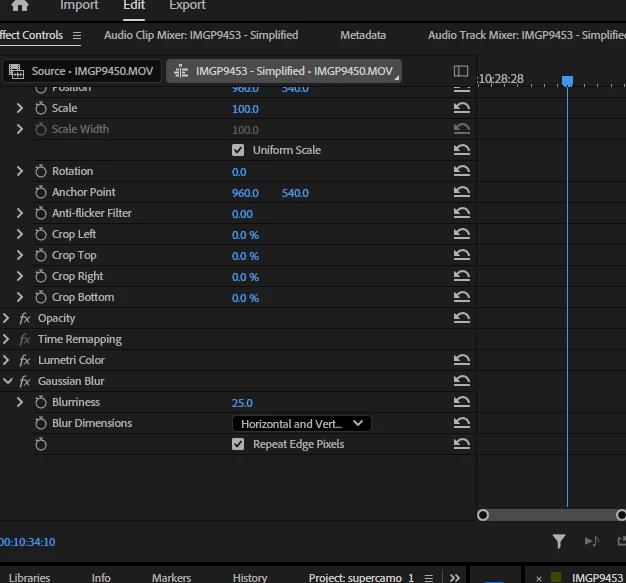
 

Screenshot 2025-09-27 095911.png

260
Translate
Report
Community guidelines
Be kind and respectful, give credit to the original source of content, and search for duplicates before posting. Learn more
community guidelines
New Here ,
Sep 27, 2025 Sep 27, 2025

Did some more research found out new masking in beta... thanks everyone for your concern 😉

Translate
Report
Community guidelines
Be kind and respectful, give credit to the original source of content, and search for duplicates before posting. Learn more
community guidelines
Community Expert ,
Sep 27, 2025 Sep 27, 2025

Moved to beta forum: discussions.

provide feedback.png

Translate
Report
Community guidelines
Be kind and respectful, give credit to the original source of content, and search for duplicates before posting. Learn more
community guidelines
Adobe Employee ,
Sep 29, 2025 Sep 29, 2025

With New Masking, the Masking tools have been moved to the Tools panel Now in Premiere Pro Beta: New Masking Tools

Translate
Report
Community guidelines
Be kind and respectful, give credit to the original source of content, and search for duplicates before posting. Learn more
community guidelines
New Here ,
Oct 20, 2025 Oct 20, 2025

Is there any way to use object mask and modify it?   I just want to blur a face, not the whole body, and track it from when the person comes into the camera until they sit down.  I used to be able to do this in the old setup, and have been banging my head against the monitor trying to do this with an ellipse on the face only - am I missing something here?  

Translate
Report
Community guidelines
Be kind and respectful, give credit to the original source of content, and search for duplicates before posting. Learn more
community guidelines
New Here ,
Oct 21, 2025 Oct 21, 2025

Since I had to get this done, I went back to Premiere 2025 to get my motion blur to work.  So in the beta, either I'm doing something wrong, or it doesn't work.   I could not get it to track the motion of the person walking into the frame an sitting down.  So any recommendations or pointing to a tutorial where it is done differently in the beta would be helpful.

Translate
Report
Community guidelines
Be kind and respectful, give credit to the original source of content, and search for duplicates before posting. Learn more
community guidelines
Community Expert ,
Oct 21, 2025 Oct 21, 2025

To animate a mask you need to be in Frame mode not clip mode.

Translate
Report
Community guidelines
Be kind and respectful, give credit to the original source of content, and search for duplicates before posting. Learn more
community guidelines
New Here ,
Oct 21, 2025 Oct 21, 2025

Thanks, Ann - Wow. I just had to look up Frame mode, and it's taking me to an outside program.  This is not at all as easy as it is in 2025.   Guess I'm going to have to figure this out at some point or get off the beta altogether.   I'm already not thrilled with how things that were accessible before are now buried in sub menus, but this was is so non-intutive to use now compared with before.   Thanks for the reply, as it has gotten me closer to understanding how to do it, but not something I will be able to do without a lot of futzing around.


Translate
Report
Community guidelines
Be kind and respectful, give credit to the original source of content, and search for duplicates before posting. Learn more
community guidelines
Adobe Employee ,
Oct 22, 2025 Oct 22, 2025

You can use the lasso tool within the Object Mask tool to draw a selection around the subject's face to track it and apply effects like Mosaic and Blur.

Translate
Report
Community guidelines
Be kind and respectful, give credit to the original source of content, and search for duplicates before posting. Learn more
community guidelines
New Here ,
Oct 22, 2025 Oct 22, 2025

I tried that - once I object mask, I do see the lasso tool, but it doesn't let me select the face.  When I draw the circle around the face, nothing happens.  I got what I need to do done in 2025, but it seems like there's a steep learning curve to figure this out in the beta.


Translate
Report
Community guidelines
Be kind and respectful, give credit to the original source of content, and search for duplicates before posting. Learn more
community guidelines
Adobe Employee ,
Oct 22, 2025 Oct 22, 2025
LATEST

Object Mask Face.png

Depending on the lighting and framing of your shot, you can pull an object mask around your subject's face.

Translate
Report
Community guidelines
Be kind and respectful, give credit to the original source of content, and search for duplicates before posting. Learn more
community guidelines