




Now in Beta: Generative Extend
Hey Everyone! We're thrilled to announce the beta release of Generative Extend, an AI tool in Premiere Pro designed to address a common challenge faced by video editors: the need for those extra few frames to perfectly time edits and transitions.
What is Generative Extend?
Generative Extend allows you to seamlessly add additional video or audio media to the beginning or end of your clips. You can hold emotional beats longer for greater impact, hide unwanted camera movements, adjust timing without sacrificing quality, extend background audio to cover edits, and more!
Powered by Adobe Firefly Video model, Generative Extend analyzes your footage and audio, then generates up to two seconds or video or 10 seconds of audio that blends seamlessly with your original content. Your data is never used for training purposes.
Generative Extend handles all kinds of content types including humans, landscapes, and animals. And it’s perfect for room tone, ambiance, and sound effects that get cut off too soon.
For more information you can read Feature overview and FAQs
Limitations in Beta
While Generative Extend has some limitations in beta, we’re rapidly innovating and expanding its capabilities for professional use cases with your feedback. We want to hear how it’s working (or not working) for you. Currently, the limitations are:
- 1920x1080 or 1280x720 resolutions – no vertical video yet.
- 16:9 aspect ratio
- 12-30fps
- 8-bit, SDR
- Mono and stereo audio formats
Some limitations are by design. Dialogue will not be extended – if you extend the edge of a dialogue clip, the room tone will be generated! Music extension is also not supported due to potential copyright issues, but you can automatically lengthen and shorten tracks with the existing Remix tool.
How It Works:
- Select the Generative Extend Tool in the Toolbar.
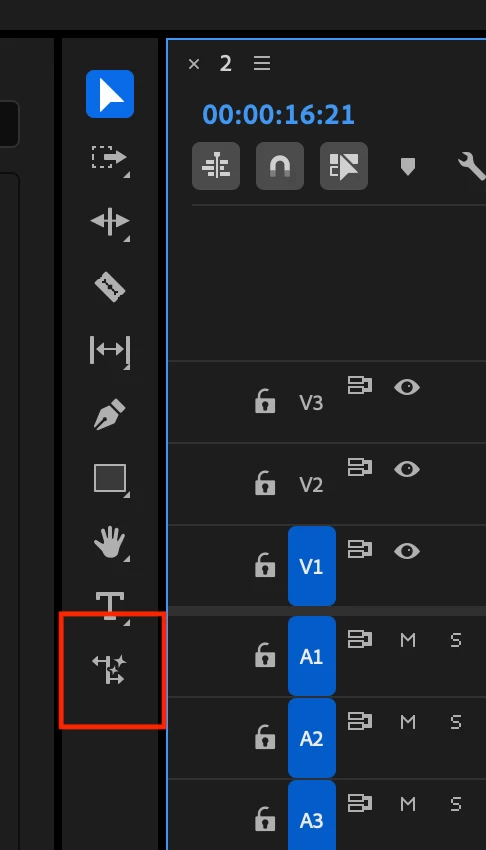
- Drag the edge of a video or audio clip to the desired length. (Video clips must be at least two seconds long, audio clips must be at least three seconds long.)
- AI generates additional content and inserts it into your sequence. You can continue working while this processes in the background.
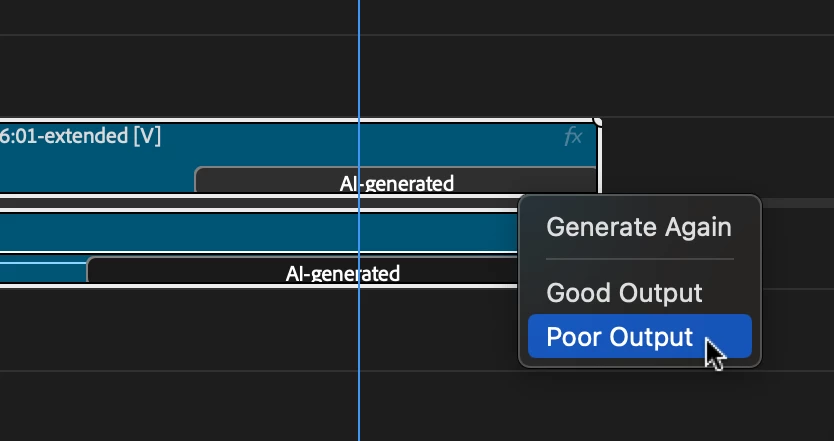
- If needed, right-click on the AI-generated label to regenerate for variations.
- After each extension, you can provide feedback by right-clicking on the AI label and selecting "Good Output" or "Poor Output." This helps us understand what works well and where we can improve.
Our Vision for the Future of Editing
We believe Generative Extend will revolutionize the editing process for both video and audio content. By giving creators more control and flexibility over their media, we're enabling a new level of precision and creativity in post-production.
This tool is designed to save time on technical adjustments, allowing editors to focus more on storytelling and creative decisions. Whether you're fine-tuning a character's reaction shot, perfecting the timing of a scene transition, or creating the perfect audio backdrop, Generative Extend is here to enhance your workflow.
Commitment to Privacy and Creator-Friendly AI
Your media is never used to train our AI models. We use it solely to create the requested extensions, ensuring your content remains private and under your control.
And just like our other Firefly generative AI models, the Adobe Firefly Video Model is designed to be commercially safe and is only trained on content we have permission to use – never on Adobe users’ content.
Read more about our generative AI commitments
Help Shape the Future of AI-Assisted Editing
As we continue to develop Generative Extend, we're committed to expanding its capabilities based on your feedback. We're already working on supporting higher resolutions, more frame rates, HDR content, and additional aspect ratios, including vertical video for social media. Your input is crucial in refining this tool.
Try Generative Extend in Premiere Pro (beta) today and be part of shaping the future of AI-assisted video and audio editing. Together, we're pushing the boundaries of what's possible in post-production, giving you the tools to bring your creative vision to life with unprecedented precision and ease.
 AdChoices