


Community Manager
September 2, 2020
質問

Discuss : Prores Raw - Raw to Log conversion support

  • September 2, 2020
  • 返信数 6.
  • 3390 ビュー

Hi Everyone,

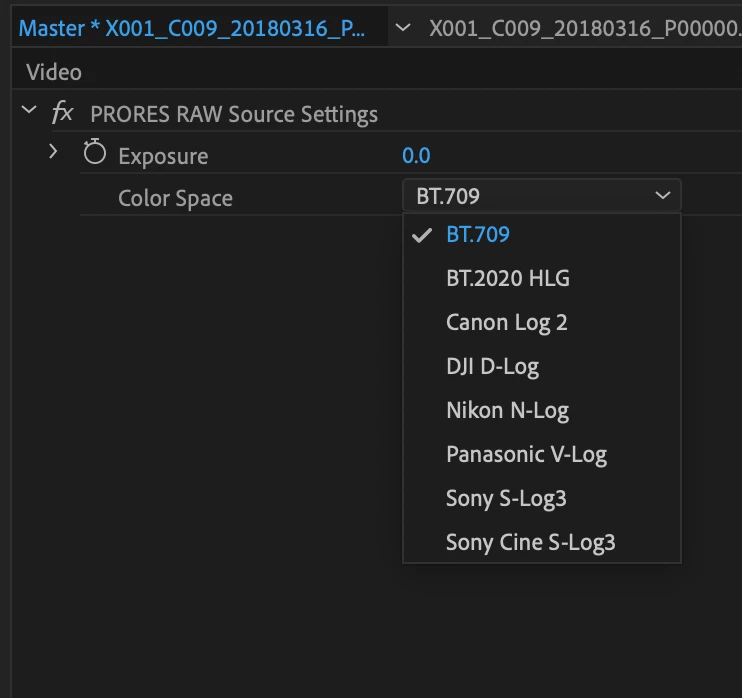
We have added support of Raw to Log conversion for Prores Raw. Currently it is available for MAC OS only in Beta build 14.5.0_9 and later. It will be available on Windows Beta build shortly. 


Feature is available through Source setting dialog and Effects Control panel. 


Please check the  screenshot. Looking forward to get your feedback on the feature.

Thanks

Brajesh
 

このトピックへの返信は締め切られました。

返信数 6

Inspiring
September 25, 2020

ProRes RAW decoding is broken in 14.5.0.37 on MacOS.

Inspiring
September 17, 2020

For the conversions, especially N-Log, are they in full or legal range?

Inspiring
September 6, 2020

Are there any specs available on the color spaces being converted to?

I'm assuming S-Log3 is S-Gamut3 and C-Log2 is Cinema Gamut but is there a way we can tell for sure? I tested with some conversion LUTs and this seems to be the case, I just want to make sure that it's exactly correct.

Manish_Kulkarni
Community Manager
Community Manager
September 6, 2020

Yes, that's correct. These are the gamuts:

  • Canon: Cinema Gamut
  • DJI: D-Gamut
  • Nikon: Rec.2020
  • Panasonic: V-Gamut
  • Sony: S-Gamut3
  • Sony Cine: S-Gamut3.Cine
Inspiring
September 6, 2020

Perfect! 

As a suggestion, it might be a good idea to list the conversions with their Gamut next to them such as:

  • C-Log2 / Cinema Gamut
  • D-Log / D-Gamut
  • N-Log / Rec.2020
  • V-Log / V-Gamut
  • S-Log3 / S-Gamut3
  • S-Log3 / S-Gamut3.Cine


Would make it super clear and simple what exactly is what when applying a conversion.

Inspiring
September 6, 2020

I have been asking for this for months and am super excited it's being implemented now!


I haven't been able to test much, but my only inital suggestion would be to add an option to apply the conversion to all clips at once.

This puts Premiere on the right track for supporting ProRes RAW fully. If we could get WB and ISO controls, I would be in heaven.

https://adobe-video.uservoice.com/forums/911233-premiere-pro/suggestions/40507270-raw-to-log-conversions-for-prores-raw

Inspiring
September 5, 2020

Looking forward to providing feedback when available on Windows. 

Manish_Kulkarni
Community Manager
Community Manager
September 6, 2020

Ryan, the Windows build is available now. 


Be sure to install the latest version of Apple ProRes RAW for Windows.
https://support.apple.com/kb/dl2033

estarkey
Known Participant
September 5, 2020

Great! Eagerly awaiting the Windows Version!!!!

Manish_Kulkarni
Community Manager
Community Manager
September 5, 2020

Premiere Pro (Beta) version 14.5 for Windows is available now.


Be sure to install the latest version of Apple ProRes RAW for Windows.
https://support.apple.com/kb/dl2033

Participant
October 11, 2020

When I import my ProRes RAW footage into Premiere Pro it appears super overexposed when I know it was NOT recorded that way. I can use the ProRes RAW master exposure tab to dial it back and make it managable (I think). But is that because I don't have the correct color space to choose from in my 14.4 version? If I can chose the Log color space I need will that give me the dynamic range and correct exposure I expect to have? If so, I am desparatley in need of the 14.5 Beta version or the regular version ASAP.