
Participating Frequently
February 23, 2021
Question

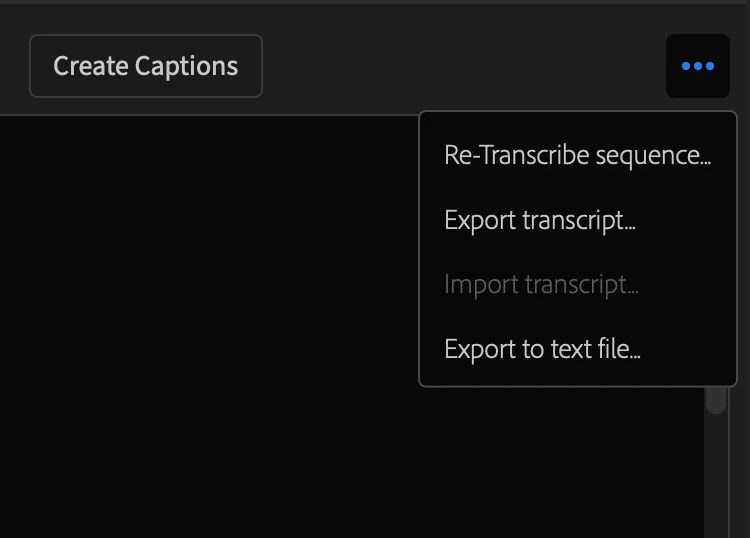
Import Transcript function

  • February 23, 2021
  • 2 replies
  • 21637 views

I am trying to find the most fluid workflow for various language editions of a video using the new caption features in Premiere Pro Beta. I have been accepted to the testing program and see that the trascription feature works well. However I would like to import a trascript already done professionally and see that the "import transcript" feature is greyed out. Will this be available in the future?
This topic has been closed for replies.

2 replies

Participant
February 10, 2022

Now a year later from original post on this and the "Import Transcript" is grayed out for me as well. 


I transcribed my sequence, then exported it. Modifications where made to the txt file. I wanted to import the updated txt file version but the import is grayed out.


Any word on why this is grayed out or how to use the import feature?

Participant
February 21, 2022

I have the option to import a transcription if there is nothing already created. However, when it lets me choose a file to import, I can't select anything. It looks like there isn't any file extension that it will import. I don't get an error when trying to import an SRT, txt, VTT, docx, pdf etc. I just cannot select any file to import. i don't understand what kind of file it would let me import...


On the other hand, importing a SRT file in the captions tab worked 100% and with no problem. But it still left the transcript section blank. The only option its giving me is to use their auto-transcribe function. Which I'm not going to do since i already paid for a 3rd party transcription and edited it. 

Stan Jones
Community Expert
Community Expert
February 21, 2022

jeffrey, the only kind of transcript that can be imported is the .prtranscript file type that PR exports (when doing "export transcript"). It is a feature request to import other types of transcripts.


All the other imports that actually import (e.g. srt) are imports of captions.


You must convert your transcript to something that will import as captions.


Stan


Kevin-Monahan
Community Manager
Community Manager
February 23, 2021

Hi Kimberly,

That looks a bit confusing. Hopefully, the developers can comment. However, I found this in the new docs: https://helpx.adobe.com/premiere-pro/user-guide.html/premiere-pro/using/working-with-captions.ug.html See "Using a Third Party Service." Does that help?


Thanks,
Kevin

Kevin Monahan - Sr. Community & Engagement Strategist – Pro Video and Audio
KimCSCAuthor
Participating Frequently
February 26, 2021

Thanks Kevin. I think I'm finding that the time consuming "work" of doing subtitles in languages other than the original is not easily avoided. My problem is the translated texts are not in the SRT format. 

I have tried exporting the original language SRT file from premiere and then copy and pasting the professionally translated texts into a duplicate SRT file and importing that into Premiere. This works fine but is little or no advantage timewise than simply copy and pasting the translation directly into the Premiere timeline. 

I could have the translaters do this but I'm afraid they will inadvertently mess up the timecodes...


Let's see what the developers have in mind for that import text function that is currently not active (at least for me - though I have the latest build).


Thanks for your time!