Exit
  • Global community
    • Language:
      • Deutsch
      • English
      • Español
      • Français
      • Português
  • 日本語コミュニティ
  • 한국 커뮤니티
0

Auto transcription - english changes to another language

Community Beginner ,
Nov 18, 2025 Nov 18, 2025

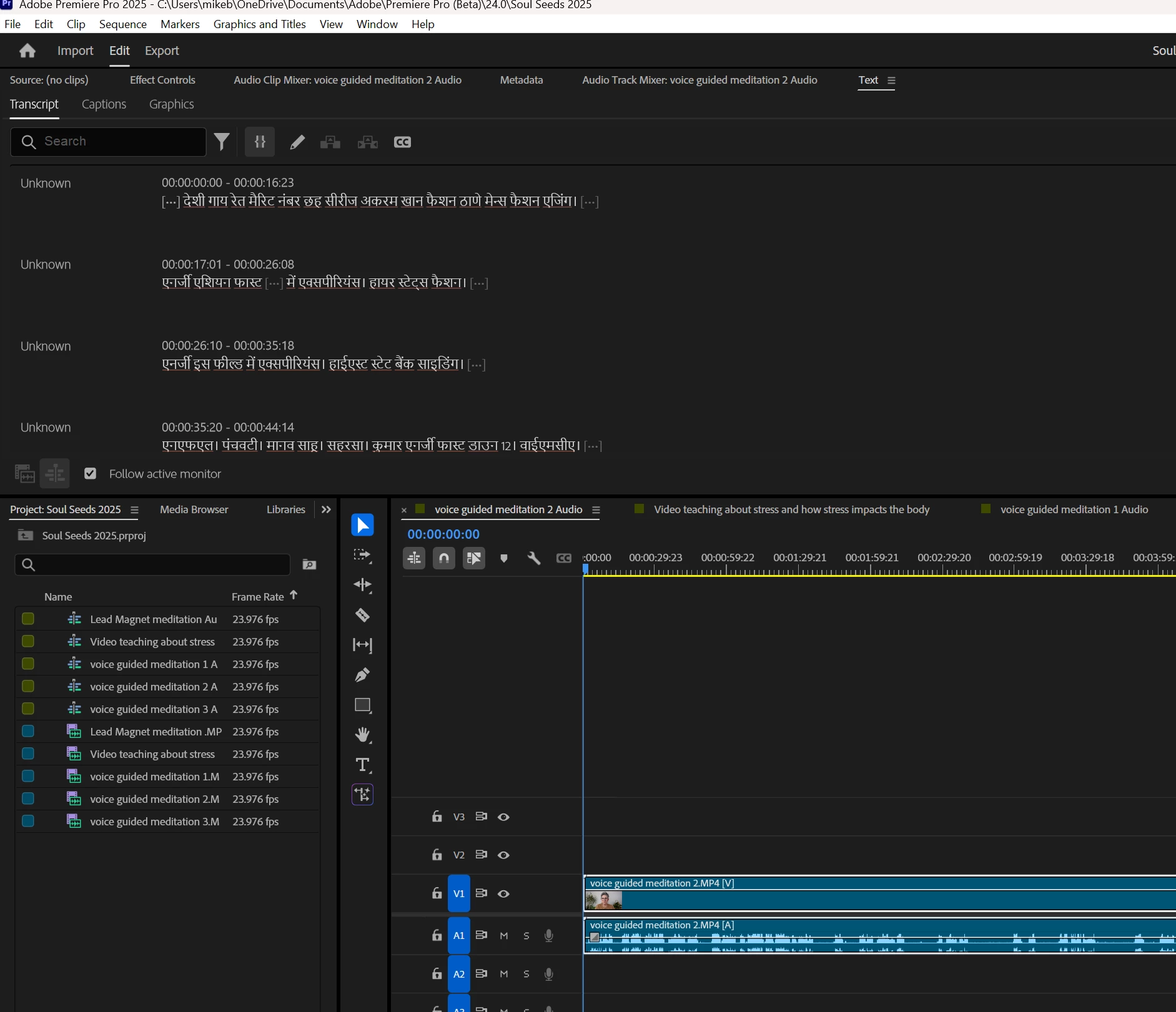
This happens on occasion. I load a video into PP as normal. It auto-transcribes, but when the text is revealed, the language is, I think, Hindi. The speaker is speaking English. I speak English. I've gone into the settings and checked if I may have set the language wrong or a change happened during the latest update. I can't find anything. Even weirder is that the only videos that get transcribed into a different language are files that I load as a guided meditation.Screenshot 2025-11-18 073339.pngScreenshot 2025-11-18 073403.png
Bug Acknowledged
TOPICS
Editing and Playback , Import and ingest , User experience or interface
262
Translate
Report
Community guidelines
Be kind and respectful, give credit to the original source of content, and search for duplicates before posting. Learn more
community guidelines

correct answers 1 Pinned Reply

Adobe Employee , Nov 18, 2025 Nov 18, 2025

Hi @michaelb41135377 -Thank you for reporting this. I was able to reproduce the issue and have filed a bug report. We’ll update this thread as soon as we have more information to share. 


As a workaround, Please install Premiere Pro version 25.2.3.

In the Creative Cloud desktop app click the apps in the sidebar and then click the three dots under Premiere Pro > Other versions > 25.2.3

Status Acknowledged
Translate
17 Comments
Adobe Employee ,
Nov 18, 2025 Nov 18, 2025

Hi @michaelb41135377 -  Thanks for submitting your bug report. We need a few more details to try to help with the issue.
Please see, How to Report a Problem.


Can you share screenshots of your preferences the "Media Analysis & Transcription" and the "Graphics"


Can you create a new project and then hold down "SHIFT" while launching Premiere and check the boxes
"Reset app preferences" (Backup Preferences first)
"Clear media cache files"
"Reset plugin loading cache"


Sorry for the frustration.

Status Needs More Info
Translate
Report
Community Beginner ,
Nov 18, 2025 Nov 18, 2025

Screenshot 2025-11-18 080239.pngScreenshot 2025-11-18 080355.png

Translate
Report
Community Beginner ,
Nov 18, 2025 Nov 18, 2025

I reset PP cleared everything. Created a new project and it still transcribed my video into the wrong language.

Translate
Report
Community Beginner ,
Nov 18, 2025 Nov 18, 2025

I updated the software yesterday. It worked fine before the update.

Translate
Report
Adobe Employee ,
Nov 18, 2025 Nov 18, 2025

Hi @michaelb41135377 - Can you send that test file so that we can take a look?  You can email a link to jamiec@adobe.com 

Translate
Report
Community Beginner ,
Nov 18, 2025 Nov 18, 2025

I'm not sure what link you are referring to. I do have the file on my google drive but I work with it locally.

Translate
Report
Adobe Employee ,
Nov 18, 2025 Nov 18, 2025

Can you send the google drive link to jamiec@adobe.com so we can investigate what is happening?

Translate
Report
Community Beginner ,
Nov 18, 2025 Nov 18, 2025
Translate
Report
Community Beginner ,
Nov 18, 2025 Nov 18, 2025

This happened once before. I reverted the update back to the older version and it cleared up. But no issues since then until this latest update. I'm using windows 11 gtx 1070. This is very frustrating because I'm right in the middle of a project and I use the transcript to speed up my editing process.

Translate
Report
Adobe Employee ,
Nov 18, 2025 Nov 18, 2025

Hi @michaelb41135377 - I see the issue, thank you for the test file.  As a workaround can you click the three dots in the text panel and select generate static transcript.  That should fix it for you, while we investigate why this is happening


Translate
Report
Community Beginner ,
Nov 18, 2025 Nov 18, 2025

Yes I can and I have done that. The simple problem is editing using the text. Once you create the static transcript it doesn't lock to the actual video while you edit it. 1st cut and all of your transcription is off of the correct time stamp. Thanks for looking into this. 

Translate
Report
Adobe Employee ,
Nov 18, 2025 Nov 18, 2025

Hi @michaelb41135377 -Thank you for reporting this. I was able to reproduce the issue and have filed a bug report. We’ll update this thread as soon as we have more information to share. 


As a workaround, Please install Premiere Pro version 25.2.3.

In the Creative Cloud desktop app click the apps in the sidebar and then click the three dots under Premiere Pro > Other versions > 25.2.3

Status Acknowledged
Translate
Report
Community Beginner ,
Nov 18, 2025 Nov 18, 2025

Thank you for looking in to this. I honestly thought I had done something. I hope it can be fixed quickly. I rely heavily on this feature. 

Translate
Report
Community Beginner ,
Nov 24, 2025 Nov 24, 2025

How will I know when the bug is fixed? 

Translate
Report
Adobe Employee ,
Dec 03, 2025 Dec 03, 2025

Hi @michaelb41135377 - As a workaround, Can you right click the file and choose transcribe with the language set to english.

Translate
Report
Community Beginner ,
Dec 03, 2025 Dec 03, 2025

I appreciate the help, but this really doesn't answer my question as to whether the bug is fixed or not. I do regularly update the software, but since this incident, I have had to revert to an older version. The auto transcribe is working now, but I want to be able to stay up to date on anything new that is in the software. Thank you again.

Translate
Report
Adobe Employee ,
Dec 03, 2025 Dec 03, 2025
LATEST

Hi @michaelb41135377 - You can use the latest version of Premiere Pro currently 25.6.2, just avoid using the auto detect language. and set it to English until the fix is available

Translate
Report