
Participant
August 21, 2023
Answered

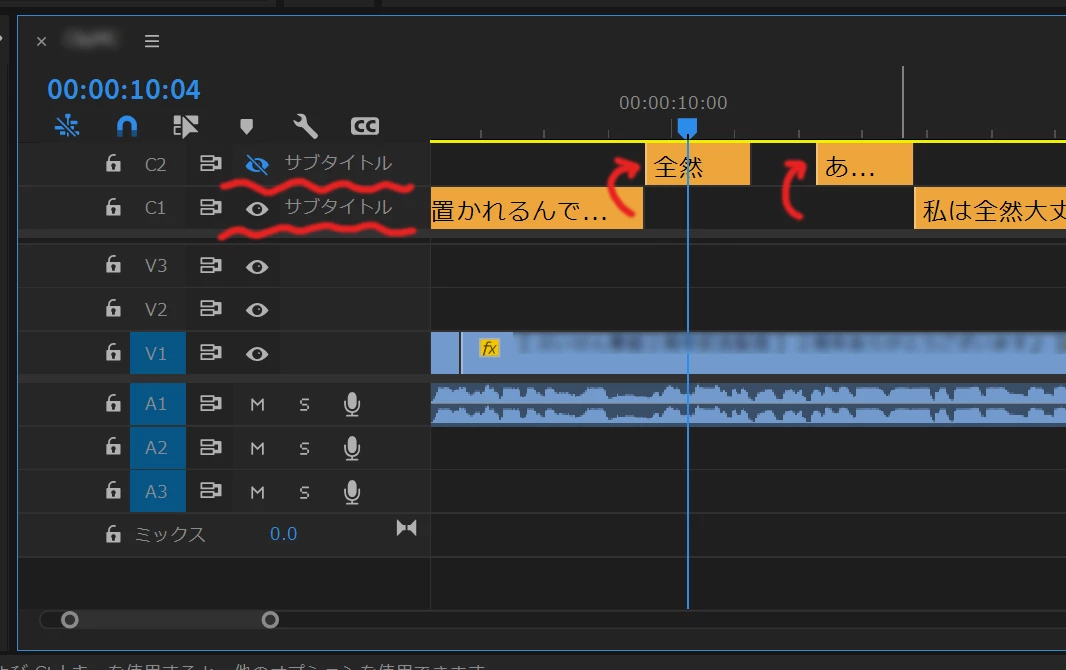
Bug when using two separate subtitles. (Subtitles not hidden)

  • August 21, 2023
  • 5 replies
  • 545 views

Issue:Occurs when using two separate subtitles. Even if the subtitle is moved from the display side to the non-display side, it remains displayed (instead of being hidden).


Adobe Premiere Pro version number:23.5~23.6

Operating system:Windows11

System Info: 

 CPU:12th Gen Intel(R) Core(TM) i9-12900 2.40 GHz

 GPU:RTX3070

 RAM:(64GB)

Expected result:Subtitles are hidden

Actual result:Subtitles not hidden
This topic has been closed for replies.
Correct answer Trent Happel

Thank you for reporting this. This is an issue that we are still investigating. Until this issue can be resolved, a possible workaround when you are in this state is to close the Project and reopen. Hopefully this helps.

5 replies

Stan Jones
Community Expert
Community Expert
September 4, 2023

I did not actually confirm this is fixed until PR Beta 24.1.0.2.


Thanks!


Stan


jstrawn
Community Manager
Community Manager
September 1, 2023

This should now be fixed using Pr 24.0 beta 43.

So you can try it in a Beta build if you want to see the fix right away, or you can update to the Pr 24 public release in the not too distant future.

Stan Jones
Community Expert
Community Expert
August 22, 2023

@Trent Happel,


Thanks for commenting. Closing and reopening the project did correct the display in the timeline.


That is good to know, because my suggestions to a user to undo the move and fix via copy did not work for them.


Stan


Trent HappelCommunity ManagerCorrect answer
Community Manager
August 21, 2023

Thank you for reporting this. This is an issue that we are still investigating. Until this issue can be resolved, a possible workaround when you are in this state is to close the Project and reopen. Hopefully this helps.

Stan Jones
Community Expert
Community Expert
August 21, 2023