
Participant
November 5, 2024

Exporting 25fps timeline - Davinci Reads as 50 fps

  • November 5, 2024
  • 19 replies
  • 10156 views
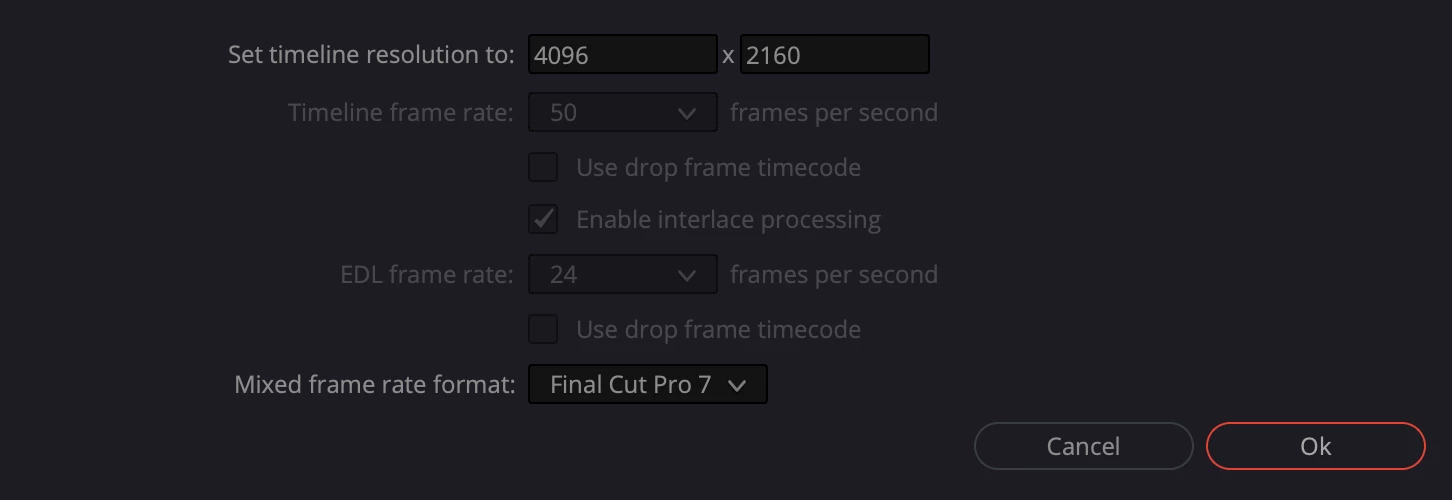
After updating to 2025 25.0 Premiere I noticed that after exporting 25fps timeline XMLs for grade, colourist receive 50fps timeline in davinci.

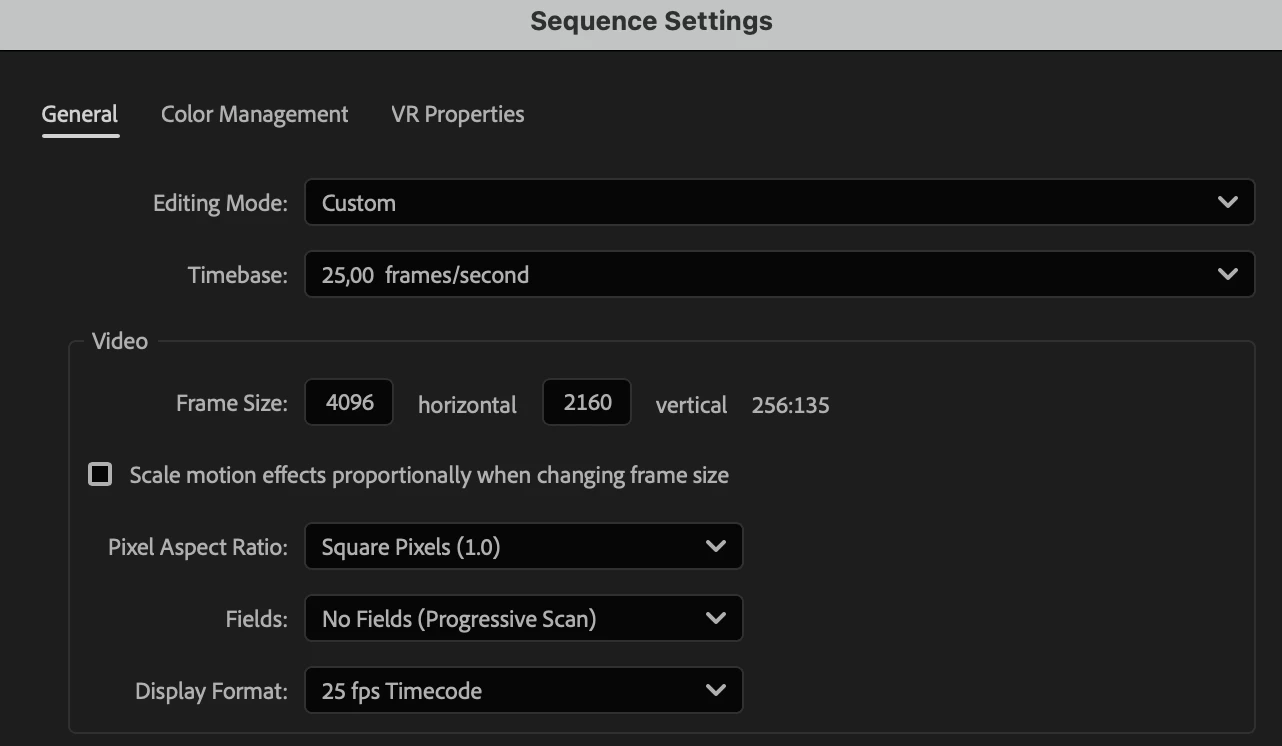
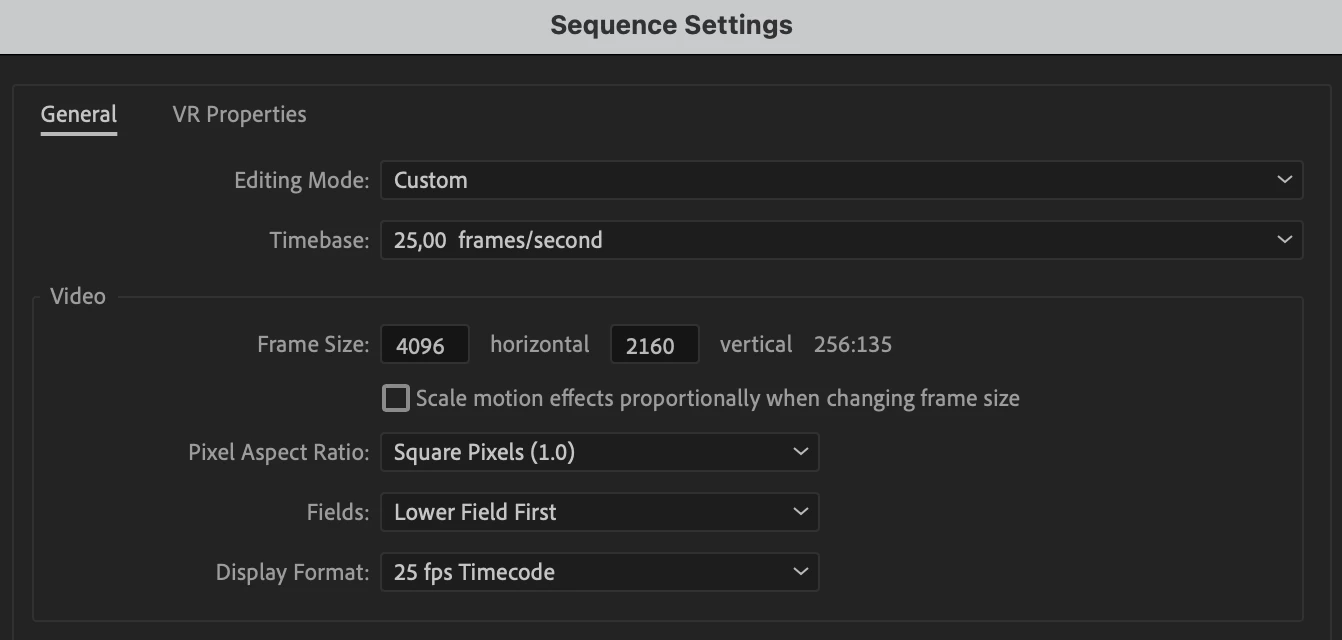
After opening same timeline in the premiere 2025 24.6.3 it appears that 2025 premiere exported it as interlaced sequence. 


Premiere 25.0 Sequence settings  
Davinci Project Import Screen
Premiere 24.6.3 same XML import


19 replies

IanB_360
Community Manager
Community Manager
December 20, 2024

Hi @clkn ,

I thought I read you had import your project into Premiere with an XML that was 25fps. There is an issue when importing XMLS that offsets them . It is similar to an export of the XML as currently Premiere is not reading them correctly for PAL. If this is not your issue then forgive me and may you start a new thread with the specifics again. Chances are though if you are seeing a drift in audio the XML is loading all the media with an offset due to the xml.

Thank you

Ian

R Neil Haugen
Legend
December 18, 2024

Please start a new thread with complete details of your OS, hardware, media, effects, and workflow including where exactly things break.

Everyone's mileage always varies ...
Known Participant
December 18, 2024

Hi @IanB_360 I think you are mistaken by merging these issues together. My problem is not a XML export issue, it's a audio synchronisation issue that has not directly to do with the frame rate or the export. 

Known Participant
December 18, 2024

Description:

We are a professional film production and have encountered a critical bug in Adobe Premiere Pro that has completely disrupted our project and caused unpredictable issues.


Problem:

After restarting the program, numerous audio files that were previously synced using Tentacle Sync and functioning correctly suddenly went OFFSET.. This leads to the following issues:

1.The audio tracks are no longer in sync – neither in the master sequences nor in the edit sequences.

2.The original sync map also becomes entirely faulty.

Attempted Solutions:

•Deleting the peak files and cache files had no effect.

•Even loading older auto-save files did not resolve the issue, as those files also became unsynchronized after the bug occurred; although we had correect exports from older versions. 

•The bug is unpredictable, occurs spontaneously, and affects all previously functioning files within the same project.

Additional Details:

•The workflow was conducted using Tentacle Sync, which works perfectly in other projects.

•The video footage was filmed in 50 fps.

•The issue appears to be Premiere-specific, as XML exports also contain incorrect syncs, after the bug occurs, making recovery in other programs like DaVinci impossible.
- We use Premiere 25.1, but trying to downgrade to 25.0 didn't solve the problem either. After the bug occurs, we also tried to open the Premiere file on different device but after the bug it was impossible to recover the original audio syncs.

Impact:

This bug has caused significant problems during a tight deadline project, as the entire audio synchronization was destroyed with no way to restore the original state.


Urgency:

We kindly request an immediate resolution or guidance, as this bug is severely affecting our work.

Known Participant
December 18, 2024

R Neil Haugen
Legend
December 11, 2024

They always run things first through the public beta, to catch unexpected issues.


Then schedule a new shipping release with several items in it. I think only once or twice in the last decade have they ever fixed one thing and done an immediate "shipping" update release.

Everyone's mileage always varies ...
Participant
December 11, 2024

Why not just fix it in the actual release? So I need to install both versions of Prem now just to export XMLs correctly?

IanB_360
Community Manager
Community Manager
December 5, 2024

Hi @jonas5C3F ,

This issue has been fixed in beta 25.2 build 10 . Thank you for pointing it out to us. 

Ian

R Neil Haugen
Legend
December 4, 2024

As noted, is work for/with/teach pro color, most of them based in Resolve or Baselight. I spend nearly as much time in Resolve and the BM forums as Premiere.


Conforming from any app to another is a huge part of on-going discussions. Standard clips are solid enough, but scaling can be an issue.


And time things are always difficult for simple speed changes. But if you do any speed ramps, forget it. There's no way to get that between apps. Period.

Everyone's mileage always varies ...
Participant
December 4, 2024

I honestly don't know how people use Premiere in a professional environment. How can such a simple task such as exporting a XML suddenly have bugs? I've been a Prem editor for over 10 years and have slowly been rolling over all my presets and plugins to alternative software. The focus on rolling out new features over fixing old bugs and creating a stable program is mind blowing.

Odobe
Known Participant
November 20, 2024

I can confirm this is happening too.