
Participant
January 6, 2025

Feedback on Copy/Paste Volume Behavior in Premiere Pro 2025

  • January 6, 2025
  • 23 replies
  • 1648 views

I’d like to share feedback regarding a functionality change in Premiere Pro 2025 that has significantly impacted my workflow.

In the current version, I noticed that when I copy the volume level of an audio clip (e.g., -11dB) using the right-click menu on the volume effect and selecting "Copy," and then paste it with Ctrl+V onto other clips, the program now creates a new volume effect instead of simply adjusting the volume of the target clip. This results in compounded volume levels, as shown in the example below:
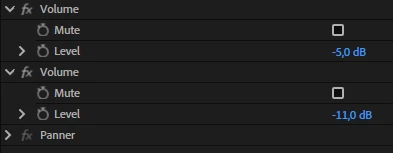


  • The target clip’s original volume is set to -5dB.
  • I copy the -11dB volume from another clip.
  • When I paste it, Premiere adds a new -11dB effect to the clip, resulting in a combined volume of -16dB.


In previous versions (up until 2024), pasting the volume level onto other clips replaced the existing volume value with the copied one, which was more intuitive and efficient. With this change, I now have to adjust the volume manually for each clip, which significantly slows down the process, especially when working with multiple audio clips.

This alteration negatively affects users who rely on this feature for quick adjustments in complex projects. I kindly request that you reconsider this functionality or provide an option to restore the previous behavior.


Thank you for your attention and for your ongoing dedication to improving Premiere Pro. I hope this feedback helps make the program better for everyone!


23 replies

Community Manager
January 23, 2025

Hi @Ryan23218100z31v,


Sorry for the trouble - it sounds like you are using the "Paste Attributes" functionality? Could you please provide more info about the exact steps and also the clips' audio channel format (mono, stereo, 5.1, adaptive)?


Thanks and Best Wishes,
Volker

Jarrett5E6A
Participant
January 22, 2025

it honestly feels like Adobe hates it's users. They refuse to fix long standing issues with the software, and simultaneously make stupid UI changes and other "fixes" that do nothing but confuse regular users. I've lost count of how many times my work flow has changed JUST IN THE PAST YEAR, because of stupid "fixes" by Adobe. This is why theyre losing market share. Came here and signed in just to write this in hopes someone ad Adobe sees this and stops messing with my software.

Participant
January 18, 2025

This workaround works - adjust the clip volume in the effect control panel for the source clip, any amount, after which you can paste attribute volume to other clips.

Participant
January 18, 2025

@volker_audio_team  this hasn't resolved the situation described above nor has reverting back to previous versions. 

Participant
January 18, 2025

@Ryan23218100z31v open creative cloud, go to apps on the left, move to the beta section (right below the search bar) and download premiere pro beta

Participant
January 18, 2025

@volker_audio_team where is this beta 25.2 version please?


Participant
January 17, 2025

@volker_audio_team just tested it, the issue has been resolved in beta 25.2, can't wait for the official release

Community Manager
January 14, 2025

Hi @MS262331524689,

We fixed this issue now in the latest Premiere Pro 25.2 beta version, so please feel free to give it a try. Thank you for reporting it!

Thanks,
Volker

Kevin-Monahan
Community Manager
Community Manager
January 9, 2025

Updating the status of this bug report.


Thanks,
Kevin


Kevin Monahan - Sr. Community and Engagement Strategist – Adobe Pro Video and Audio
Community Manager
January 7, 2025

Perfect, thank you.   We have a bug generated for this now.