
Toast555
Participant
September 8, 2025

Hindi Devanagari font ligature issue. Broken syllables not connecting problem Help!

  • September 8, 2025
  • 8 replies
  • 786 views

The problem is: Premiere 2025 doesn't recognize Devanagari (Hindi) fonts correctly, it drops/ breaks/ unlinks / disconnects / etc... the leters that are compound letters such as a P and a Ch constonants combined together.

1. Open a new project
2. New sequence (any format from the sequence choices)

3. select the Text  "I" beam tool and click on the monitor window
4. Copy and paste these words into the text box:  दृष्‍टि श्‍वेत प्राप्‍त 
5. optional: choose the "Adobe Devanagari" font from the properties window (this font I installed through the CC font system)
6. Compare the on monitor screen results with the original three Hindi words above in point 4, they don't match.

The problem is that Premiere 2025 font engine isn't supporting the correct ligature for the Hindi (devanagari) script, this problem has presisted throughout the versions of Adobe software and it is so frustrating!


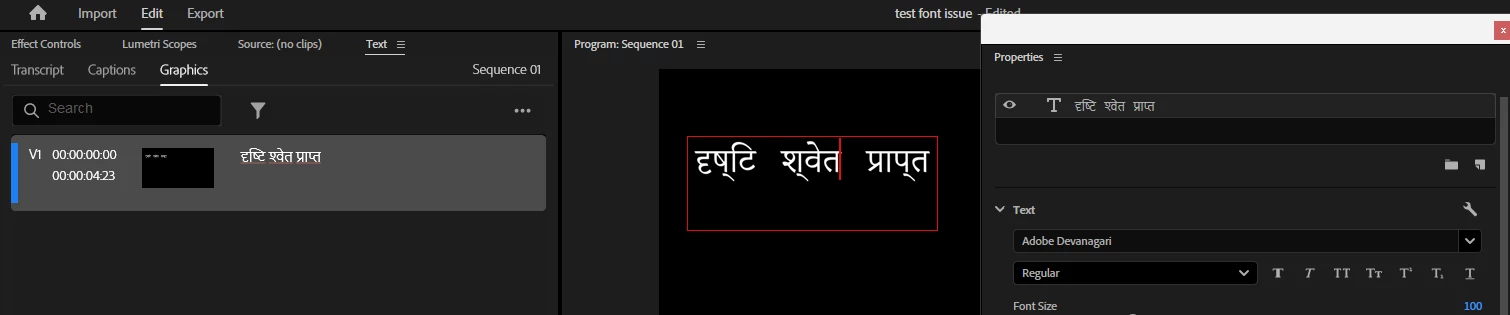
Problem in Premiere 2025 screenshot: (see on the text window (left) and properties window (right) it displays correctly but in the monitor window (center) it is wrong and disconnected showing a drop mark like a comma at the bottom of the letter)
 

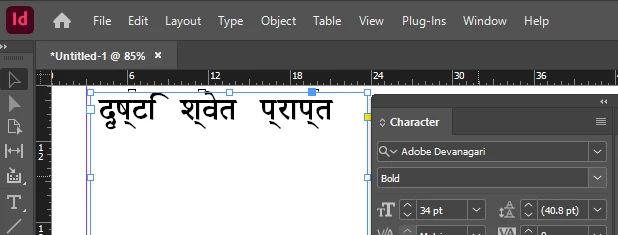
Same problem in InDesign 2025:
 

But Photoshop 2025 displays correctly (friends at Adobe - what is going on?) Can you please talk together and straigten this out once and for all?!?!
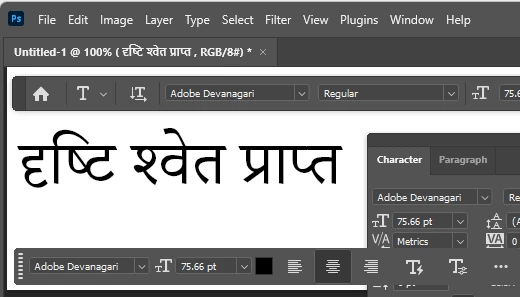
Above screen shot from Photoshop 2025 is the correct way the letters should show.


I have tried this on two different PC systems:

Edition Windows 11 Pro
Version 24H2
OS build 26100.2894


My work around is to do all the work in Photoshop then import the slides back to premiere which is very time consuming! I have hundreds of slides to do.  I wish premiere which I am paying for would fulfill the requirement instead of making crutches to work.
Help!

Thank you.


8 replies

Toast555
Toast555Author
Participant
September 9, 2025

I am using the latest version 25.4.1 build 3

Stan Jones
Community Expert
Community Expert
September 9, 2025

@Mike-Berry,


Fascinating. I remember the Mac only bug where captions would disappear if there was a ligature...


Thanks for the info and quick attention.


Stan


Adobe Employee
September 8, 2025

I can verify that the issue is the presence of zero width joiners in the pasted text, though our repros are more spectacularly wrong in Pr - we see no text at all when the supplied text is pasted into the PGM. We are looking into it.

Community Manager
September 8, 2025

Hi @Toast555,


Thanks for the message. This is indeed a bug. Our engineers are looking into it. Can you tell me which version of Premiere 2025 you're using?

Stan Jones
Community Expert
Community Expert
September 8, 2025

@ellie25074187jpdj,


Thanks; I'll give it a try when I get a few minutes later today.


Stan


Participant
September 8, 2025

Hi Stan,


Both directly inputing the text into Premiere or copy paste gives the same results.

to directly input to premiere Hindi script you must install the Hindi keyboard on your computer.


if you don't want to install the Hindi keyboard you an input the letters for example "kr" with google input tools set to Hindi and then copy paste over to Premiere for the same results.
https://www.google.com/inputtools/try/


Stan Jones
Community Expert
Community Expert
September 8, 2025

@Toast555,


I see the same thing when pasting from the text you provided in the post. Win 11, working at the moment in PR Beta 25.6.0.55. But I also see it when pasting into Notepad++.


Did you type these on a keyboard, or copy/paste from somewhere?


I'm thinking some kind of combining unicode characters, but I forget how to check that.


Stan


Toast555
Toast555Author
Participant
September 8, 2025


Adobe Illustrator has the same problem