

Creative Industry Trainer
Participant
September 16, 2024

Libraries fixed behind my Premiere Pro software (not where it usually is)

  • September 16, 2024
  • 4 replies
  • 281 views

Hello eveyone! 

I've been using (and teaching) Premiere Pro for 18 odd years now and am genuinely question over this silly issue, my library is no longer appearing in a software panel but in a fixed state behind my software which is infuriating not only to work with but to teach with. 


Has anyone else ever come across this issue, and more importantly, know how to solve it? 


Re-installing the software has no effect, I've the latest patch and I'm on a PC.


 Thanks in advance! 


Si
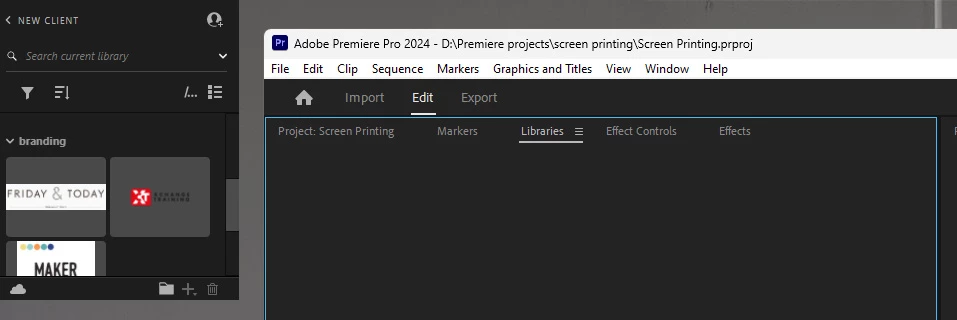
 

This topic has been closed for replies.

4 replies

R Neil Haugen
Legend
September 17, 2024

That's utterly bizarre.


I've got 9 custom workspaces, and in all of those, plus just checking a couple original ones, the Libraries palette is exactly where it normally is, lower left quadrant panel group of the "main" screen.


Just checking for troubleshooting purposes, have you relaunched Premiere while holding the Shift key. And selecting dump cache files?

Everyone's mileage always varies ...
Kevin-Monahan
Community Manager
Community Manager
September 17, 2024

Hi @Creative Industry Trainer,

Thanks for the bug report, for using Premiere Pro, and for teaching it to others. I hope the team or I can help you.


I would first ask about your workspace. Is this a custom workspace or one of the stock workspaces? Let the community know.


Thanks
Kevin

Kevin Monahan - Sr. Community and Engagement Strategist – Adobe Pro Video and Audio
Creative Industry Trainer
Participant
September 16, 2024

Hey @R Neil Haugen

I mean it's behind the software flat against the top left of my desktop screen NOT floating in a panel or in any weird brower window. 

R Neil Haugen
Legend
September 16, 2024

Not understanding what you mean by a "fixed state" ... do you mean a floating panel? Or a browser window?

Everyone's mileage always varies ...