
schwarzlicht
Known Participant
October 14, 2023
Answered

panel button bar missing in program monitor

  • October 14, 2023
  • 3 replies
  • 395 views

For a few months now, I've been missing the panel button bar (play, go to in-point, screenshot, etc.) in Premiere's program monitor. There is no longer a + symbol there either, so no button editor.
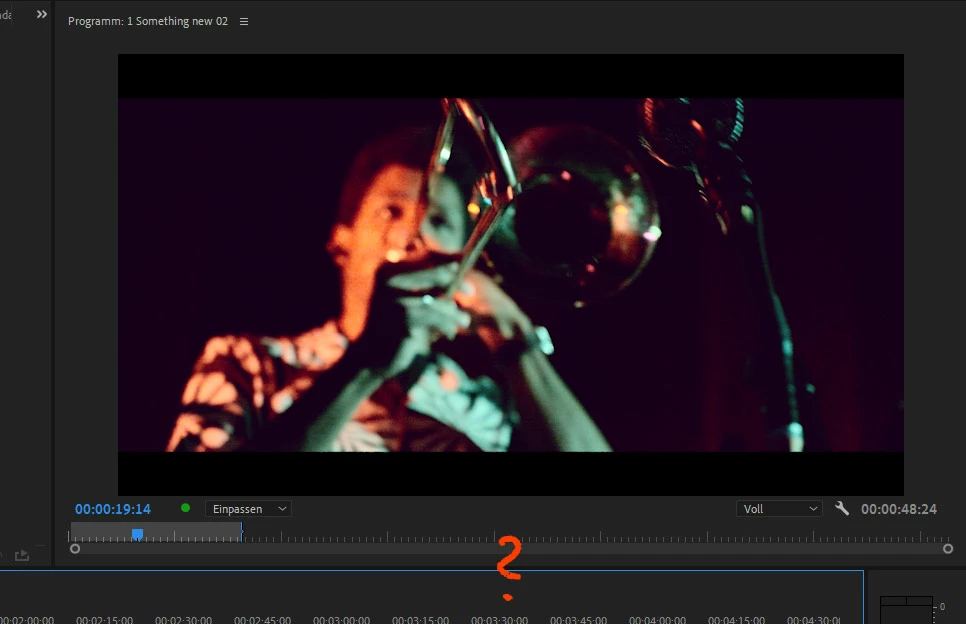
 
The updates haven't changed anything, I have no idea why they're gone or where I can find them again.
This topic has been closed for replies.
Correct answer MyerPj

Click the WRENCH icon on the program monitor and select 'show transport controls'

3 replies

schwarzlicht
Known Participant
October 27, 2023
Fascinatingly simple. Thanks! 
MyerPj
Community Expert
Community Expert
October 14, 2023

The + button is on the Transport Controls, you'll see it (again!) 🙂

MyerPj
Community Expert
MyerPjCommunity ExpertCorrect answer
Community Expert
October 14, 2023

Click the WRENCH icon on the program monitor and select 'show transport controls'