
patrickg43411636
Participant
March 27, 2023
Answered

Premiere Pro freezes after scaling clip

  • March 27, 2023
  • 3 replies
  • 352 views

I've got a new to me issue that triggers when I change the scale of a clip.


My normal process is editing 4k clips on a 1080 timeline. I can play the clip back in 4k on the timeline.. I can change the sequence settings to 1080p and play the clip at 100% scale.. but the moment I adjust the scale of the clip it will no longer play or render. Premiere Pro freezes and eventually must be force closed. 


I'm editing on Windows 11 Home, 3080 graphics card, 1tb internal ssd. Newest studio driver from nvidia and have tried current and previous versions of Premiere Pro. 


Any suggestions?
This topic has been closed for replies.
Correct answer MyerPj

I'm not having the problem, and I haven't seen much around here about it.


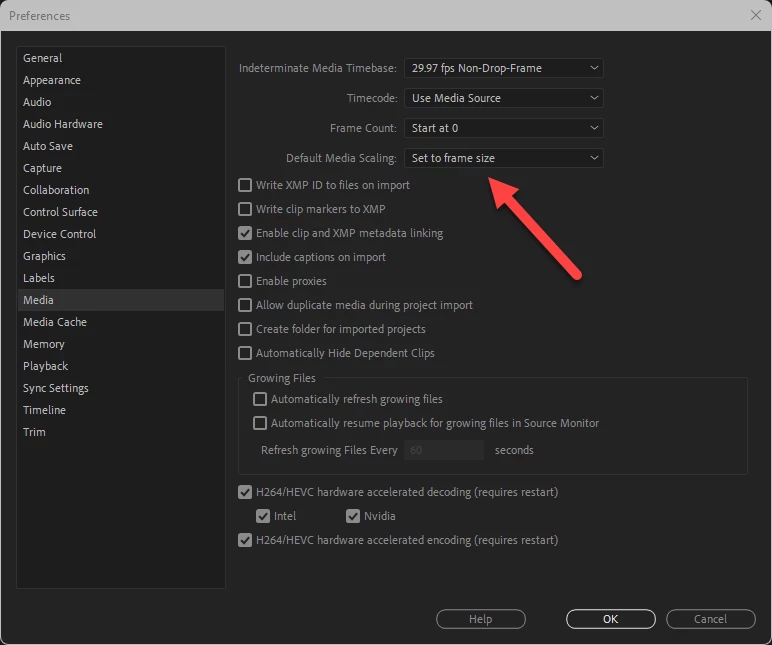
I keep in Preferences\Media\ Default Media Scaling = SET to frame size.


Try turning that on, that would set your scale to 50% when you drop it on the 1080p timeling (I like to see the full frame and can then scale if I want to). See if you can set scale with it starting at 50.


3 replies

Stephen_Spider
Inspiring
March 30, 2023

Try using a much older studio driver that still works with Win11

patrickg43411636
Participant
March 28, 2023

Will give this a try. Probably a good setting for my typical workflow either way. Thanks!

MyerPj
Community Expert
MyerPjCommunity ExpertCorrect answer
Community Expert
March 27, 2023

I'm not having the problem, and I haven't seen much around here about it.


I keep in Preferences\Media\ Default Media Scaling = SET to frame size.


Try turning that on, that would set your scale to 50% when you drop it on the 1080p timeling (I like to see the full frame and can then scale if I want to). See if you can set scale with it starting at 50.