Participant
April 14, 2025

Rendering Issue on New System (i5-13400F, RTX 4060)

  • April 14, 2025
  • 7 replies
  • 1028 views

I am facing a peculiar issue with rendering in Adobe Premiere Pro after upgrading to a new system. My current specs are:


  • CPU: Intel i5-13400F

  • GPU: NVIDIA RTX 4060

  • RAM: 16GB


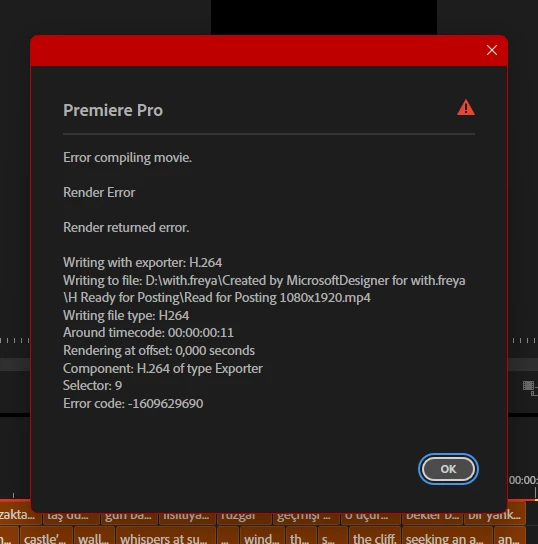
On my previous lower-spec laptop, although rendering took longer, I was able to successfully render projects that included a PNG logo as a watermark. However, on this new, more powerful system, I am unable to complete rendering when the PNG logo is included in the video project. When I remove the logo, rendering works perfectly fine.

Additional Information:


  • The PNG file size or resolution should not be an issue as the same logo worked without problems on my older laptop.

  • I have tried other troubleshooting methods, but none have resolved this issue.

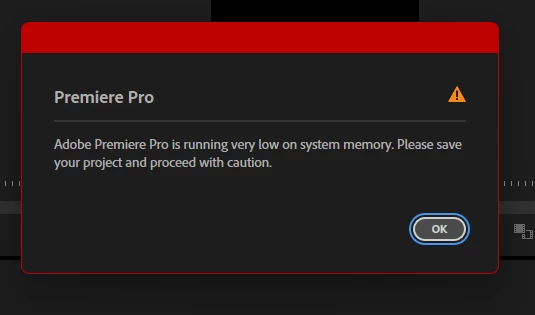
  • I attached screenshots showing the error messages received during the rendering process.


Questions:


  1. Could this be related to specific settings in Adobe Premiere Pro, NVIDIA GPU configurations, or BIOS adjustments?

  2. Has anyone faced similar issues with PNG files causing rendering failures despite having high-end hardware?


Any guidance would be highly appreciated! Thank you.


7 replies

Community Manager
April 24, 2025

Hi @Aegnoril,

Responded to your direct message and wanted to see if you were still having issues. Something else you could try is to go to the 'hamburger' menu on sequence timeline, select 'Work Area Bar', and then go to the top menu > Sequence > Render Entire Work Area, and see if this makes a difference. If you are still having problems and would be willing to share your project with the PNG file in question, the team could take a look to try and reproduce the problem.

Sorry for the frustration,
Dani

AegnorilAuthor
Participant
April 15, 2025

Hi @Dani_V.  ,

Thank you for your response and suggestions.

I wanted to share some updates based on your advice:


  • I have reinstalled NVIDIA drivers multiple times, both Studio and Game-Ready versions, ensuring clean installations each time. Unfortunately, this didn’t resolve the issue.

  • Hardware acceleration in Premiere Pro is already enabled under Preferences > Media. I also tried disabling it to see if that would make a difference, but the results were the same.

  • Suspecting that the PNG file itself might be problematic, I recreated the logo and re-imported it into Premiere Pro. However, the error persisted.

  • Thinking the project might be buggy, I rebuilt the entire project from scratch multiple times, but I am still encountering the same rendering issue.

  • I can confirm that at 00:00:00:11, there is no additional effect or element other than the PNG logo.


Additionally:


  • My export settings are shown in the attached image for further review.

  • I’d also like to clarify that the error at 00:00:00:11 is not specific to that timestamp—it occurs at a similar interval every time I attempt to export the project. I’ve attached images showcasing this behavior to provide more context.


If there are any further tests or alternative solutions you would recommend, I’d be happy to try them. Thank you again for your assistance!

AegnorilAuthor
Participant
April 15, 2025

I appreciate your insight regarding Intel's F-series CPUs and their reliance on software for H.264 encoding/decoding. Allow me to share some context on my situation:
My current personal circumstances have led me to acquire this specific system. It wasn't about choosing more or less—this is simply the configuration that was accessible to me.
For over 10 years, I worked with an Intel i5-7200U and NVIDIA 940MX system, managing to achieve a 12-second output successfully, despite the limitations of that setup. Now, it feels unreasonable to think I can't replicate that result with this newer system.

R Neil Haugen
Legend
April 14, 2025

Dani,


That CPU doesn't have any hardware for H.264 workflows. So the only hardware acceleration would be coming from the GPU, that RTX4060.


I understand those do have hardware encoding for H.264, am I correct?

Everyone's mileage always varies ...
Community Manager
April 14, 2025

Hi @Aegnoril,

Sorry for the frustration. Do you have hardware acceleration enabled in Premiere Pro > Settings > Media, and is your driver up to date? It is recommended for NVIDIA to have the Studio Driver installed for Premiere Pro.

If you go to File > Project Settings > General, what is your Renderer set to?

It looks like the error is showing up at around 00:00:00:11—is this coinciding with the placement of the PNG or is there another effect there in use?Can you share your export settings as well?


Hope we can help you soon,
Dani

R Neil Haugen
Legend
April 14, 2025

Intel's F CPUs don't have any internal H.264/long-GOP hardware involved, so any H.264 encodes or decodes will be "software" ... and slower.


I still don't know why people get such CPUs for video work.

Everyone's mileage always varies ...
Peru Bob
Community Expert
Community Expert
April 14, 2025

Try turning off Hardware encoding in the Video tab of the export settings.