
Participant
Apr 2, 2024 11:55 AM UTC
Answered

Speed-Duration - cannot lock percentage

Hello, I want to report an error I encountered after installing 24.3.

When we right-click on an image in the Timeline and open the Clip Speed/Duration menu, we cannot lock the % symbol and open it yet. By locking this, we could automatically cut the clips at a certain time. We can't do it now and I have tons of videos I need to use urgently


.
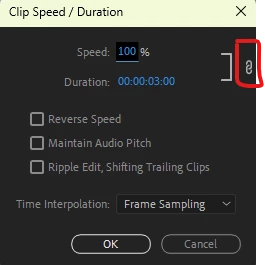
 

Mod note: Title changed. Moved to bugs.

This topic is closed to new replies. Start a new post to keep the conversation going.
Trent HappelCorrect answer
Adobe Employee
May 16, 2024 12:09 AM UTC

This should now be resolved in 24.4, which just shipped.

15 replies

Adobe Employee
Apr 5, 2024 4:37 PM UTC

This should be working again in the Timeline with 24.4 beta build 038+

Translate
Kevin J. Monahan Jr.
Legend
Apr 2, 2024 11:16 PM UTC

Sure looks like it, @Stan Jones. Noted. However, for now, I will avoid moving Beta bugs into the main forum.


Cheers,
Kevin

Translate
Kevin Monahan - Sr. Community and Engagement Strategist – Adobe Pro Video and Audio
Stan Jones
Community Expert
Community Expert
Apr 2, 2024 10:18 PM UTC
Kevin J. Monahan Jr.
Legend
Apr 2, 2024 6:58 PM UTC

A member of the product team has verified this bug, @Recep Ergin. I have updated the status to "Investigating."


Thank You!
Kevin

Translate
Kevin Monahan - Sr. Community and Engagement Strategist – Adobe Pro Video and Audio
Adobe Employee
Apr 2, 2024 6:39 PM UTC

Thank you for the report! This is under investigation.

Translate